Debug on Rockchip platform-based Boards via ADB
1. Introduction
- The device must be able to boot up to Debian
2. Preparatory Tools
- Host computer
- USB Cable
3. Debug on Windows via ADB
New released images already included RKDevTool and USB Driver(DriverAssitant_vxxx.zip).
Adb tool will be found in RKDevTool_Release\bin folder.
adb.exe
AdbWinApi.dll
AdbWinUsbApi.dll
3.1 Install USB Driver
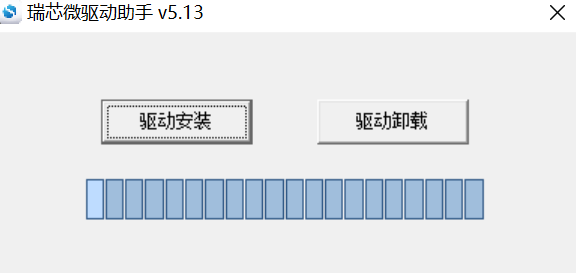
Extract USB Driver DriverAssitant_vxxx.zip, and then run DriverInstall.exe inside.
In order for all devices to use the updated driver, first select Driver uninstall(驱动卸载) and then select Driver install(驱动安装).
3.2 Install ADB Tool
- Create folder
C:\adb - Copy
adb.exeAdbWinApi.dllandAdbWinUsbApi.dlltoC:\adb
3.3 Debug via ADB
- Configure the OTG port of the board to
devicemode. - Connect the board to host computer via USB cable.
- Power up the device.
- Press the
Win+R, inputcmdand pressEnterto open the command prompt window on host computer. - Run the following command to debug
cd C:\adb
adb shell
root@linaro-alip:/#