產品介紹
資源特性(Features)
- TI Sitara™ AM3352 Cortex®-A8 800MHz processor
- 1GB of DDR3-800 and 8 GB of eMMC NAND Flash onboard
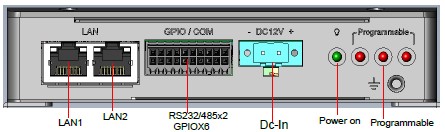
- 2 Gigabit Ethernet ports
- 2 RS232/485, 1 USB OTG, 6 GPIO
- WiFi/BT/LTE solution ready
- Yocto Linux support
- -20 ~ 70 °C operating temperature/ 12~24V DC power supply
- Equipped with hardware watchdog timer for system protection
產品官網連結(Product information Link)[edit]
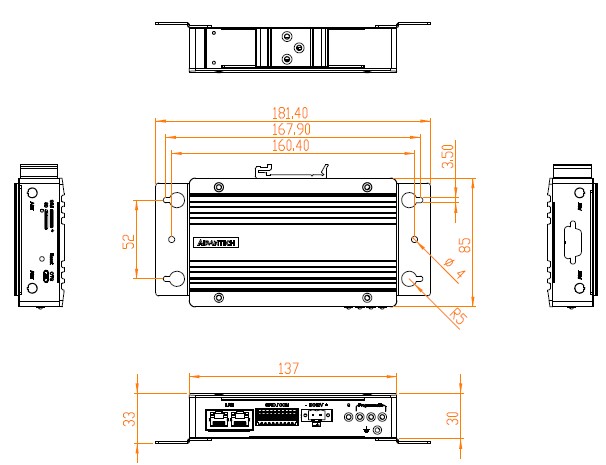
接口布局和尺寸(Layout and Sizes)
EPC-R3220 接口布局圖 Board Dimension Layout
Front I/O
Left-Side
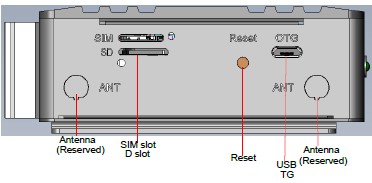
Right-Side
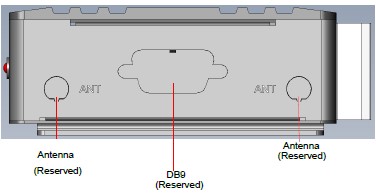
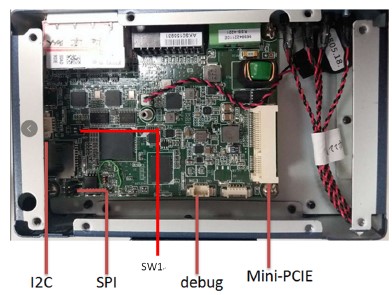
**机械尺寸 (**Mechanical Characteristics)
EPC-R3220
快速入门 (Quick Start)
系统下载 (OS Download)
-
'Linux系统 (Linux OS)'
-
Baidu link for TI Yocto 2.4 Password:bxel
Note :LBV=BSP , LIV= Image , UIV=Ubuntu , DIV = Debian
| Git BSP Tag Version | Product | CPU | BSP/Image | Date | Alpha Release | Beta Release | MP Release | Release Note | SDK | Release Owner |
| am335xDBV20012 | EPC-R3220A1 | am3352 | 2021-07-29 | 2021-07-29 | Image:am335xDIV20012 BSP:am335xDBV20012 | [Release Note](./img_EPC-R3220/22/EPC-R3220_Release_Notes_Debian10_V20012.pdf "EPC-R3220 Release Notes Debian10 V20012.pdf".md) | am335xDBV20012_SDK | Zhengguang.Yang | ||
| am335xUBV20012 | EPC-R3220A1 | am3352 | 2021-07-29 | 2021-07-29 | Image:am335xUIV20012 BSP:am335xUBV20012 | [Release Note](./img_EPC-R3220/b7/EPC-R3220_Release_Notes_Ubuntu18.04_V20012.pdf "EPC-R3220 Release Notes Ubuntu18.04 V20012.pdf".md) | am335xUBV20012_SDK | Zhengguang.Yang | ||
| am335xLBV20012 | EPC-R3220A1 | am3352 | 2021-07-29 | 2021-07-29 | Image:am335xLIV20012 BSP:am335xLBV20012 | [Release Note](./img_EPC-R3220/22/EPC-R3220_Release_Notes_Yocto2.4_V20012.pdf "EPC-R3220 Release Notes Yocto2.4 V20012.pdf".md) | am335xLBV20012_SDK | Zhengguang.Yang |
Linux 燒錄方法 (Linux Flash eMMC Method)
使用Flash tool 燒錄鏡像到eMMC (Flash image into eMMC by Flash Tools) [Use Ubuntu 18.04 to create SD card (Test the SD image can boot into Linux without problem that created on Ubuntu18.04 or 20.04)]
解壓縮檔案(Unzip the files)

mkdir ti-sdk-XXX(XXX represents numbers, e.g. ti-sdk-001)
Command : phill@riscserver-Default-string:/home/RISC_BSP_Home/EPC-R3220/R3220A1AIM20LIV20012_am335x_2021-07-29$ mkdir ti-sdk-001
Unzip file to ti-sdk-001
Command : tar -xJf processor-sdk-linux-image-am335xepcr3220a1-20210729031957.tar.xz -C ti-sdk-001

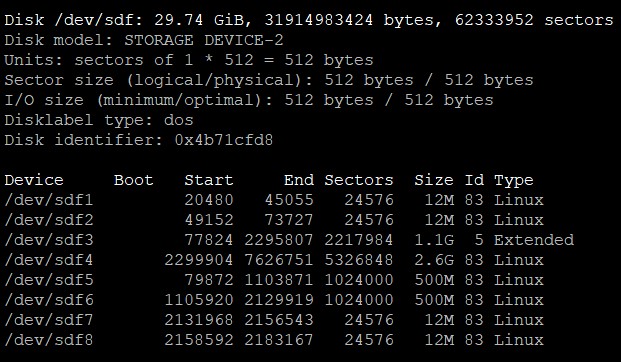
Step0: 檢查SD卡在Linux 環境的代號 (check SD card symbol in Linux system)

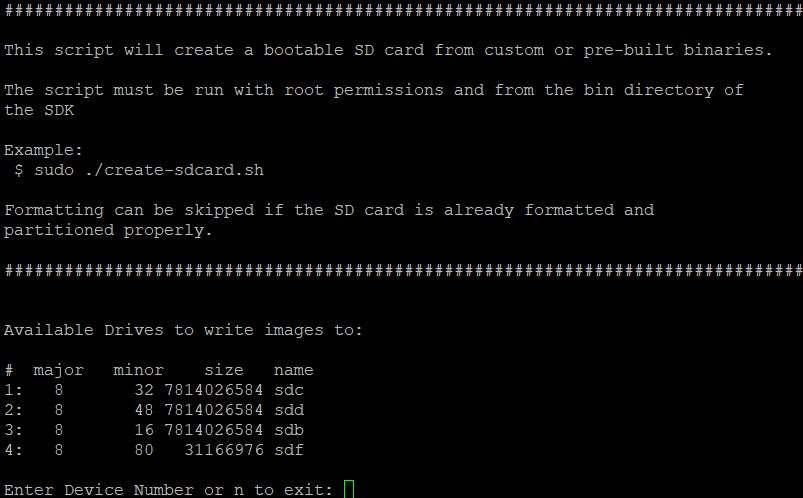
Step1: 創造一張可開機的SD 卡 (Create a bootable SD card)
$ cd ti-sdk-XXX/bin

$ sudo ./create-sdcard.sh

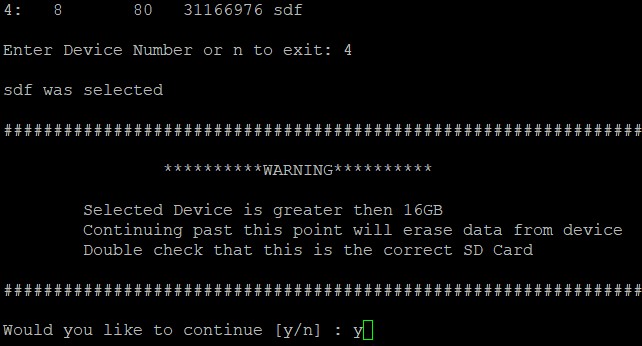
Select SD card:
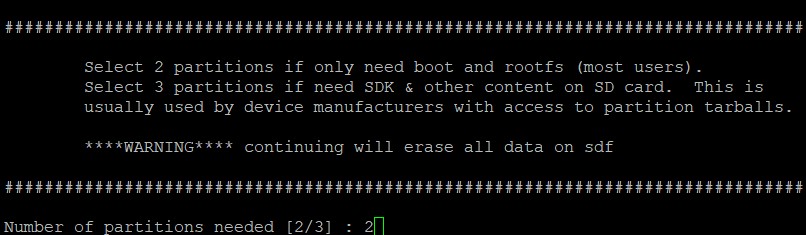
Select number of partitions:
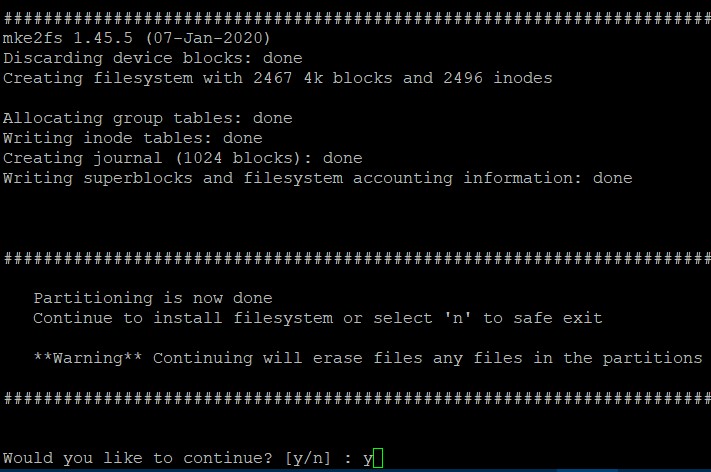
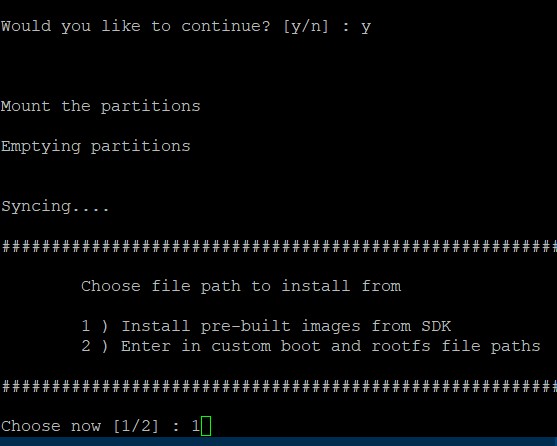
Select Pre-built System image:
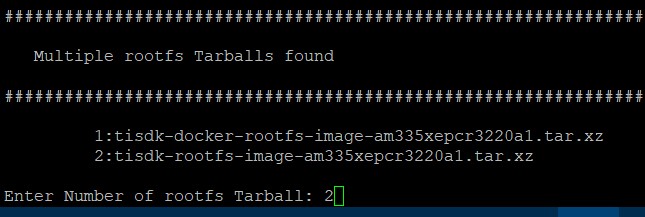
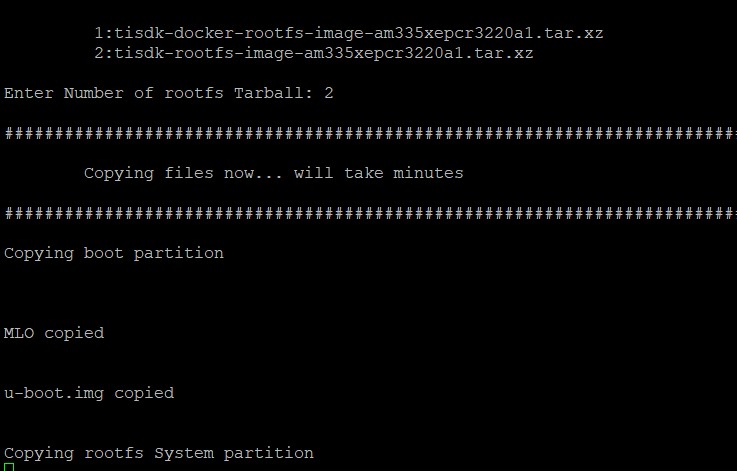
Select tisdk-rootfs-image-XXX.tar.xz(XXX represents machine name, e.g. am335xepcr3220a1):
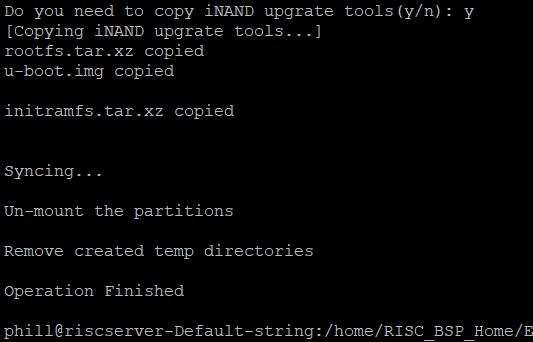
If you need to transfer whole system to on-board flash, please press y followed by Enter.

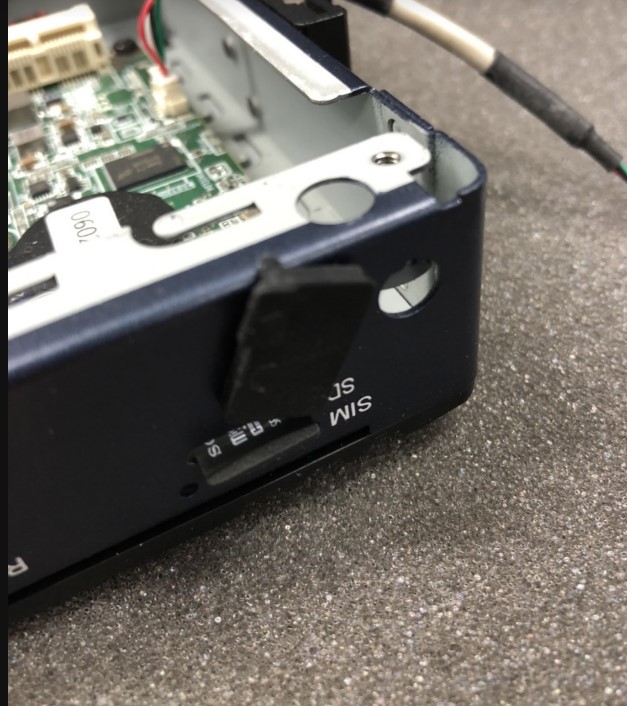
Step2: 將可開機的SD 卡插入底板SD卡卡槽(Plug the SD card into Carrier board 's SD card slot)
Step3: 確認開機選擇指撥開關(Check the SW1 switch)
SPL開機模式(SPL boot mode: boot from SD/MMC, SPI...)
1--off 2---off
eMMC開機模式(eMMC(SPI) boot mode): The R3220 can only support SPI and SD boot in HW design. So it needs to flash the MLO file to the SPI flash, and it can boot the SPI first and then boot the u-boot from the eMMC
1--on 2--off
Note: After change switch setting. Unplug and plug AC power for the change to take effect.
Step3:打開電源 和 終端機 (Turn on the Power & Terminal)
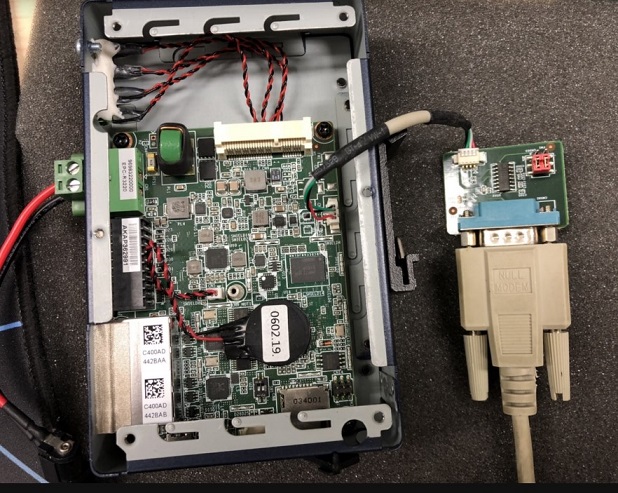
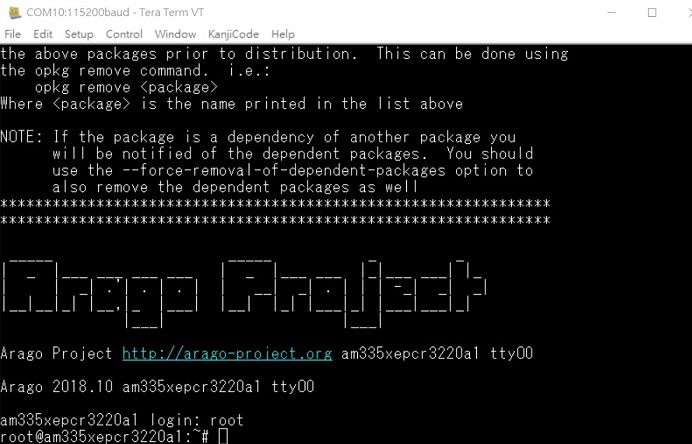
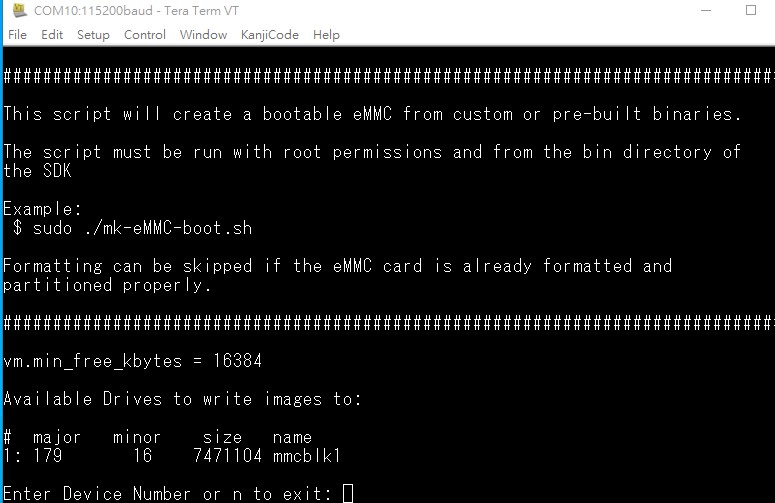
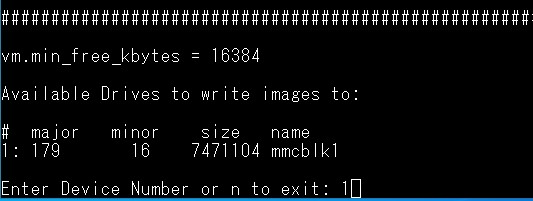
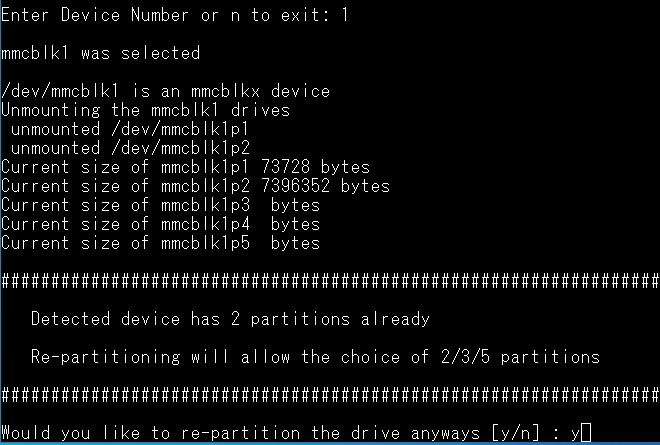
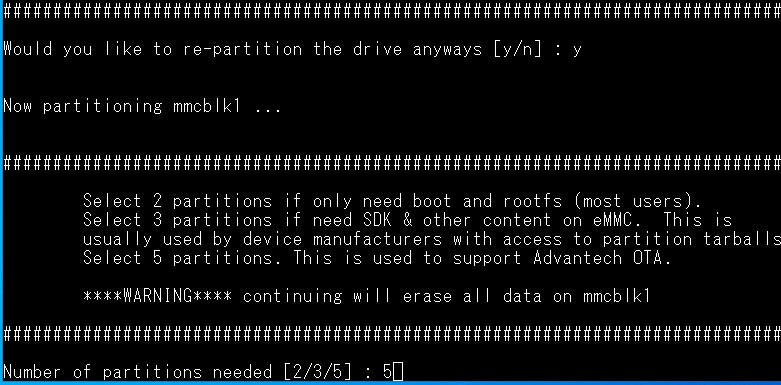
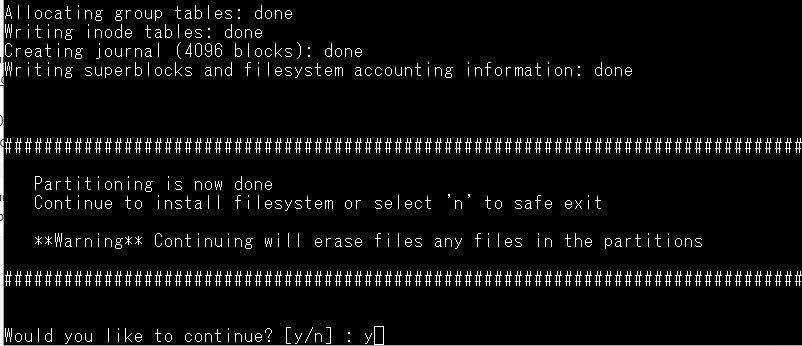
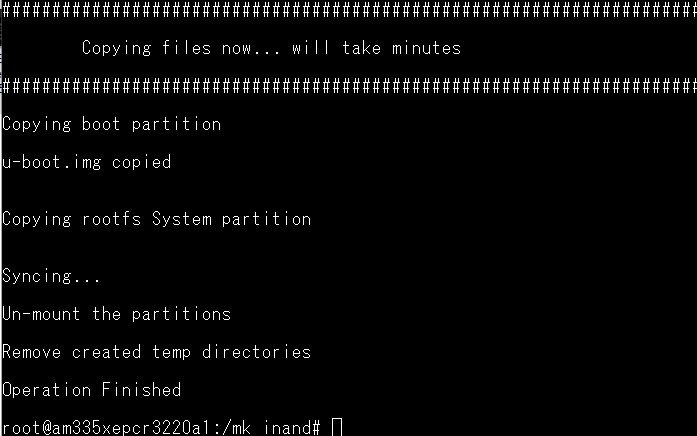
Step4: 利用mk-eMMC-boot.sh 安裝eMMC 鏡像(Flash image to eMMC Flash by mk-eMMC-boot.sh )

Debug 串口調試 (Debug port Setting)
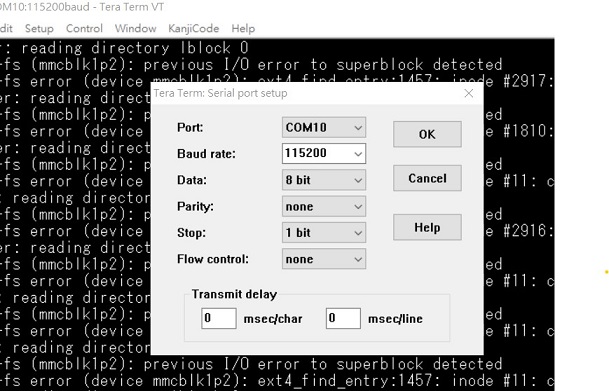
以 Tera Term 为例介绍如何使用串口调试功能
   Baud Rate波特率:115200
   Data 数据位:8
   Parity 奇偶校验:无
   Stop 停止位:1
   Flow Control流控:无
Tera Term Tool
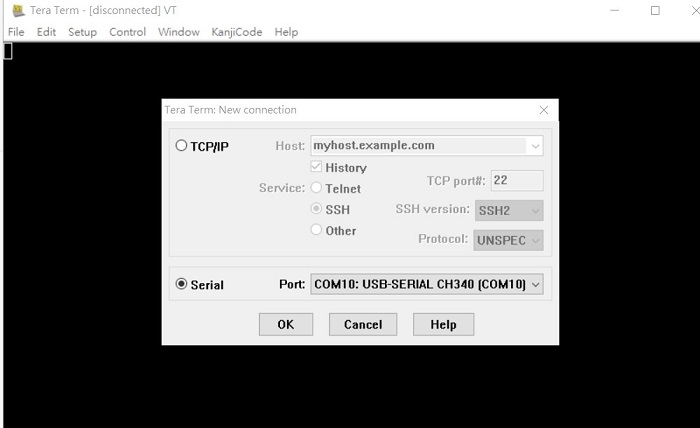
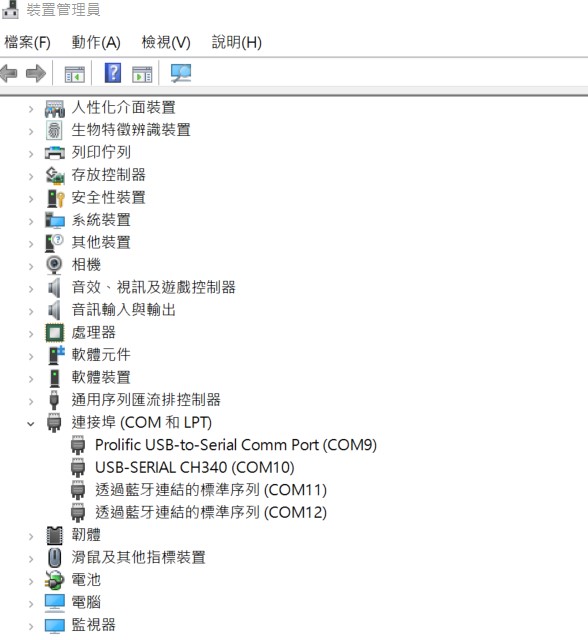
Check the Sriel port in Device Manager (查看PC端的串口号):
if you can not identify the Serial device , please check your serial driver.
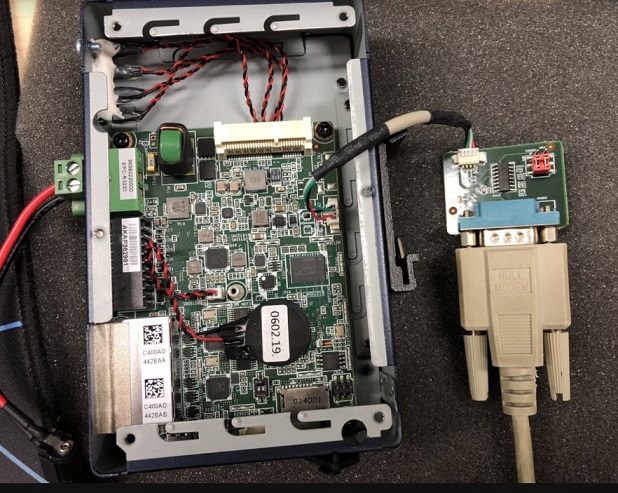
Debug port connection (串口連接)
Log into Terminal Tool (进入串口调试终端):
Linux系统的基本使用(Linux System Basic Operating Method)
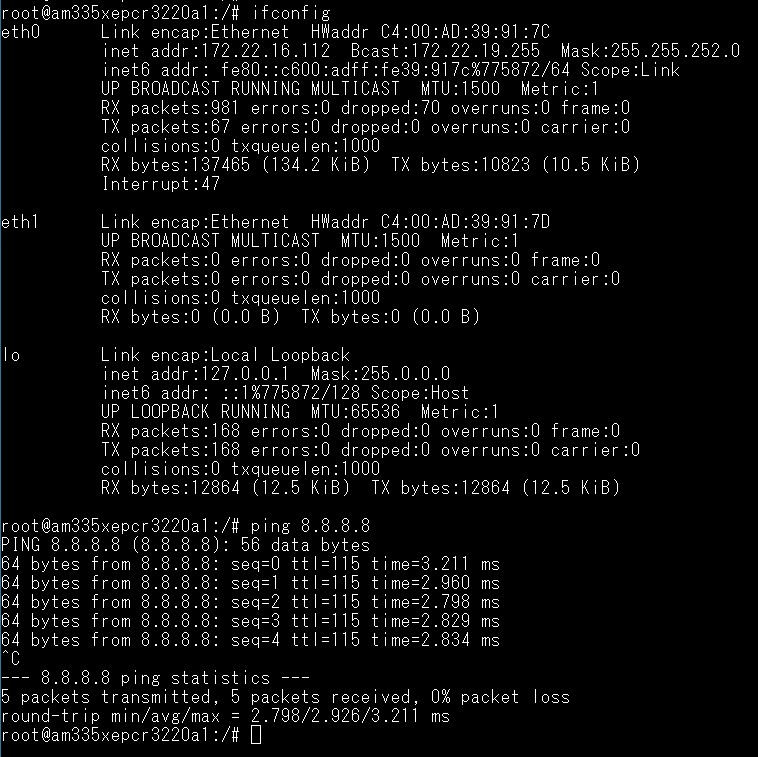
乙太網路使用方法(Ethernent Testing Method)
Command : ifconfig
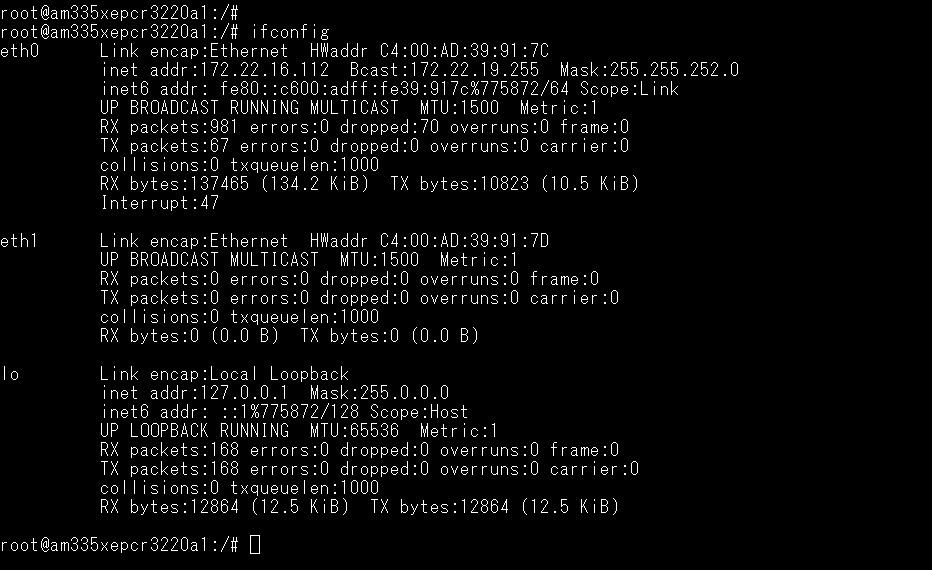
Command: Ping - I eth1 8.8.8.8 or Ping - I eth0 8.8.8.8
WiFi使用方法(WIFI Testing Method)
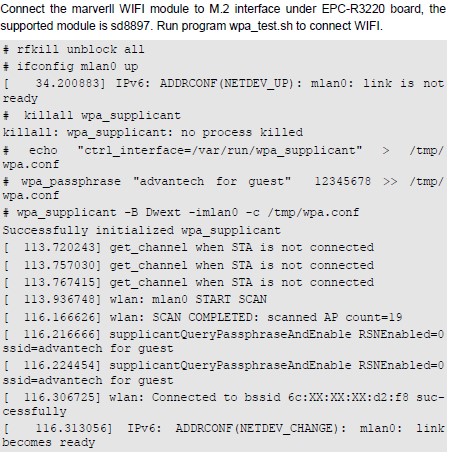
M.2 Mrvl. WIFI/BT Test
EPC-R3220 supports MarverllSD8897 wifi/bt modules throught M.2.
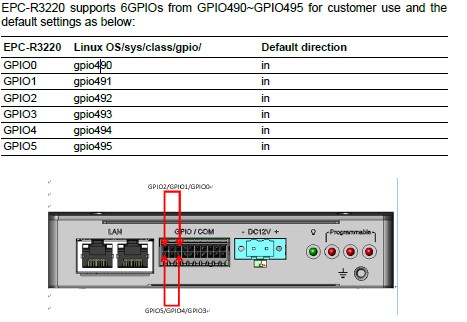
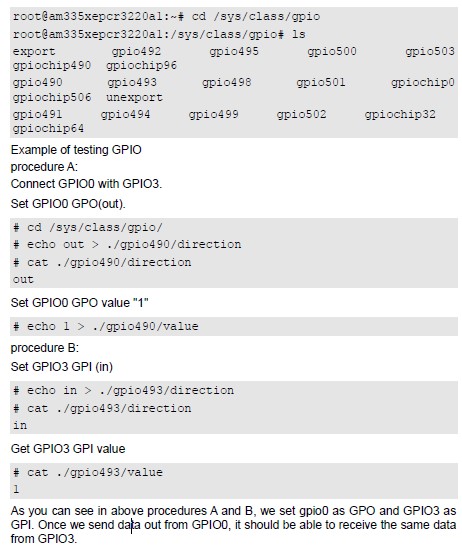
GPIO使用方法(GPIO Operating Method)
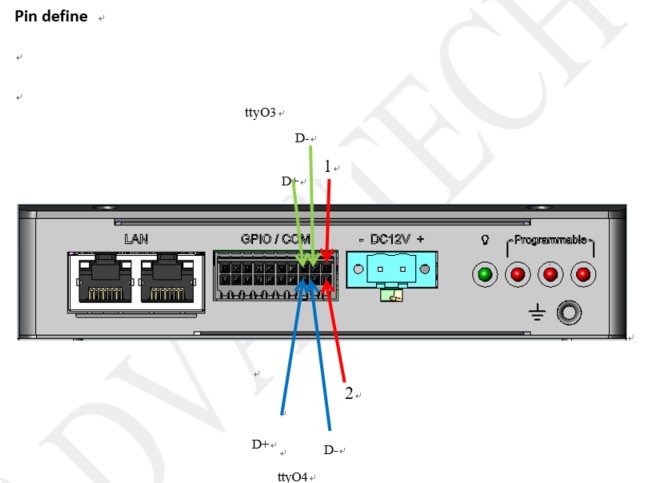
串口使用方法(Serial Port Operating Method)
RS-232 Test
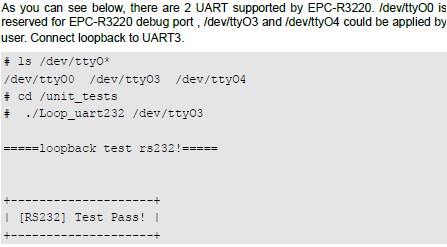
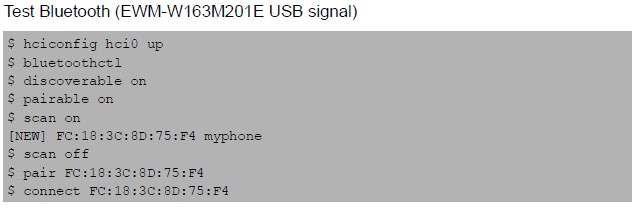
蓝牙使用方法(BlueTooth Operating Method)
Command :

$ hciconfig hci0 up
$ bluetoothctl
$ discoverable on
$ pairable on
$ scan on
[NEW] FC:18:3C:8D:75:F4 myphone
$ scan off
$ pair FC:18:3C:8D:75:F4
$ connect FC:18:3C:8D:75:F4
遠程訪問及文件傳輸(Remote Access and File Transimmion)
**查看主板IP位址 ( Chech IP Address ):**
Command : ifconfig
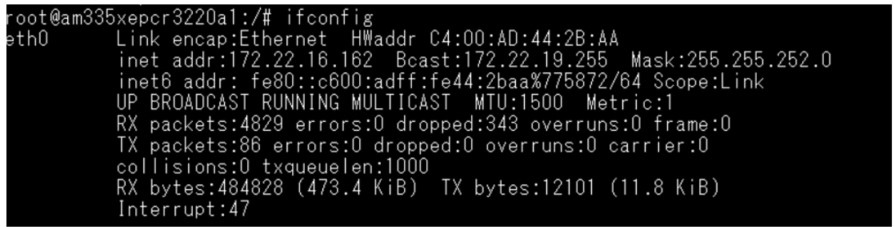
Windows下SSH访问及文件传输
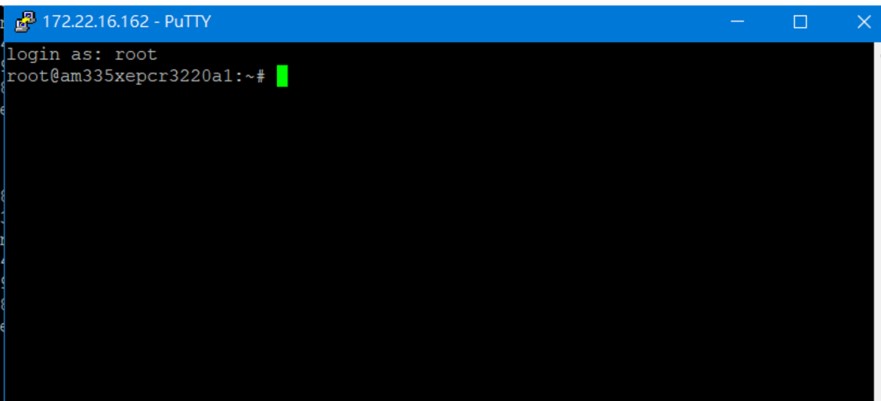
SSH Remote Log into Device
- SSH远程登录,以putty选择putty.exe(或者使用Xshell、SecureCRT等类似软件)
- 需要设置远程设备的IP、通讯端口(默认22)、通讯方式,登录后验证用户名密码
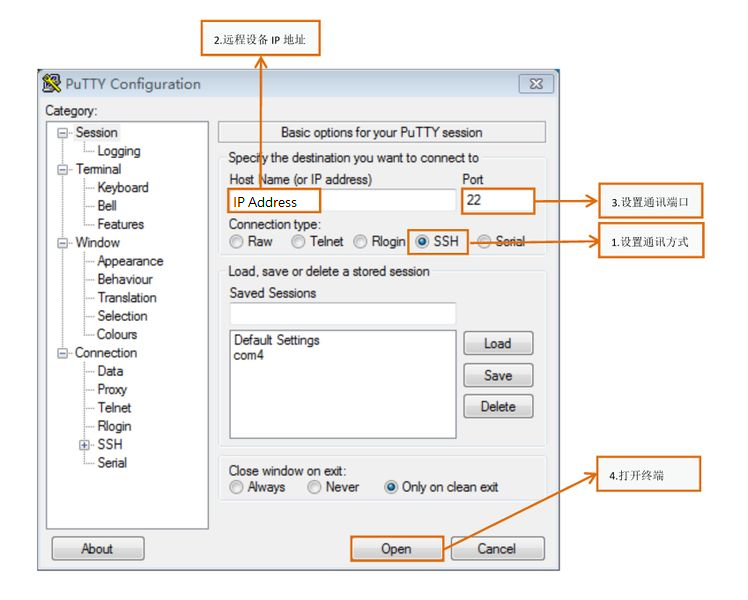
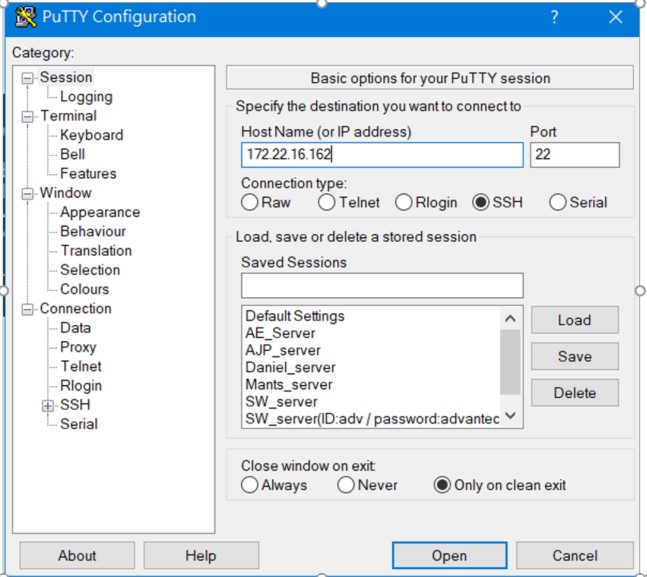
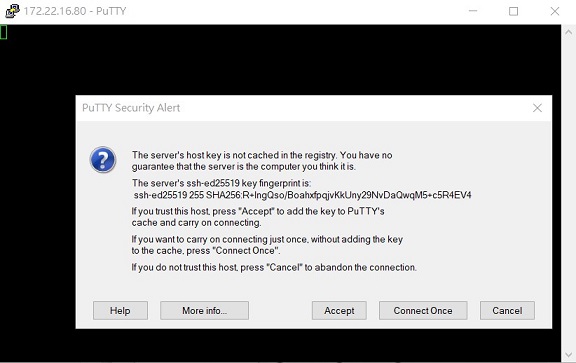
Account is “root” , no password.
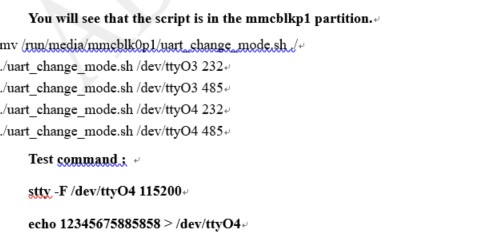
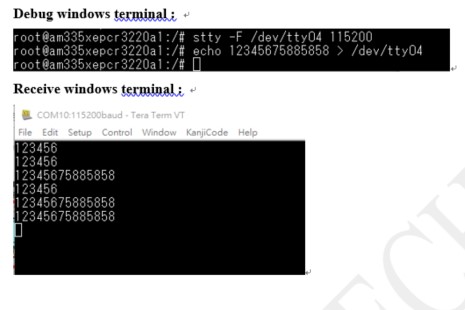
RS-485 測試方式 (RS-485 testing method)
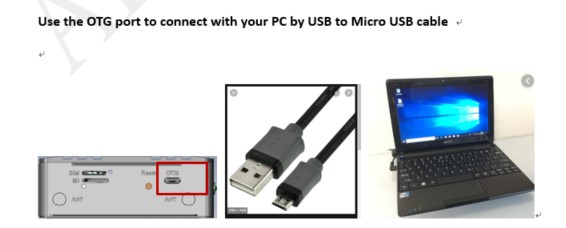
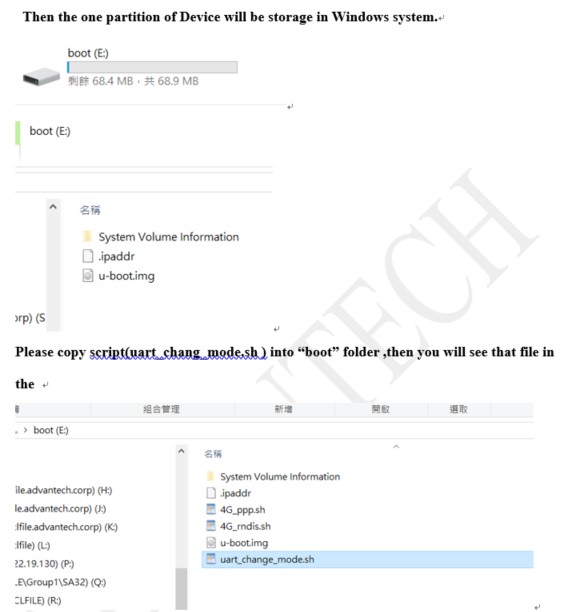
Test tool script :
Uart change mode
百度網盤(Baidu Disk): 链接:  https://pan.baidu.com/s/1HGJoW0jqp_GGK5VFvXAieg
提取码:luug
通用方法(General Method)
**'**查看CPU频率(Check CPU Frequency)'
           root@am335xepcr3220a1:/# cat /sys/devices/system/cpu/cpufreq/policy0/cpuinfo_cur_freq
           >> 600000
           root@am335xepcr3220a1:/# cat /sys/devices/system/cpu/cpufreq/policy0/cpuinfo_max_freq
           >> 800000
查看内存容量(Check Memory Capacity)
root@am335xepcr3220a1:~# busybox free -m[  143.716190] NET: Registered protocol family 15

             total       used       free     shared    buffers     cached
Mem:          1002        152        849          9         23         88
-/+ buffers/cache:         40        961
Swap:            0          0          0
查看存储容量(Check Storage Capacity)
root@am335xepcr3220a1:~# busybox df -h
Filesystem                Size      Used Available Use% Mounted on
/dev/root                 6.1G      2.2G      3.5G  39% /
devtmpfs                476.7M      4.0K    476.7M   0% /dev
tmpfs                   501.2M         0    501.2M   0% /dev/shm
tmpfs                   501.2M      9.6M    491.6M   2% /run
tmpfs                   501.2M         0    501.2M   0% /sys/fs/cgroup
tmpfs                   501.2M         0    501.2M   0% /tmp
tmpfs                    16.0M         0     16.0M   0% /media/ram
tmpfs                    50.0M    128.0K     49.9M   0% /var/volatile
/dev/mmcblk1p3           58.0M     31.1M     23.7M  57% /run/media/mmcblk1p3
/dev/mmcblk1p6          739.9M    796.0K    700.7M   0% /cache
/dev/mmcblk1p5            2.9M     34.0K      2.6M   1% /run/media/mmcblk1p5
/dev/mmcblk1p1           68.9M    472.5K     68.4M   1% /run/media/mmcblk1p1
tmpfs                   100.2M         0    100.2M   0% /run/user/0
網路Ping測試(Ping Network Testing)
     ping 8.8.8.8
     PING 8.8.8.8 (8.8.8.8) 56(84) bytes of data.
     64 bytes from 8.8.8.8: icmp_seq=1 ttl=54 time=2.10 ms
     64 bytes from 8.8.8.8: icmp_seq=2 ttl=54 time=2.10 ms
設置RTC (RTC Setting)
root@am335xepcr3220a1:~# date 101212102021 && hwclock -w && date
Tue Oct 12 12:10:00 UTC 2021
Tue Oct 12 05:52:57 UTC 2021
root@am335xepcr3220a1:~# date
Tue Oct 12 05:52:58 UTC 2021
root@am335xepcr3220a1:~#