RSB-4680_Debian_User_Guide
產品介紹(Product Presentation)
產品特性(Product Features)
- Rockchip ARM Cortex-A17 RK3288 Quad Core, up to 1.6GHz
- Onboard 2GB DDR3L memory and 8GB eMMC
- HDMI 3840x2160 at 60Hz, VGA 1920x1200 at 60Hz, Dual Channel 18/24/30 bit LVDS
- Support 4K H.264/H.265 Video decoder
- 6 UART, 6 USB2.0, 1 GbE, 8 GPIO, 1 MIPI CSI, 1 SPI
- M.2 for WIFI/BT support, mini-PCIe for 3G/4G support
- Support Linux and Android
产品官网链接(Product official website link)
RSB-4680 - 研华 (advantech.com.cn)
接口布局和尺寸(Layout and Sizes)
接口布局圖 Board Dimension Layout
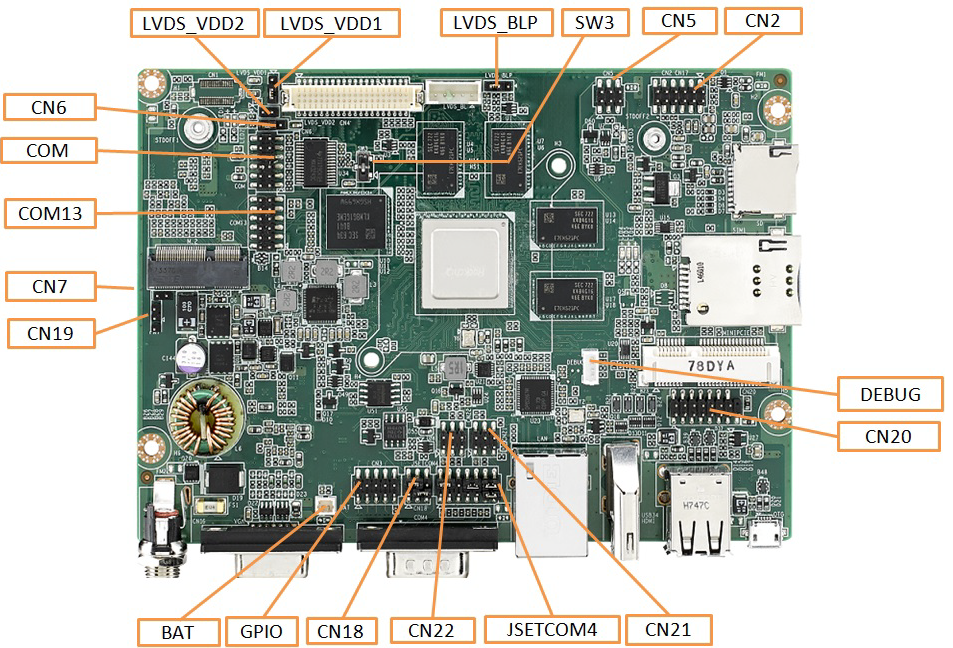
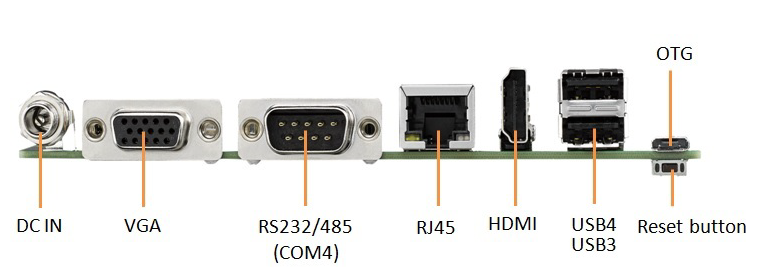
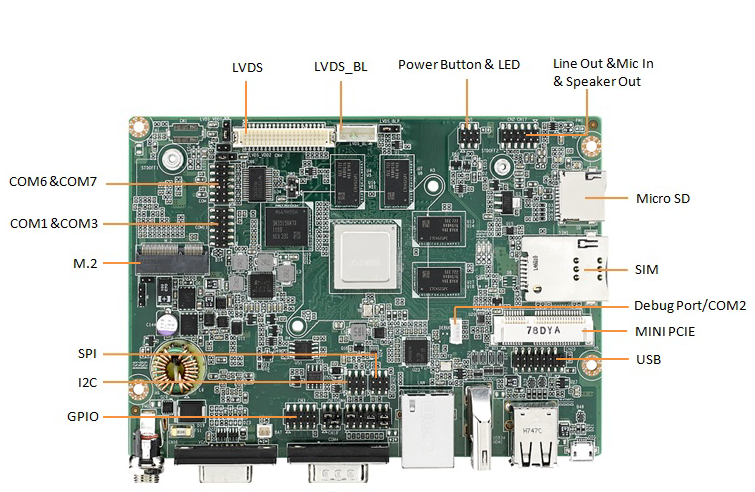
Connector List
| BAT | RTC Battery Connector |
| CN2 | Audio |
| CN3 | GPIO |
| CN4 | 18/24/30 bit Dual-Channel LVDS |
| LVDS_BL | LVDS Backlight Control |
| CN5 | Power Button & LED |
| CN7 | Recover |
| CN16 | 12V DC Jack |
| CN20 | Internal USB Pin Header |
| USB34 | Dual Type A USB Connector |
| OTG | Micro USB Connector |
| CN21 | SPI |
| CN22 | I2C |
| COM | Internal RS232 (COM6 & COM7 with 12V/5V Power) |
| COM13 | Internal RS232 (COM1 & COM3) |
| COM4 | External COM (With RS232 &RS-485) |
| DEBUG | COM2 or Console |
| HDMI | HDMI |
| LAN | LAN |
| M.2 | M.2 |
| MINIPCIE | MINIPCIE |
| SD | Micro SD |
| SIM1 | Standard SIM |
| SW2 | Reset Button |
| VGA | VGA |
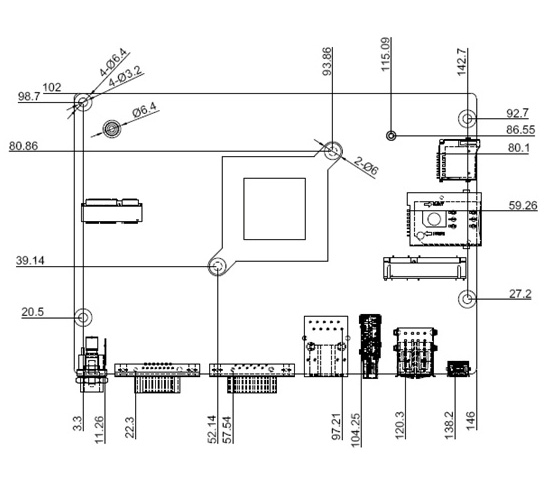
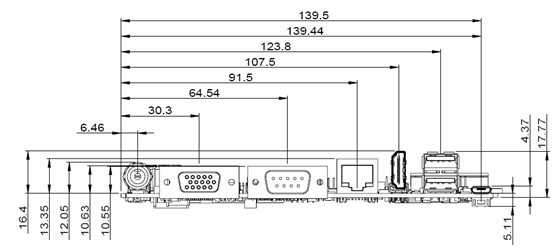
**机械尺寸 (**Mechanical Characteristics)
快速入门 (Quick Start)
系統下载 (OS Download)
Debian 9.8
-
Pan.Baidu_Link_for_RK3288 Password : 4jvr
| Platform | Product | Image Version | Release Date | Release Version | Release notes | Image Download | BSP Download Tag | Comment |
| RK3288 | RSB-4680 | DIV21045 | 2021/08/10 | Alpha | Release_Note | Baidu Password:a887 Dropbox | RK3288DIV21045.xml | |
| DIV21041 | 2020-04-21 | Beta | Release Note | Baidu Password:a887 | RK3288DIV21041.xml |
Debian 10
- Baidu link for Debian10 Password:iz74
| Image Version | Product | Date | Release | Release Note | Binary OS Image Name |
| DIV230009 | RSB-4680 | 2021-04-13 | Beta | Release Note | 4680A3AIM20DIV230009_2021-04-13.img.tgz |
Debian 燒錄方法 (Debiand Flash eMMC Method)
1. [Update through Android Tool](./RSB-4680_Debian_User_Guide_wiki_data/RSB_4680_Update_through_Android_Tool "RSB 4680 Update through Android Tool".md)
2. [Usering bootup_sd_disk made_by SDDiskTool](./RSB-4680_Debian_User_Guide_wiki_data/RSB-4680_Usering_bootup_sd_disk_made_by_SDDiskTool "RSB-4680 Usering bootup sd disk made by SDDiskTool".md)
NOTE :
This way only support Linux(Debian9) upgrade to Linux(Debian9) 、 Android6.0 upgrade to Android6.0 or Android8.1 upgrade to Android8.1.
If the device is in Android, you want to upgrade to Linux(Debian9), please use Android Tool.
Linux系统的基本使用(Linux System Basic Operating Method)
User Guide
- [How to debug.](./RSB-4680_Debian_User_Guide_wiki_data/RSB-4680_How_to_debug. "RSB-4680 How to debug.".md)
- [How to use GPIO.](./RSB-4680_Debian_User_Guide_wiki_data/RSB-4680_How_to_use_GPIO. "RSB-4680 How to use GPIO.".md)
- [How to use UART.](./RSB-4680_Debian_User_Guide_wiki_data/RSB-4680_How_to_use_UART. "RSB-4680 How to use UART.".md)
- [How to Config 4G-module.](./RSB-4680_Debian_User_Guide_wiki_data/RSB-4680_How_to_Config_4G-module. "RSB-4680 How to Config 4G-module.".md)
- [How to Config Multi-Display.](./RSB-4680_Debian_User_Guide_wiki_data/RSB-4680_How_to_Config_Multi-Display. "RSB-4680 How to Config Multi-Display.".md)
- [How to boot from sd-card.](./RSB-4680_Debian_User_Guide_wiki_data/RSB-4680_How_to_boot_from_sd-card. "RSB-4680 How to boot from sd-card.".md)
- [RK3288_qt5Creater](./RSB-4680_Debian_User_Guide_wiki_data/RSB-4680_RK3288_qt5Creater "RSB-4680 RK3288 qt5Creater".md)
- [qt5Creater_toolchain_Qt_5.11.3](./RSB-4680_Debian_User_Guide_wiki_data/RSB-4680_qt5Creater_toolchain_Qt_5.11.3 "RSB-4680 qt5Creater toolchain Qt 5.11.3".md)
通用方法(General Method)
查看CPU温度(Check CPU Temperature)
root@linaro-alip:/# cat /sys/class/thermal/thermal_zone0/temp
42769
查看CPU频率(Check CPU Frequency)
cat /sys/devices/system/cpu/cpufreq/policy0/scaling_cur_freq
600000
cat /sys/devices/system/cpu/cpufreq/policy4/scaling_cur_freq
900000
查看GPU温度(Check GPU Temperature)
root@linaro-alip:/# cat /sys/class/thermal/thermal_zone1/temp
43042
查看GPU频率(Check GPU Frequency)
root@linaro-alip:/# cat /sys/class/devfreq/ffa30000.gpu/cur_freq
200000000
查看DDR频率(Check DDR Frequency)
root@linaro-alip:/# cat /sys/class/devfreq/dmc/cur_freq
0
查看存储容量(Check Storage Capacity)
root@linaro-alip:/# df -h
Filesystem      Size  Used Avail Use% Mounted on
/dev/root       3.9G  2.5G  1.3G  67% /
devtmpfs        991M  8.0K  991M   1% /dev
tmpfs          1000M     0 1000M   0% /dev/shm
tmpfs          1000M  8.9M  991M   1% /run
tmpfs           5.0M  4.0K  5.0M   1% /run/lock
tmpfs          1000M     0 1000M   0% /sys/fs/cgroup
/dev/mmcblk1p9  3.1G  3.3M  3.1G   1% /userdata
/dev/mmcblk1p7   63M   13M   48M  21% /oem
tmpfs           200M  8.0K  200M   1% /run/user/1000
tmpfs           200M     0  200M   0% /run/user/0
网路Ping測試(Ping Network Testing)
Command:ifconfig
root@linaro-alip:~# ifconfig
docker0: flags=4099<UP,BROADCAST,MULTICAST>  mtu 1500
        inet 172.17.0.1  netmask 255.255.0.0  broadcast 172.17.255.255
        ether 02:42:9d:3a:25:6f  txqueuelen 0  (Ethernet)
        RX packets 0  bytes 0 (0.0 B)
        RX errors 0  dropped 0  overruns 0  frame 0
        TX packets 0  bytes 0 (0.0 B)
        TX errors 0  dropped 0 overruns 0  carrier 0  collisions 0

eth0: flags=4163<UP,BROADCAST,RUNNING,MULTICAST>  mtu 1500
        inet 192.168.127.100  netmask 255.255.255.0  broadcast 192.168.127.255
        inet6 fe80::3269:bcb5:eaa7:b6b7  prefixlen 64  scopeid 0x20<link>
        ether c4:00:ad:41:6d:fb  txqueuelen 1000  (Ethernet)
        RX packets 175  bytes 16715 (16.3 KiB)
        RX errors 0  dropped 0  overruns 0  frame 0
        TX packets 109  bytes 7172 (7.0 KiB)
        TX errors 0  dropped 0 overruns 0  carrier 0  collisions 0
        device interrupt 44

lo: flags=73<UP,LOOPBACK,RUNNING>  mtu 65536
        inet 127.0.0.1  netmask 255.0.0.0
        inet6 ::1  prefixlen 128  scopeid 0x10<host>
        loop  txqueuelen 1  (Local Loopback)
        RX packets 980  bytes 66000 (64.4 KiB)
        RX errors 0  dropped 0  overruns 0  frame 0
        TX packets 980  bytes 66000 (64.4 KiB)
        TX errors 0  dropped 0 overruns 0  carrier 0  collisions 0
Command:Ping 192.168.127.100
root@linaro-alip:~# ping 192.168.127.100
PING <span style="color:#FF0000;">192.168.127.100</span> (192.168.127.100) 56(84) bytes of data.
64 bytes from 192.168.127.100: icmp_seq=1 ttl=64 time=0.200 ms
64 bytes from 192.168.127.100: icmp_seq=2 ttl=64 time=0.161 ms
64 bytes from 192.168.127.100: icmp_seq=3 ttl=64 time=0.147 ms
^C
--- <span style="color:#FF0000;">192.168.127.100</span> ping statistics ---
3 packets transmitted, 3 received, 0% packet loss, time 2ms
rtt min/avg/max/mdev = 0.147/0.169/0.200/0.024 ms
設置RTC (RTC Setting)
root@linaro-alip:~# sudo su
root@linaro-alip:~# date
Tue Oct 26 08:16:04 UTC 2021
root@linaro-alip:~# date -s "2022-9-1 13:00:00"
Thu Sep  1 13:00:00 UTC 2022
root@linaro-alip:~# date
Thu Sep  1 13:00:10 UTC 2022
root@linaro-alip:~#hwclock -w
root@linaro-alip:~# hwclock
Thu Sep  1 13:01:07 2022  0.000000 seconds