RSB-4710_Android_User_Guide
產品介紹(Product introduction )
產品特性(Product Features)
- Rockchip RK3399 ARM Dual Cortex-A72 and Quad Cortex-A53 1.8 GHz
*Onboard 2GB LPDDR4 memory and 16GB eMMC
*Dual HDMI(4K 60fps + 1080P), 1 x eDP, 1 x dual channel LVDS, 1 x MIPI CSI
*Supports 4K H.264/H.265 video decoder
*6 x serial, 1 x USB3.0, 4 x USB2.0 ,1 x USB OTG, 2 x GbE, 1 x SPI, 1 x I2C, 5 x GPIOs
*M.2 for WIFI/BT support, mini-PCIe for 3G/4G support
*Supports Debian9/10 and Android7.1/10.0
產品官網連結(Product Features)
硬件接口說明(Hardware interface introduction)
接口布局和尺寸(Layout and Sizes)
接口布局圖 Board Dimension Layout
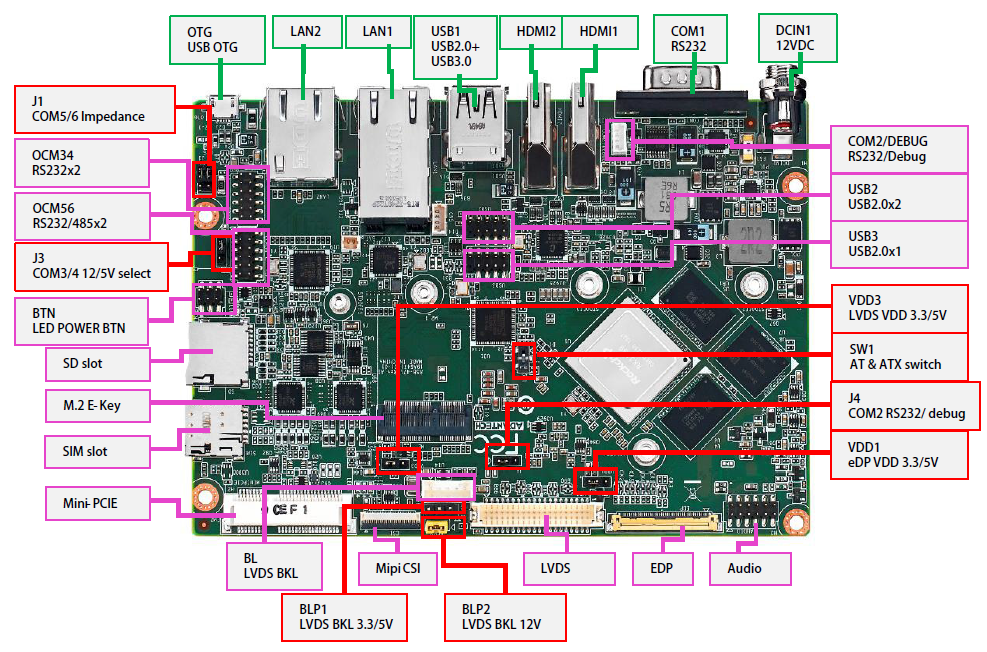
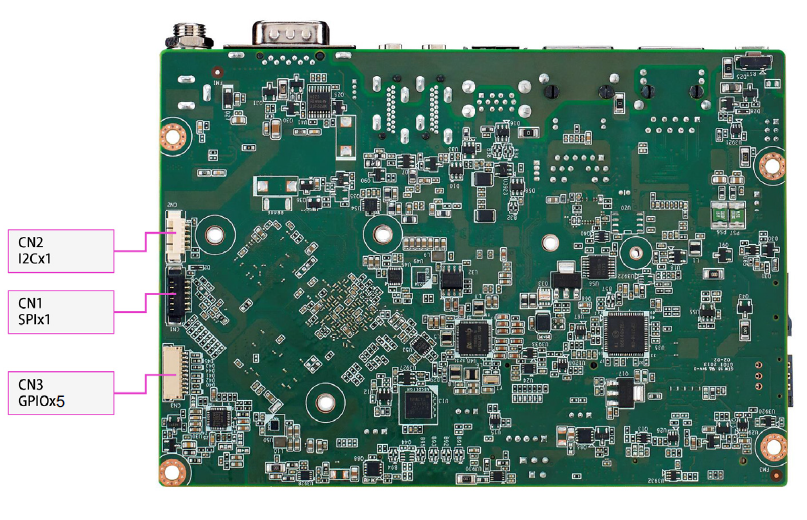
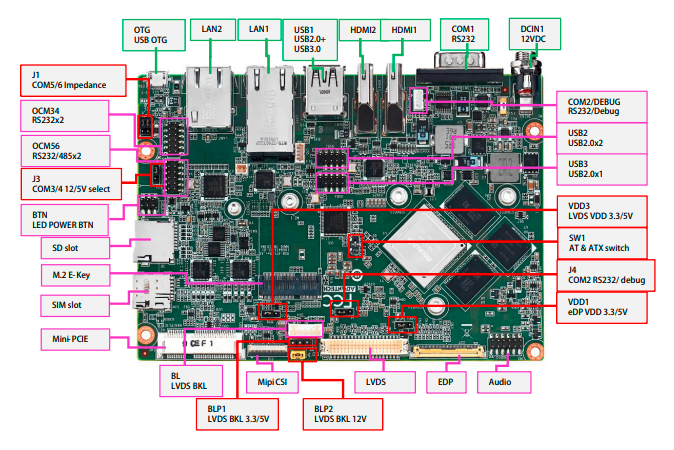
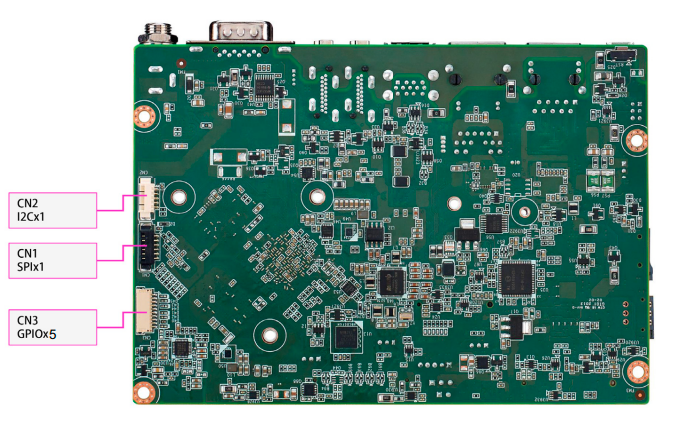
Connector List
接口引脚定義 (Pin definitions)
- [电池扣(RTC)](./RSB-4710_Android_User_Guide_wiki_data/电池扣(RTC) "电池扣(RTC)".md)
- 串口(RS-232 (COM1),RS-232/Debug Port (COM2/DEBUG),RS-232/485 (COM56),Internal RS-232 (COM34))
- [显示接口(LVDS,LVDS_BL,EDP,HDMI)](./RSB-4710_Android_User_Guide_wiki_data/显示接口(LVDS,LVDS_BL,EDP,HDMI) "显示接口(LVDS,LVDS BL,EDP,HDMI)".md)
- [LAN接口(LAN1,LAN2)](./RSB-4710_Android_User_Guide_wiki_data/LAN接口(LAN1,LAN2) "LAN接口(LAN1,LAN2)".md)
- [USB接口(USB1,Pin Header,OTG)](./RSB-4710_Android_User_Guide_wiki_data/USB接口(USB1,Pin_Header,OTG) "USB接口(USB1,Pin Header,OTG)".md)
- [音频接口(Audio)](./RSB-4710_Android_User_Guide_wiki_data/音频接口(Audio) "音频接口(Audio)".md)
- [Micro SD & Nano SIM Card](./RSB-4710_Android_User_Guide_wiki_data/Micro_SD_&_Nano_SIM_Card "Micro SD & Nano SIM Card".md)
- [电源及指示灯和开关机复位按钮(DC Power,Power Button and LED)](./RSB-4710_Android_User_Guide_wiki_data/电源及指示灯和开关机复位按钮(DC_Power,Power_Button_and_LED,Power_Button_and_LED) "电源及指示灯和开关机复位按钮(DC Power,Power Button and LED,Power Button and LED)".md)
- [Mini PCIe & MIPI CSI 接口](./RSB-4710_Android_User_Guide_wiki_data/Mini_PCIe_&_MIPI_CSI_接口 "Mini PCIe & MIPI CSI 接口".md)
- [M.2接口](./RSB-4710_Android_User_Guide_wiki_data/M.2接口 "M.2接口".md)
- [GPIO接口](./RSB-4710_Android_User_Guide_wiki_data/GPIO接口 "GPIO接口".md)
- [SPI ,I2C接口](./RSB-4710_Android_User_Guide_wiki_data/SPI_,I2C接口 "SPI ,I2C接口".md)
- [RSB-4710 Jumper List](./RSB-4710_Android_User_Guide_wiki_data/RSB-4710_Jumper_List "RSB-4710 Jumper List".md)
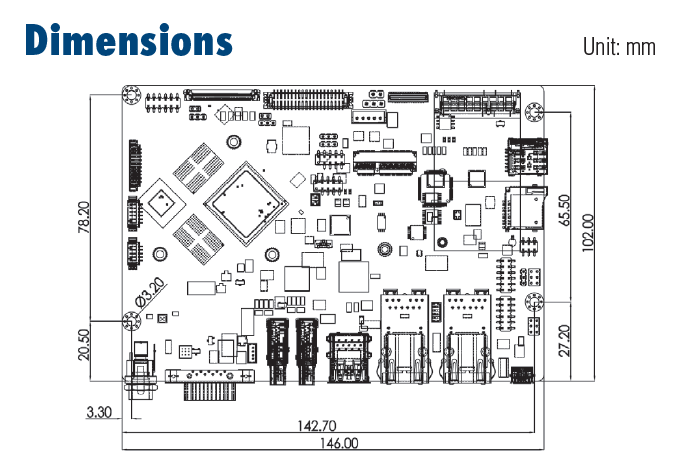
**机械尺寸 (**Mechanical Characteristics)
快速入门 (Quick Start)
系统下载 (OS Download)
Android7.12
Note: AIV=Android image ABV=BSP
| Product | Image Version | Release Date | Release Version | Release notes | Image Download | BSP Download Tag | Comment |
| RSB-4710 | V1180 | 2020/08/27 | RTM | Release_Note | Baidu Password:a887 Dropbox | RK3399_N7_AIV1180.xml |
-
Alpha: Basic I/O function bring up by RD;
-
Beta: Basic I/O function、performance and middleware verified by RD. Peripherals integrated;
-
GA: Beta version by QE verification;
-
RTM: Beta version by SI/Power/QE verification and pre-loaded;
Android 燒錄方法 (Android Flash eMMC Method)
There are three ways to update images:
[1.Using_AndroidToool.](./RSB-4710_Android_User_Guide_wiki_data/1._Using_AndroidToool. "1. Using AndroidToool.".md)
There is no limitation by this way.
[2.Using_storage(such sd_or_USB_disk)with_update.zip_in_it.](./RSB-4710_Android_User_Guide_wiki_data/2._Using_storage(such_sd_or_USB_disk)with_update.zip_in_it. "2. Using storage(such sd or USB disk)with update.zip in it.".md)
There are some limitations:
(1)The device must be able to boot up to Android system.
(2)Only update images from the same os, eg :
Android6.0 upgrade to Android6.0 or Android7.1 upgrade to Android7.1.
(3)Using update.zip to upgrade. (see more detail in "Create OTA zip" on how to create update.zip)
[3.Using_bootup_sd_disk made_by SDDiskTool.](./RSB-4710_Android_User_Guide_wiki_data/3._Using_bootup_sd_disk_made_by_SDDiskTool. "3. Using bootup sd disk made by SDDiskTool.".md)
(1)Only update images from the same os, eg :
Android6.0 upgrade to Android6.0 or Android7.1 upgrade to Android7.1.
(2)Using update.img to upgrade.
Linux系统的基本使用(Linux System Basic Operating Method)
[How to debug](./RSB-4710_Android_User_Guide_wiki_data/How_to_debug_for_RSB-4710 "How to debug for RSB-4710".md)
[How to use GPIO](./RSB-4710_Android_User_Guide_wiki_data/How_to_use_GPIO_for_RSB-4710 "How to use GPIO for RSB-4710".md)
[How to use UART](./RSB-4710_Android_User_Guide_wiki_data/How_to_use_UART_for_RSB-4710 "How to use UART for RSB-4710".md)
[How to config Multi-Display](./RSB-4710_Android_User_Guide_wiki_data/How_to_config_Multi-Display_for_RSB-4710 "How to config Multi-Display for RSB-4710".md)
[How to use I2C Hub](./RSB-4710_Android_User_Guide_wiki_data/How_to_use_I2C_Hub_for_RSB-4710 "How to use I2C Hub for RSB-4710".md)
[How to Config 4G-module](./RSB-4710_Android_User_Guide_wiki_data/How_to_Config_4G-module_for_RSB-4710 "How to Config 4G-module for RSB-4710".md)
MAC_Address
[Android signature](./RSB-4710_Android_User_Guide_wiki_data/RSB-4710_Android_signature "RSB-4710 Android signature".md)
[Install Jave in Linux](./RSB-4710_Android_User_Guide_wiki_data/RSB-4710_Install_Jave_in_Linux "RSB-4710 Install Jave in Linux".md)
DS-100
- [Linux BSP User Guide for rk3399 series Debian9](./RSB-4710_Android_User_Guide_wiki_data/IoTGateway/BSP/Linux/Linux_BSP_User_Guide_Debian9_for_rk "IoTGateway/BSP/Linux/Linux BSP User Guide Debian9 for rk".md)
- [Linux BSP User Guide for rk3399 series DeviceOn](./RSB-4710_Android_User_Guide_wiki_data/IoTGateway/BSP/Linux/Linux_BSP_User_Guide_DeviceOn "IoTGateway/BSP/Linux/Linux BSP User Guide DeviceOn".md)
- [Linux BSP User Guide for SGI [DMS-SA53]](./RSB-4710_Android_User_Guide_wiki_data/IoTGateway/BSP/Linux/Linux_BSP_User_Guide_SGI "IoTGateway/BSP/Linux/Linux BSP User Guide SGI".md)
乙太網路使用方法(Ethernent Testing Method)
Command : ifconfig
root@linaro-alip:~# ifconfig
docker0: flags=4099<UP,BROADCAST,MULTICAST>  mtu 1500
        inet 172.17.0.1  netmask 255.255.0.0  broadcast 172.17.255.255
        ether 02:42:83:27:77:c0  txqueuelen 0  (Ethernet)
        RX packets 0  bytes 0 (0.0 B)
        RX errors 0  dropped 0  overruns 0  frame 0
        TX packets 0  bytes 0 (0.0 B)
        TX errors 0  dropped 0 overruns 0  carrier 0  collisions 0

eth0: flags=4163<UP,BROADCAST,RUNNING,MULTICAST>  mtu 1500
        inet 192.168.127.101  netmask 255.255.255.0  broadcast 192.168.127.255
        inet6 fe80::e405:b000:5963:d697  prefixlen 64  scopeid 0x20<link>
        ether c6:ff:6c:34:9d:7d  txqueuelen 1000  (Ethernet)
        RX packets 23  bytes 7566 (7.3 KiB)
        RX errors 0  dropped 0  overruns 0  frame 0
        TX packets 45  bytes 5391 (5.2 KiB)
        TX errors 0  dropped 0 overruns 0  carrier 0  collisions 0
        device interrupt 24

eth1: flags=4099<UP,BROADCAST,MULTICAST>  mtu 1500
        ether 96:a4:98:8d:52:09  txqueuelen 1000  (Ethernet)
        RX packets 0  bytes 0 (0.0 B)
        RX errors 0  dropped 0  overruns 0  frame 0
        TX packets 0  bytes 0 (0.0 B)
        TX errors 0  dropped 0 overruns 0  carrier 0  collisions 0

lo: flags=73<UP,LOOPBACK,RUNNING>  mtu 65536
        inet 127.0.0.1  netmask 255.0.0.0
        inet6 ::1  prefixlen 128  scopeid 0x10<host>
        loop  txqueuelen 1  (Local Loopback)
        RX packets 484  bytes 32428 (31.6 KiB)
        RX errors 0  dropped 0  overruns 0  frame 0
        TX packets 484  bytes 32428 (31.6 KiB)
        TX errors 0  dropped 0 overruns 0  carrier 0  collisions 0
Command : ping 192.168.127.101
root@linaro-alip:~# ping 192.168.127.101
PING 192.168.127.101 (192.168.127.101) 56(84) bytes of data.
64 bytes from 192.168.127.101: icmp_seq=1 ttl=64 time=0.221 ms
64 bytes from 192.168.127.101: icmp_seq=2 ttl=64 time=0.135 ms
64 bytes from 192.168.127.101: icmp_seq=3 ttl=64 time=0.134 ms
64 bytes from 192.168.127.101: icmp_seq=4 ttl=64 time=0.137 ms
64 bytes from 192.168.127.101: icmp_seq=5 ttl=64 time=0.137 ms
^C
--- 192.168.127.101 ping statistics ---
5 packets transmitted, 5 received, 0% packet loss, time 5ms
rtt min/avg/max/mdev = 0.134/0.152/0.221/0.037 ms
root@linaro-alip:~#
查看CPU温度(Check CPU Temperature)
root@linaro-alip:~# cat /sys/devices/virtual/thermal/thermal_zone0/temp   34444

# 或者直接以度爲單位顯示 echo $[$(cat /sys/class/thermal/thermal_zone0/temp)/1000]° >>> 37°
查看CPU频率(Check CPU Frequency)
root@linaro-alip:~# cat /sys/devices/system/cpu/cpu0/cpufreq/cpuinfo_cur_freq
408000
root@linaro-alip:~# cat /sys/devices/system/cpu/cpu0/cpufreq/cpuinfo_max_freq
1416000
查看内存容量(Check Memory Capacity)
root@linaro-alip:~# busybox free -m
              total        used        free      shared  buff/cache   available
Mem:           1961         269        1454          18         237        1696
Swap:             0           0           0
查看存储容量(Check Storage Capacity)
root@linaro-alip:~# df -h
Filesystem       Size  Used Avail Use% Mounted on
/dev/root        7.9G  2.6G  4.9G  35% /
devtmpfs         973M  8.0K  973M   1% /dev
tmpfs            981M     0  981M   0% /dev/shm
tmpfs            981M  8.9M  972M   1% /run
tmpfs            5.0M  4.0K  5.0M   1% /run/lock
tmpfs            981M     0  981M   0% /sys/fs/cgroup
/dev/mmcblk1p10  6.4G  3.8M  6.4G   1% /userdata
/dev/mmcblk1p7    63M   13M   48M  21% /oem
tmpfs            197M  8.0K  197M   1% /run/user/1000
tmpfs            197M     0  197M   0% /run/user/0
root@linaro-alip:~#
設置RTC (RTC Setting)
root@linaro-alip:~# date
Wed May 11 01:12:06 UTC 2022
root@linaro-alip:~# date -s "2022-5-11 09:12:00"
Wed May 11 09:12:00 UTC 2022
root@linaro-alip:~# date
Wed May 11 09:12:06 UTC 2022
root@linaro-alip:~# hwclock -w
root@linaro-alip:~# hwclock
2022-05-11 09:12:17.266424+00:00
QT 安装步骤
[Qt5Creator_toolchain_Qt_5.11.3](./RSB-4710_Android_User_Guide_wiki_data/Qt5Creator_toolchain_Qt_5.11.3 "Qt5Creator toolchain Qt 5.11.3".md)
How to build Android 7 BSP (Android 7 BSP 編譯)
<http://ess-wiki.advantech.com.tw/view/Android_BSP_User_Guide_for_rk3399_series_7.1.2>