RSB-4710 Android User Guide
產品介紹(Product introduction )
產品特性(Product Features)
- Rockchip RK3399 ARM Dual Cortex-A72 and Quad Cortex-A53 1.8 GHz
*Onboard 2GB LPDDR4 memory and 16GB eMMC
*Dual HDMI(4K 60fps + 1080P), 1 x eDP, 1 x dual channel LVDS, 1 x MIPI CSI
*Supports 4K H.264/H.265 video decoder
*6 x serial, 1 x USB3.0, 4 x USB2.0 ,1 x USB OTG, 2 x GbE, 1 x SPI, 1 x I2C, 5 x GPIOs
*M.2 for WIFI/BT support, mini-PCIe for 3G/4G support
*Supports Debian9/10 and Android7.1/10.0
產品官網連結(Product Features)
硬件接口說明(Hardware interface introduction)
接口布局和尺寸(Layout and Sizes)
接口布局圖 Board Dimension Layout
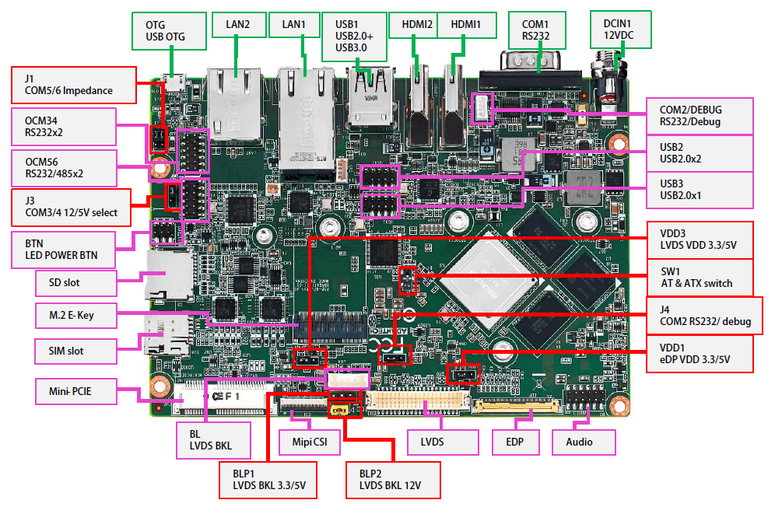
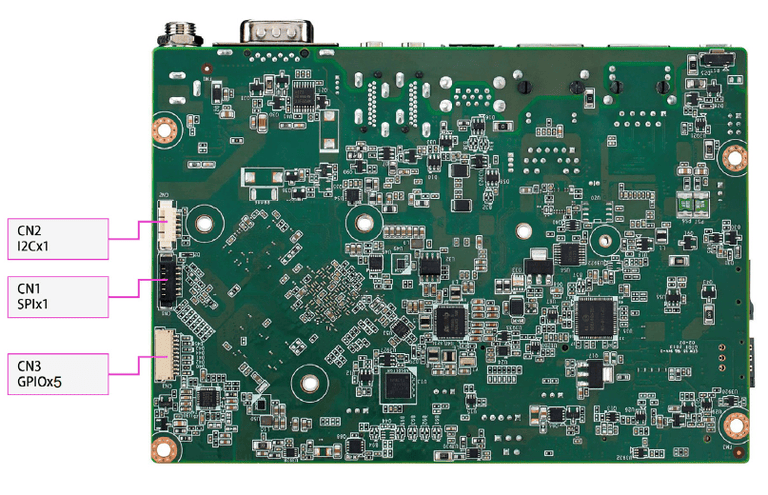
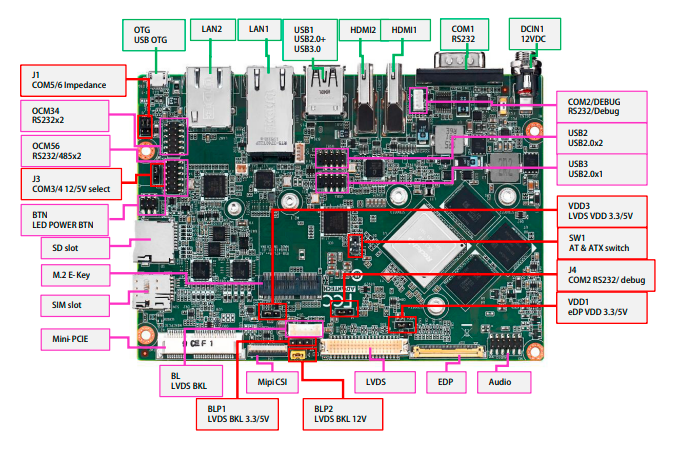
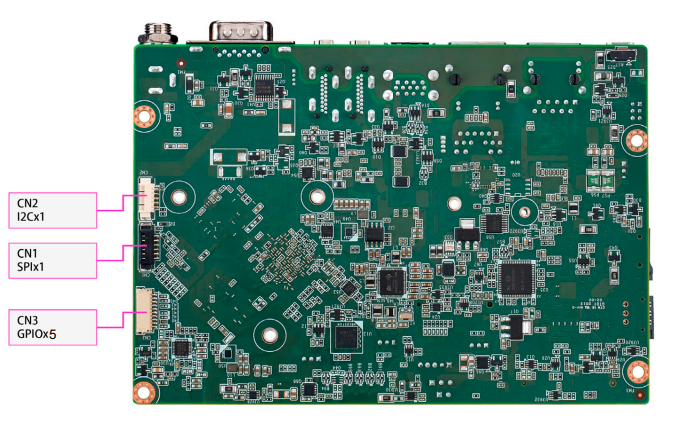
Connector List
接口引脚定義 (Pin definitions)
- 电池扣(RTC)
- 串口(RS-232 (COM1),RS-232/Debug Port (COM2/DEBUG),RS-232/485 (COM56),Internal RS-232 (COM34))%EF%BC%8CRS-232/Debug_Port_(COM2/DEBUG)%EF%BC%8CRS-232/485_(COM56)%EF%BC%8CInternal_RS-232_(COM34)%EF%BC%89 "串口(RS-232 (COM1),RS-232/Debug Port (COM2/DEBUG),RS-232/485 (COM56),Internal RS-232 (COM34))")
- 显示接口(LVDS,LVDS_BL,EDP,HDMI)
- LAN接口(LAN1,LAN2)
- USB接口(USB1,Pin Header,OTG)
- 音频接口(Audio)
- Micro SD & Nano SIM Card
- 电源及指示灯和开关机复位按钮(DC Power,Power Button and LED)
- Mini PCIe & MIPI CSI 接口
- M.2接口
- GPIO接口
- SPI ,I2C接口
- RSB-4710 Jumper List
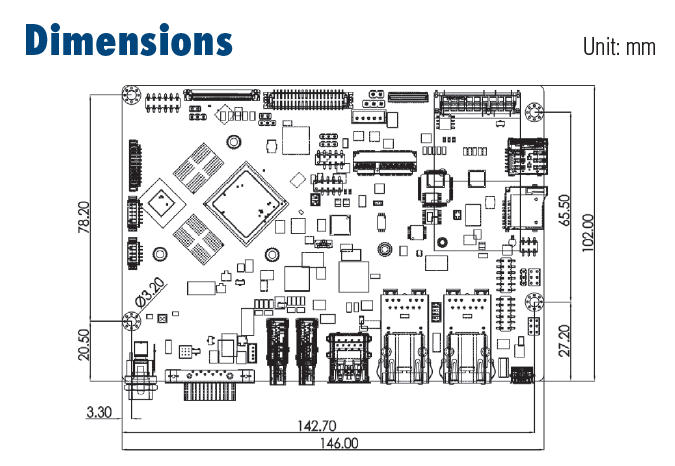
**机械尺寸 (**Mechanical Characteristics)
快速入门 (Quick Start)
系统下载 (OS Download)
Android7.12
Note: AIV=Android image ABV=BSP
| Product | Image Version | Release Date | Release Version | Release notes | Image Download | BSP Download Tag | Comment |
| RSB-4710 | V1180 | 2020/08/27 | RTM | Release_Note | Baidu Password:a887 Dropbox | RK3399_N7_AIV1180.xml |
-
Alpha: Basic I/O function bring up by RD;
-
Beta: Basic I/O function、performance and middleware verified by RD. Peripherals integrated;
-
GA: Beta version by QE verification;
-
RTM: Beta version by SI/Power/QE verification and pre-loaded;
Android 燒錄方法 (Android Flash eMMC Method)
There are three ways to update images:
1.Using_AndroidToool.
There is no limitation by this way.
2.Using_storage(such sd_or_USB_disk)with_update.zip_in_it.
There are some limitations:
(1)The device must be able to boot up to Android system.
(2)Only update images from the same os, eg :
Android6.0 upgrade to Android6.0 or Android7.1 upgrade to Android7.1.
(3)Using update.zip to upgrade. (see more detail in "Create OTA zip" on how to create update.zip)
3.Using_bootup_sd_disk made_by SDDiskTool.
(1)Only update images from the same os, eg :
Android6.0 upgrade to Android6.0 or Android7.1 upgrade to Android7.1.
(2)Using update.img to upgrade.
Linux系统的基本使用(Linux System Basic Operating Method)
How to debug
How to use GPIO
How to use UART
How to config Multi-Display
How to use I2C Hub
How to Config 4G-module
MAC_Address
Android signature
Install Jave in Linux
DS-100
- Linux BSP User Guide for rk3399 series Debian9
- Linux BSP User Guide for rk3399 series DeviceOn
- [Linux BSP User Guide for SGI [DMS-SA53]](./RSB-4710_Android_User_Guide_wiki_data/IoTGateway/BSP/Linux/Linux_BSP_User_Guide_SGI "IoTGateway/BSP/Linux/Linux BSP User Guide SGI".md)
乙太網路使用方法(Ethernent Testing Method)
Command : ifconfig
root@linaro-alip:~# ifconfig
docker0: flags=4099<UP,BROADCAST,MULTICAST>  mtu 1500
        inet 172.17.0.1  netmask 255.255.0.0  broadcast 172.17.255.255
        ether 02:42:83:27:77:c0  txqueuelen 0  (Ethernet)
        RX packets 0  bytes 0 (0.0 B)
        RX errors 0  dropped 0  overruns 0  frame 0
        TX packets 0  bytes 0 (0.0 B)
        TX errors 0  dropped 0 overruns 0  carrier 0  collisions 0

eth0: flags=4163<UP,BROADCAST,RUNNING,MULTICAST>  mtu 1500
        inet 192.168.127.101  netmask 255.255.255.0  broadcast 192.168.127.255
        inet6 fe80::e405:b000:5963:d697  prefixlen 64  scopeid 0x20<link>
        ether c6:ff:6c:34:9d:7d  txqueuelen 1000  (Ethernet)
        RX packets 23  bytes 7566 (7.3 KiB)
        RX errors 0  dropped 0  overruns 0  frame 0
        TX packets 45  bytes 5391 (5.2 KiB)
        TX errors 0  dropped 0 overruns 0  carrier 0  collisions 0
        device interrupt 24

eth1: flags=4099<UP,BROADCAST,MULTICAST>  mtu 1500
        ether 96:a4:98:8d:52:09  txqueuelen 1000  (Ethernet)
        RX packets 0  bytes 0 (0.0 B)
        RX errors 0  dropped 0  overruns 0  frame 0
        TX packets 0  bytes 0 (0.0 B)
        TX errors 0  dropped 0 overruns 0  carrier 0  collisions 0

lo: flags=73<UP,LOOPBACK,RUNNING>  mtu 65536
        inet 127.0.0.1  netmask 255.0.0.0
        inet6 ::1  prefixlen 128  scopeid 0x10<host>
        loop  txqueuelen 1  (Local Loopback)
        RX packets 484  bytes 32428 (31.6 KiB)
        RX errors 0  dropped 0  overruns 0  frame 0
        TX packets 484  bytes 32428 (31.6 KiB)
        TX errors 0  dropped 0 overruns 0  carrier 0  collisions 0
Command : ping 192.168.127.101
root@linaro-alip:~# ping 192.168.127.101
PING 192.168.127.101 (192.168.127.101) 56(84) bytes of data.
64 bytes from 192.168.127.101: icmp_seq=1 ttl=64 time=0.221 ms
64 bytes from 192.168.127.101: icmp_seq=2 ttl=64 time=0.135 ms
64 bytes from 192.168.127.101: icmp_seq=3 ttl=64 time=0.134 ms
64 bytes from 192.168.127.101: icmp_seq=4 ttl=64 time=0.137 ms
64 bytes from 192.168.127.101: icmp_seq=5 ttl=64 time=0.137 ms
^C
--- 192.168.127.101 ping statistics ---
5 packets transmitted, 5 received, 0% packet loss, time 5ms
rtt min/avg/max/mdev = 0.134/0.152/0.221/0.037 ms
root@linaro-alip:~#
查看CPU温度(Check CPU Temperature)
root@linaro-alip:~# cat /sys/devices/virtual/thermal/thermal_zone0/temp   34444

# 或者直接以度爲單位顯示 echo $[$(cat /sys/class/thermal/thermal_zone0/temp)/1000]° >>> 37°
查看CPU频率(Check CPU Frequency)
root@linaro-alip:~# cat /sys/devices/system/cpu/cpu0/cpufreq/cpuinfo_cur_freq
408000
root@linaro-alip:~# cat /sys/devices/system/cpu/cpu0/cpufreq/cpuinfo_max_freq
1416000
查看内存容量(Check Memory Capacity)
root@linaro-alip:~# busybox free -m
              total        used        free      shared  buff/cache   available
Mem:           1961         269        1454          18         237        1696
Swap:             0           0           0
查看存储容量(Check Storage Capacity)
root@linaro-alip:~# df -h
Filesystem       Size  Used Avail Use% Mounted on
/dev/root        7.9G  2.6G  4.9G  35% /
devtmpfs         973M  8.0K  973M   1% /dev
tmpfs            981M     0  981M   0% /dev/shm
tmpfs            981M  8.9M  972M   1% /run
tmpfs            5.0M  4.0K  5.0M   1% /run/lock
tmpfs            981M     0  981M   0% /sys/fs/cgroup
/dev/mmcblk1p10  6.4G  3.8M  6.4G   1% /userdata
/dev/mmcblk1p7    63M   13M   48M  21% /oem
tmpfs            197M  8.0K  197M   1% /run/user/1000
tmpfs            197M     0  197M   0% /run/user/0
root@linaro-alip:~#
設置RTC (RTC Setting)
root@linaro-alip:~# date
Wed May 11 01:12:06 UTC 2022
root@linaro-alip:~# date -s "2022-5-11 09:12:00"
Wed May 11 09:12:00 UTC 2022
root@linaro-alip:~# date
Wed May 11 09:12:06 UTC 2022
root@linaro-alip:~# hwclock -w
root@linaro-alip:~# hwclock
2022-05-11 09:12:17.266424+00:00
QT 安装步骤
Qt5Creator_toolchain_Qt_5.11.3
How to build Android 7 BSP (Android 7 BSP 編譯)
<http://ess-wiki.advantech.com.tw/view/Android_BSP_User_Guide_for_rk3399_series_7.1.2>