EPC-R7300 Ubuntu 20.04 User Guide
Introduction
EPC-R7300 Ubuntu 20.04 User Guide
產品介紹 (Product Introduction)
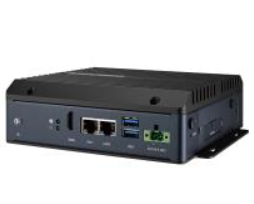
產品特性 (Product Features)
- NVIDIA Jetson Orin™ Nano and NX Module compatible Barebone PC
- Industrial and Expandable Design
- HDMI up to 3840 x 2160 at 60Hz resolution
- Dual GbE LAN, 2 USB3.2 Gen 2
- 1 Nano SIM Slot
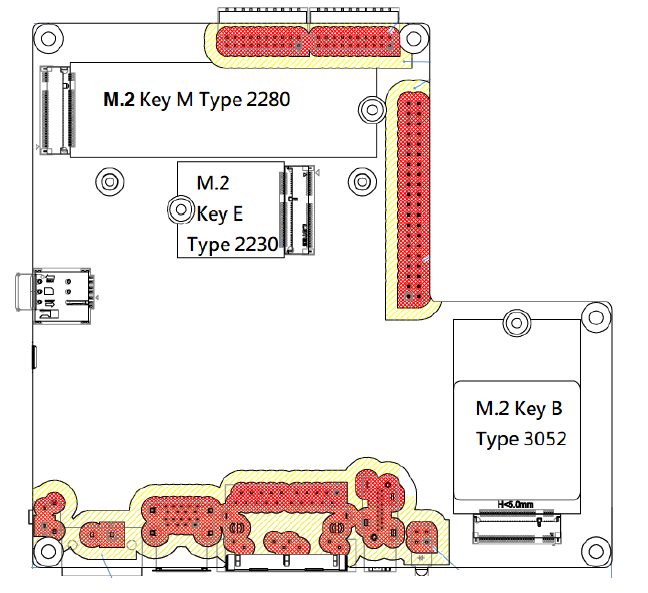
- 1 M.2 3042/52 Key B Slot, 1 M.2 2230 Key E Slot, 1 M.2 2280 Key M Slot
- 4 Kinds of Rear I/O for Each Vertical Focus: IEM, Self Service, Automation and Networking
產品官網連結 (Product Official Website Link)
硬件接口說明 (Hardware Interface Introduction)
EPC-R7300 接口布局圖 Board Dimension Layout
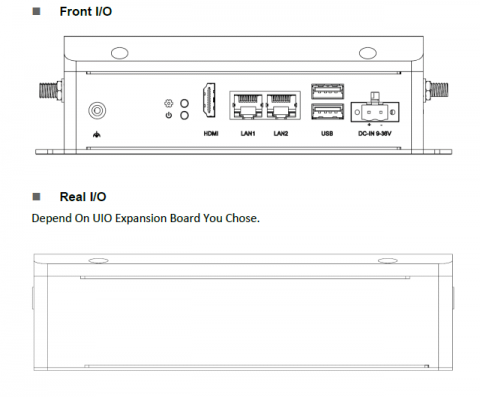
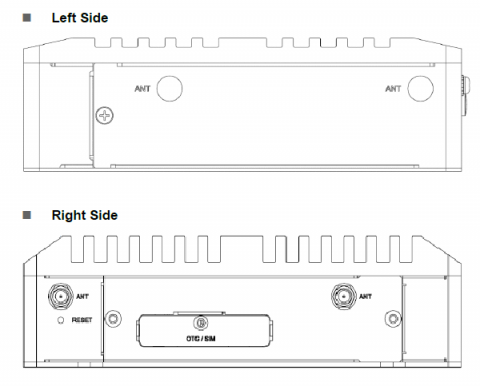
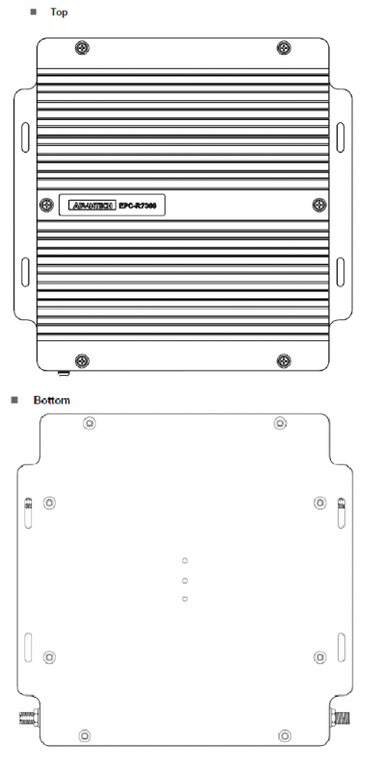
接口引脚定義 (Pin Definition)
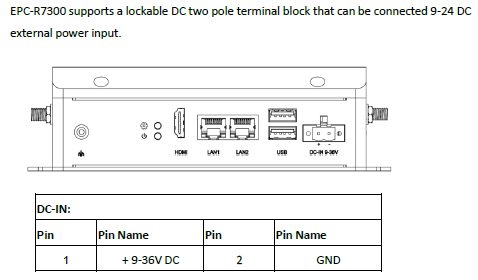
DC in
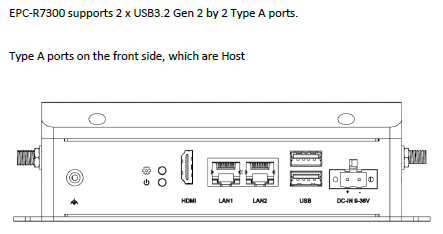
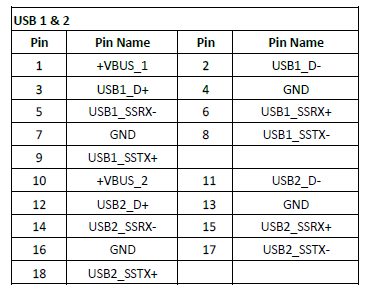
USB Ports
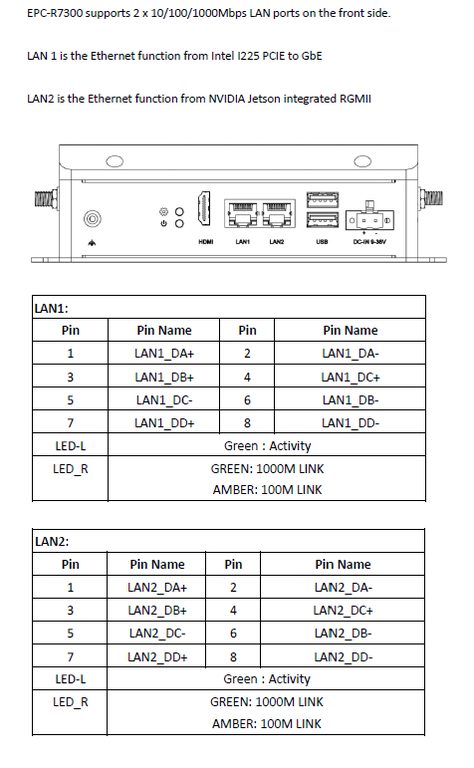
LAN Ports
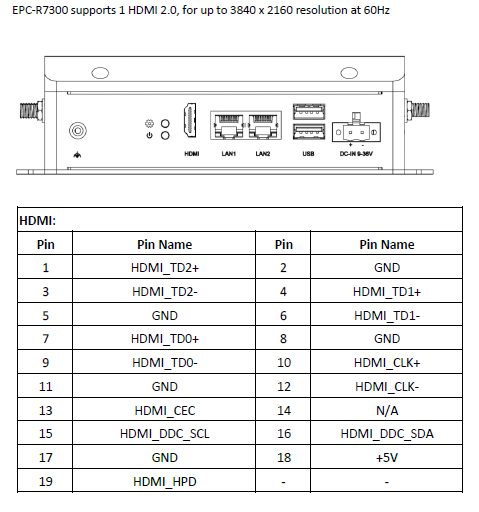
HDMI
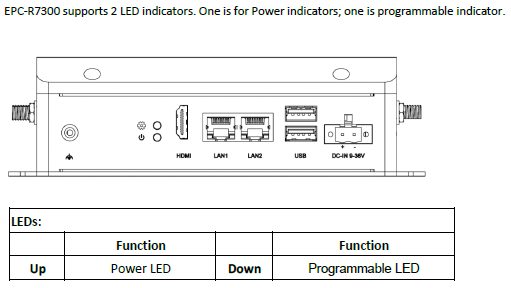
LED Indicator
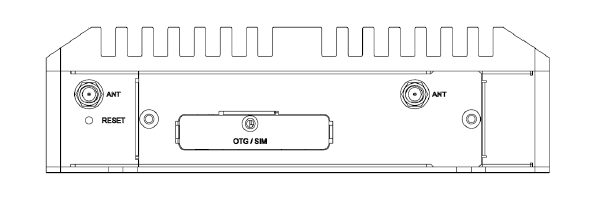
Side Door
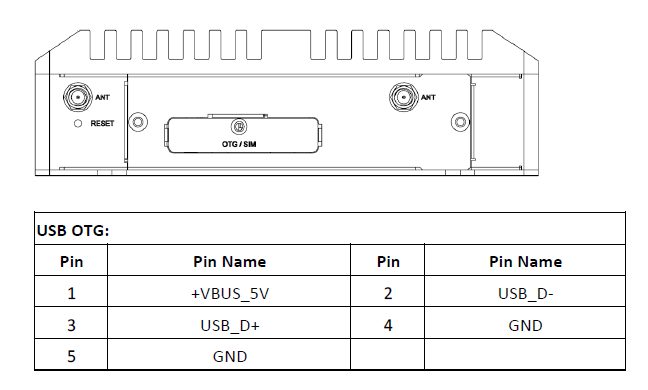
OTG Port
Nano SIM
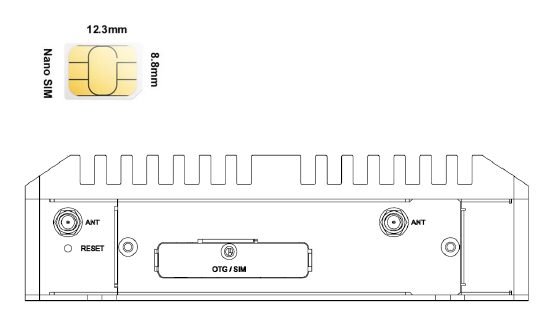
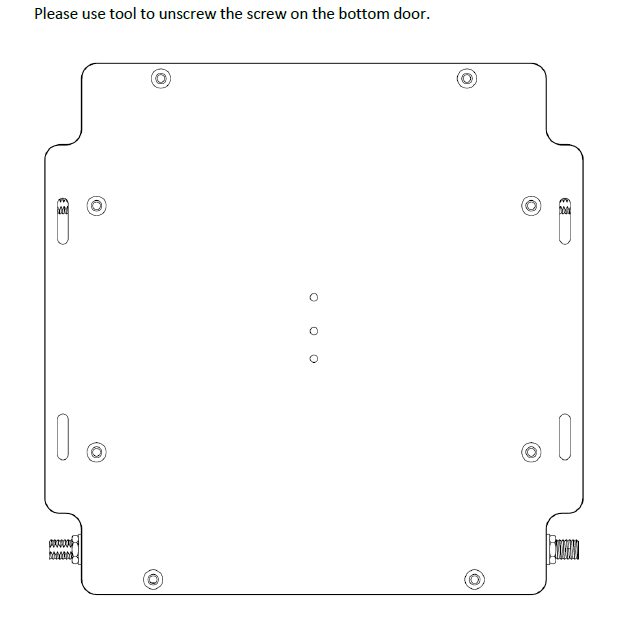
Bottom Door
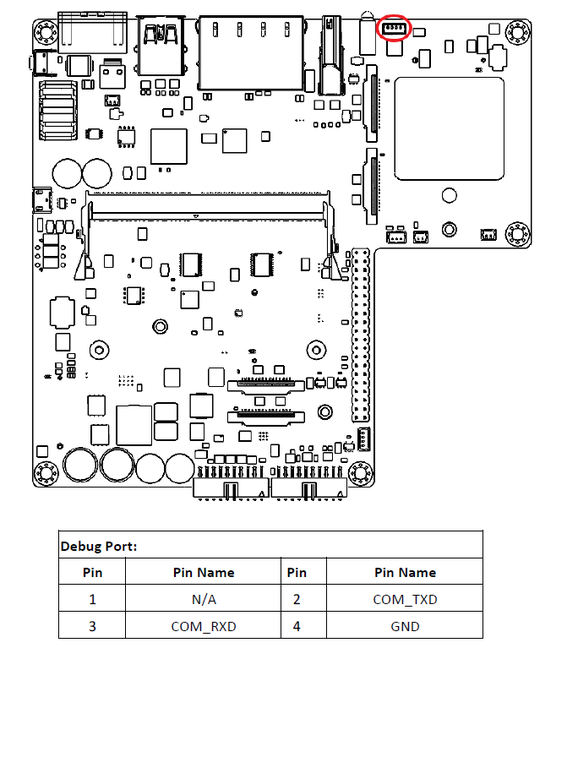
Debug Port
EPC-R7300 provides one Debug Port for development used. Debug cable P/N: 1700021565-01 4P-1.25 to D-SUB 9P (F) 60cm
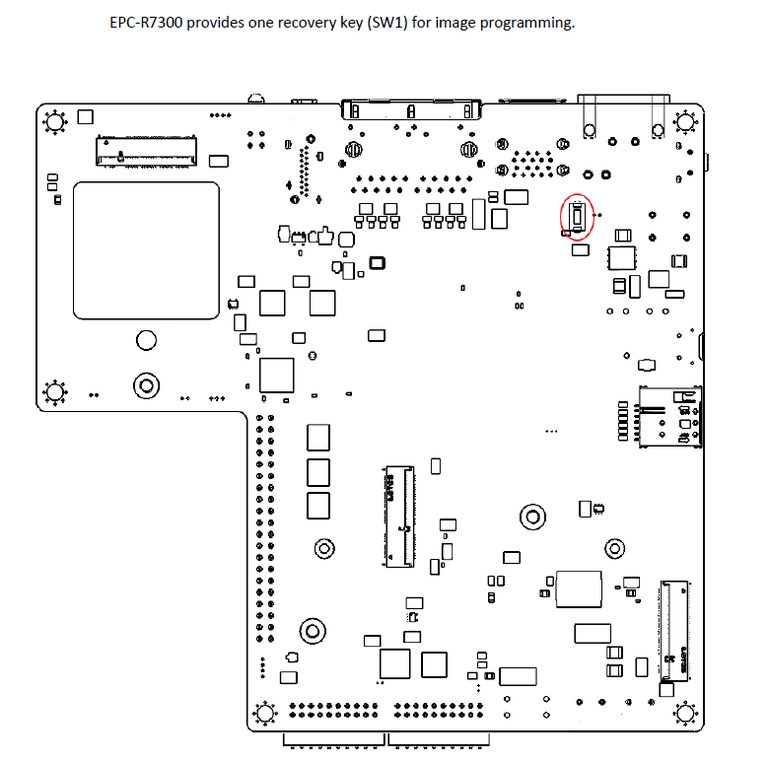
Recovery Key
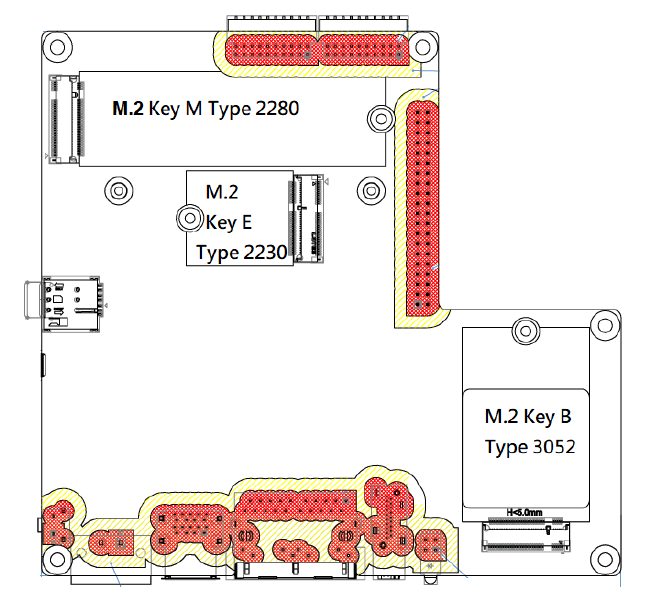
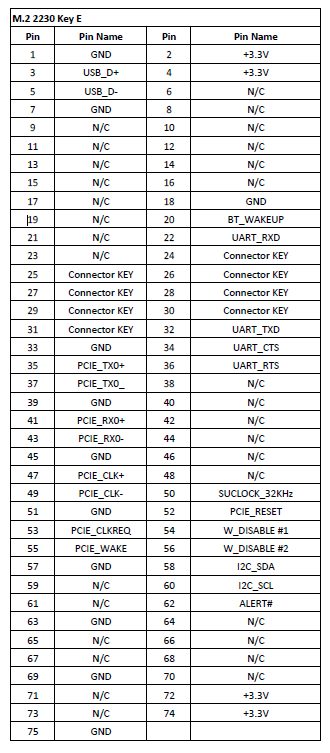
M.2 2230 Key E Slot
EPC-R7300 provides one M.2 2230 Key E Slot for WLAN card. P/N: EWM-W159M201E 802.11 ac/a/b/g/n + Bluetooth 5.0 M.2 2230 (A-E Key) Card
M.2 3042 Key B Slot
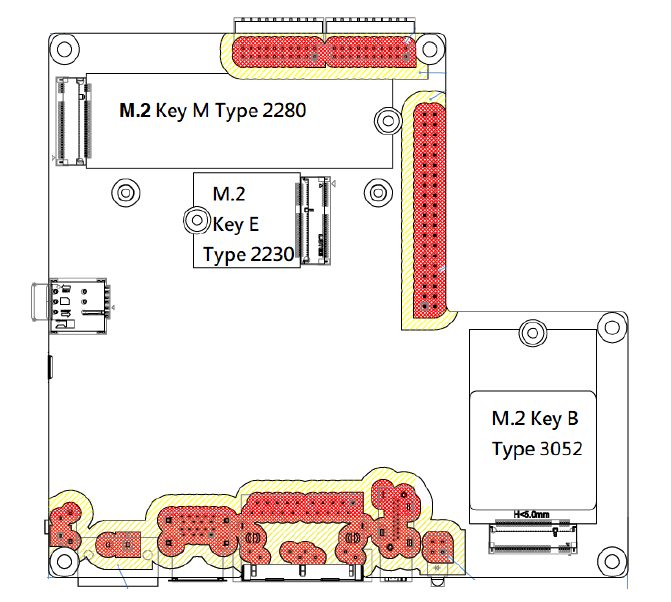
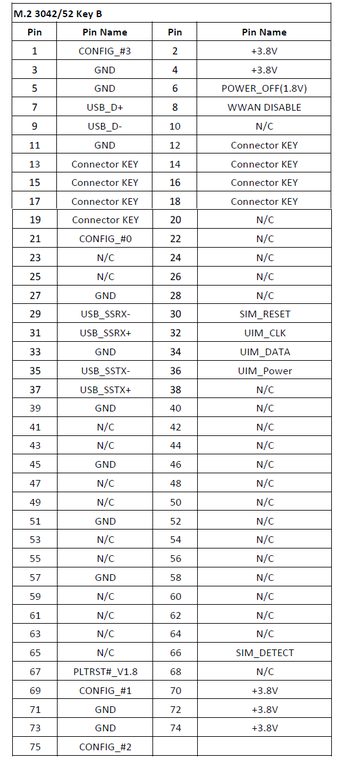
EPC-R7300 provides one M.2 3042 Key B Slot for WWAN card. P/N: AIW-355 DQ-E01 5G M.2 3052 (B Key) Card
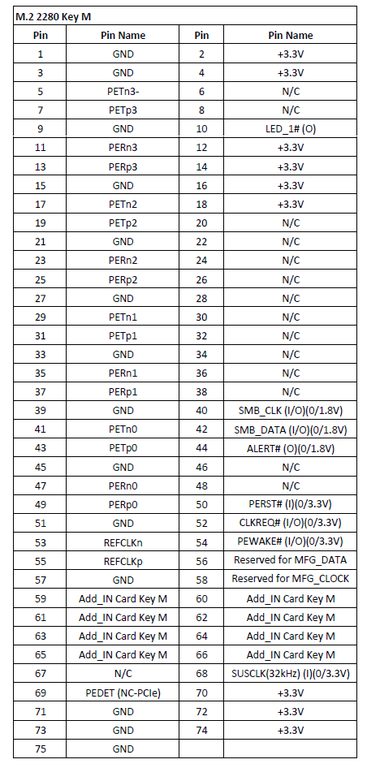
M.2 2280 Key M Slot
EPC-R7300 provides one M.2 2280 Key M Slot for NVMe card. P/N: SQF-C8MV2-128G-EDE 128G M.2 2280 (M Key) Card
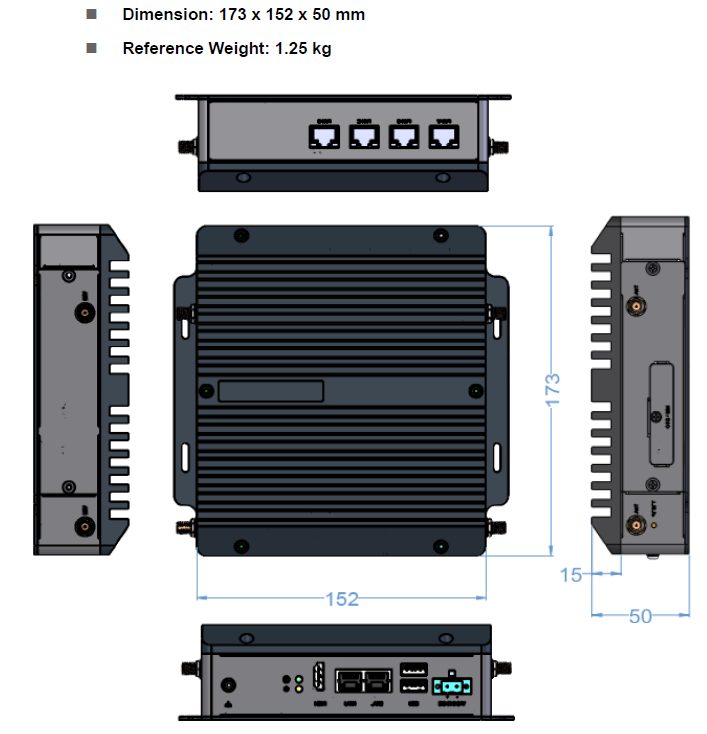
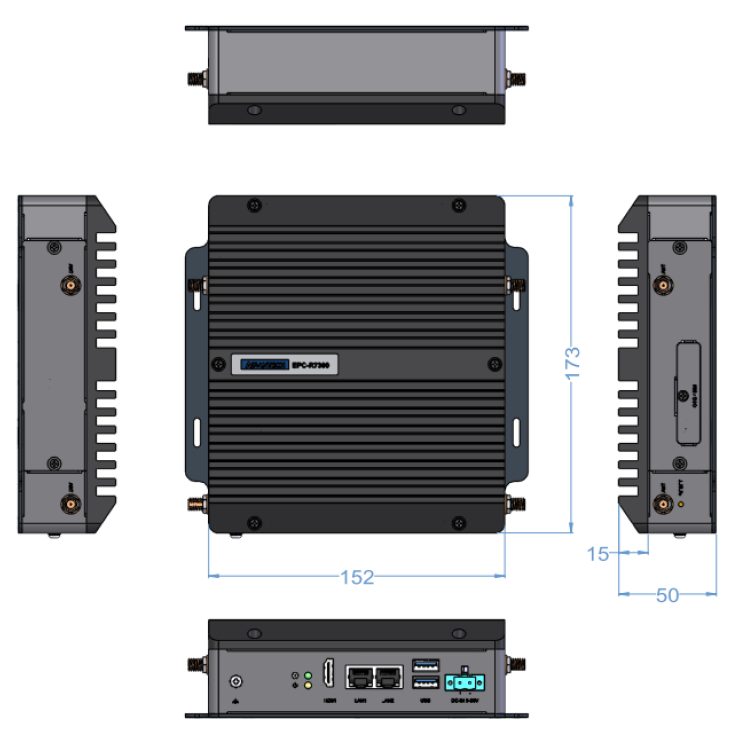
机械尺寸 (Mechanical Characteristics)
快速入门 (Quick Start)
系统下载 (OS Download)
Linux 燒錄方法 (Linux Flash eMMC Method)
- Prepare a Linux host system Ubuntu x64 v18.04. Download the image file and unzip the image.tar.gz file on Linux host PC. Example use image version 7300A1AIM35UIV20026.tar.gz.
$ sudo tar zxvf 7300A1AIM35UIV20026_2023-07-03.tgz
$ cd Linux_for_Tegra
- Enter to recovery mode by holding the recover button (SW1) and plug power to boot. Release recover button around 3 seconds after plug in power.
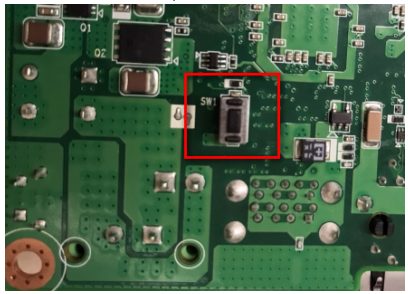
Or enter following command in the device.
$ sudo reboot --force forced-recovery
- Connect Micro USB cable from EPC-R7300 Micro USB port to Linux host PC USB TypeA port. Check the device is in recovery mode by command "lsusb". Will get NVidia Corp. with ID 0955:7623
[ubuntu@linux 11:55:43 ~]$ lsusb
Bus 002 Device 001: ID 1d6b:0003 Linux Foundation 3.0 root hub
Bus 001 Device 072: ID 174c:2362 ASMedia Technology Inc. ASM236X series
Bus 001 Device 073: ID 05ac:12a8 Apple, Inc. iPhone5/5C/5S/6
Bus 001 Device 074: ID 0955:7623 NVIDIA Corp. APX
Bus 001 Device 003: ID 0bda:0169 Realtek Semiconductor Corp. Mass Storage Device
- Execute command to flash image:
For Jetpack 5.1.1:
(1) To flash QSPI + NVME SSD:
$ sudo ./tools/kernel_flash/l4t_initrd_flash.sh --external-device nvme0n1p1 -c tools/kernel_flash/flash_l4t_external.xml -p "-c bootloader/t186ref/cfg/flash_t234_qspi.xml" --showlogs --network usb0 jetson-orin-epcr7300-a1 internal
(2) To flash only QSPI:
$ sudo ./flash.sh --no-system./img_EPC-R7300 -c bootloader/t186ref/cfg/flash_t234_qspi.xml jetson-orin-epcr7300-a1 mmcblk0p1
(3) To flash only NVMe SSD (Need to flash QSPI first):
$ sudo ./tools/kernel_flash/l4t_initrd_flash.sh --external-only --external-device nvme0n1p1 -c tools/kernel_flash/flash_l4t_external.xml --showlogs --network usb0 jetson-orin-epcr7300-a1 internal
For Jetpack 6.2:
(1) To flash QSPI + NVME SSD:
$ sudo ./tools/kernel_flash/l4t_initrd_flash.sh --external-device nvme0n1p1 -c tools/kernel_flash/flash_l4t_external.xml -p "-c bootloader/generic/cfg/flash_t234_qspi.xml" --showlogs --network usb0 jetson-orin-nano-devkit-super internal
(2) To flash QSPI + USB DISK:
$ sudo ./tools/kernel_flash/l4t_initrd_flash.sh --external-device sda1 -c tools/kernel_flash/flash_l4t_external.xml -p "-c bootloader/generic/cfg/flash_t234_qspi.xml" --showlogs --network usb0 jetson-orin-nano-devkit-super internal
- Wait around 10~15 minute to flash image to device:
If you get the below "strings: command not found" error, please install "binutils"
$ sudo apt install binutils

- Check the device login to system:
login user: ubuntu/ubuntu
- Check the eth1 can get the IP Addr:
Debug 串口調試 (Debug Port Setting)
以 Tera Term 为例介绍如何使用串口调试功能
Baud Rate波特率:115200
Data 数据位:8
Parity 奇偶校验:无
Stop 停止位:1
Flow Control流控:无
Tera Term Tool
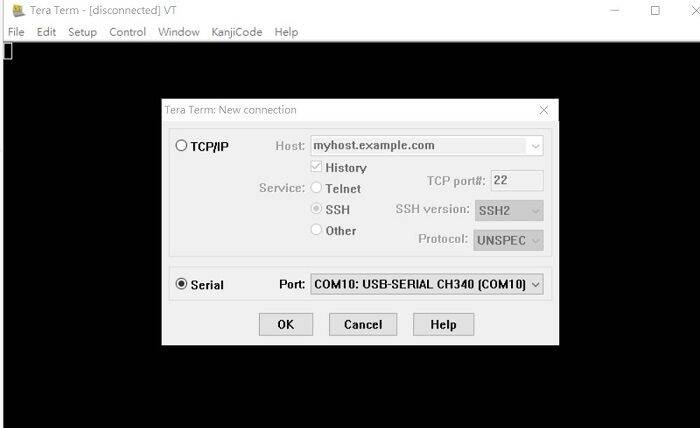
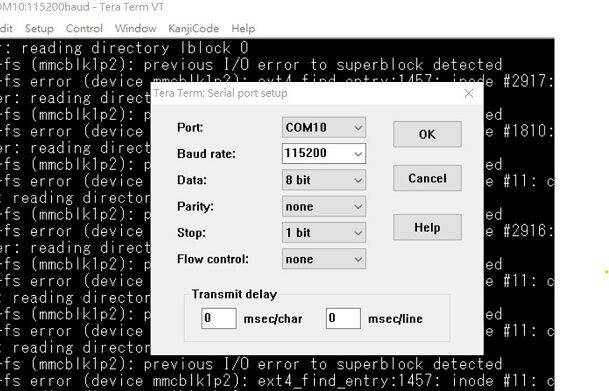
Check the Serial port in Device Manager (查看PC端的串口号):
If you can not identify the Serial device, please check your serial driver.
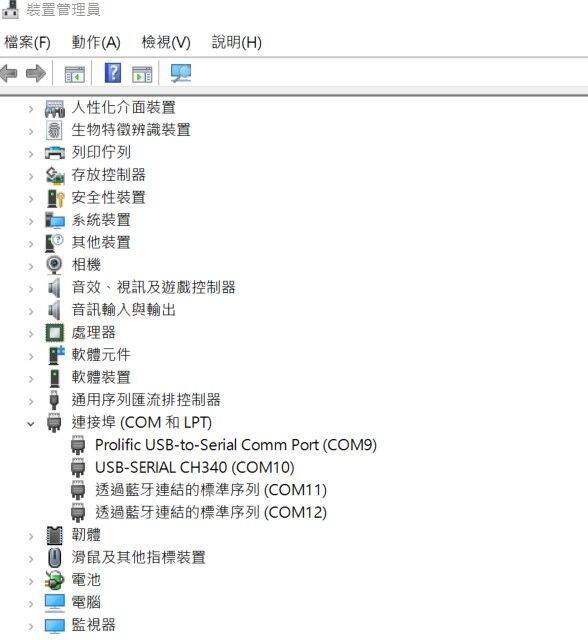
Debug port connection (串口連接)
Log into Terminal Tool (进入串口调试终端):
login user: ubuntu/ubuntu
Linux 基本使用方法 for Jetson Series (Linux System Basic Operating Method for Jetson Series)
- Check module
$ jetson_release
$ cat /proc/device-tree/model
- Check OS release version
$ cat /etc/os-release
- Check tegra version
$ cat /etc/nv_tegra_release
- Install stress-ng
$ sudo apt install stress-ng
- Execute stress test
$ stress-ng --cpu 0 --cpu-method all -t 1h
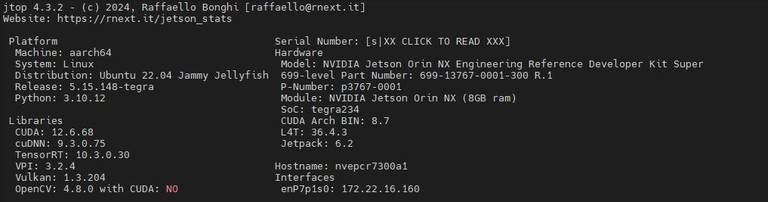
- Install jtop
$ sudo apt update
$ sudo apt install python3-pip
$ sudo pip3 install -U jetson-stats
$ jtop
- Install chromium
$ sudo snap install chromium
If there is issue cannot launch chromium, please reference link below to download grade snap version:
chromium not working
- Install nvidia-jetpack
$ sudo apt install nvidia-jetpack
Modify defconfig: If an unknown symbol issue occurs after modifying the defconfig, please refer to the compiled information below.
It may fail with additional steps. Please simply follow the steps:
- And follow the steps to rebuild kernel, out-of-tree modules, and dtbs:
// ignore step 2 which is for RT kernel
// ignore step 2 which is for RT kernel
- Manually copy the files: (quick fix for a known issue: https://forums.developer.nvidia.com/t/319667/)
$ cd /Linux_for_Tegra/rootfs/lib/modules/5.15.148-tegra/updates/
$ sudo cp nvidia.ko opensrc-disp/
$ sudo cp nvidia-modeset.ko opensrc-disp/
$ sudo cp nvidia-drm.ko opensrc-disp/
- Flash the system
$ cd /Linux_for_Tegra/
$ sudo ./flash.sh jetson-agx-orin-devkit internal
NVIDIA 模塊安裝 (NVIDIA Jetson Module Installation)
How to Build BSP (BSP Compile)
NVIDIA Jetson Software:
◼ Jetson Support Resource
https://developer.nvidia.com/embedded/community/support-resources
◼ Jetson Wiki
https://elinux.org/Jetson
◼ Jetson Jetpack SDK
https://developer.nvidia.com/embedded/jetpack
◼ Jetson FAQ
https://developer.nvidia.com/embedded/faq
Software Forum:
◼ Jetson Developer Forum
https://forums.developer.nvidia.com/c/agx-autonomous-machines/jetson-embedded-systems/70
◼ AIM-Linux Developer Forum
https://forum.aim-linux.advantech.com/
◼ NVIDIA NVONLINE
https://partners.nvidia.com/
Navigation Menu
Personal Tools
- Log in
Namespaces
- Page
- Discussion
Variants
Views
- Read
- View source
- View history
More
Search
Navigation
- AIM-Linux
- X86-Linux
- ASR
- SUSI
- Windows Embedded
- Advantech Power Suite
- Edge AI SDK
- Adv Robotic Suite
- DeviceOn
- DeviceOn/iEdge
- DeviceOn/ePaper
- AIW Module
- Internal Use
Tools
- What links here
- Related changes
- Special pages
- Printable version
- Permanent link
- Page information
- Page values
This page was last modified on 10 December 2025, at 03:28.
- Privacy policy
- About ESS-WIKI
- Disclaimers