RSB-4810_Debian_User_Guide
产品介绍(product presentation)
产品特性(product feature)
- Rockchip RK3568 Arm Quad Cortex-A55, up to 2.0GHz
- Built-in NPU with processing performance of up to 0.8 TOPS
- Onboard 2/4GB LPDDR4 memory and 16/32GB eMMC
- Supports 1 x HDMI 2.0 4K, 1 x LVDS/MIPI-DSI, and 1 x eDP
- Supports 4K H.264/H.265 video decoder
- Provides 2 x GbE, 1 x SATA 3.0, 6 x UART, 2 x USB 3.0, 2 x USB 2.0, 1 x USB OTG, and 2 x CAN FD
- Provides a M.2 E Key with PCIE 3.0/USB 2.0/SDIO/UART signal for Wi-Fi 5/6 Modules, and a MINI-PCIE with PCIE 3.0/USB 2.0 signal for LTE/5G Modules
- Supports Linux and Android OS
产品官网链接(Product official website link)
RSB-4810 - Rockchip Arm Cortex-A55 RK3568 3.5" SBC - Advantech
硬件接口说明
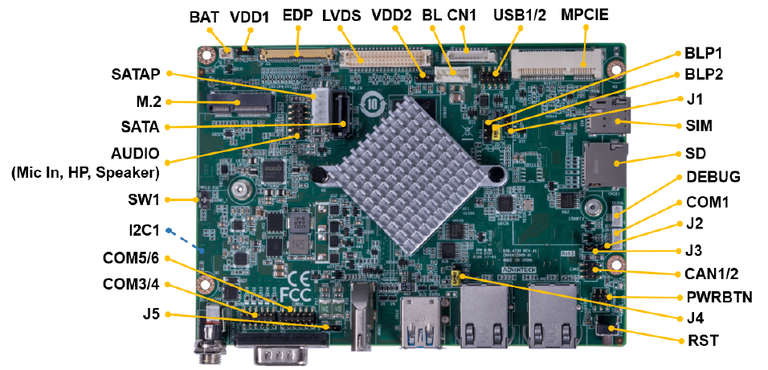
接口布局圖 Board Layout
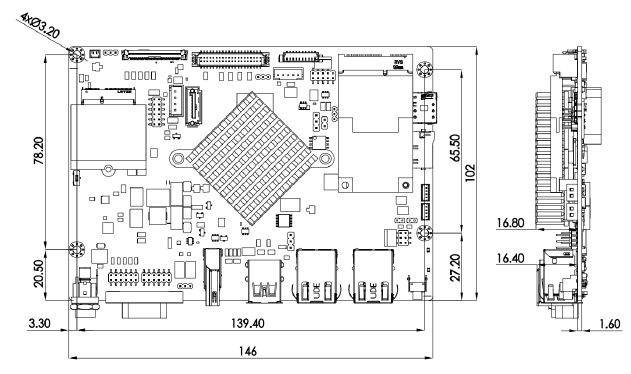
接口尺寸 Board Dimension
接口引脚定義 (Pin definitions)
| Jumper List | |
| J1 | MASKROM mode select Short pin 12 and power on the RSB-4810 to enter MASKROM mode. Change back to pin 23 before click "Run" to flash image |
| J2 | CAN impedance matching |
| J3 | CAN impedance matching |
| J4 | OTG Mode selection, default USB3.0 host |
| SW1 | AT & ATX Mode Switch, default AT mode |
| BLP1 | LVDS BKL PWR 3.3V&5V level select, default 5V |
| BLP2 | LVDS BKL PWR 12V select |
| VDD1 | EDP VDD 3.3V &5V level select, default 3.3V |
| VDD2 | LVDS VDD 3.3V & 5V level select, default 3.3V |
| J5 | COM5,COM6 power 12/5V level select, default 5V |
List
| AUDIO | Audio pin header (Headphone, Mic in, Speaker) |
| EDP | eDP CONN |
| LVDS | LVDS CONN |
| BL | LVDS Back light Control |
| SATA | SATA3.0 |
| MINIPCIE | MINI PCIe 52P |
| SIM | Nano SIM card |
| M2 | M.2 E-Key CONN |
| SD | Micro SD slot |
| PWRBTN | Power button and LED |
| DCIN1 | 12V DC jack |
| COM1 | RS-232 pin header |
| COM2 | RS-232 DB9 |
| HDMI | HDMI CONN |
| CAN1/2 | CAN FD CONN |
| USB1/2 | USB pin header |
| USB3/4 | USB Type A ((2 x USB3.0, the lower Type A connector can be configured to OTG by jumper setting)) |
| SATAP | SATA Power |
| LAN1 | LAN1 |
| LAN2 | LAN2 |
| BAT | RTC CONN |
| COM3/4 | COM3 and COM4 with RS-232 or RS-485 |
| COM5/6 | COM5 and COM6 with RS-232 |
| RST | Reset button |
| CN1 | GPIO CONN |
| I2C1 | I2C pin header |
| Debug port | Debug connector |
快速入门 (Quick Start)
系统下载 (OS Download)
Note: LIV=Yocto Linux, UIV=Ubuntu, DIV=Debian, AIV=Android
LBV=BSP, LIV=Image
| Platform | Product | Image Version | Release Date | Release Version | Release notes | Image Download | BSP Download Tag | SDK | Comment | CAN2.0 Patch |
| RK3568 | RSB-4810 | DIV130311 | 2024/03/15 | Beta | Release note | Baidu Password:a887 Dropbox | RK3568_RISC_DIV130311.xml | Baidu Password:a887 Dropbox | Test Report **CAN2.0 Errata**提取码:a887 | Baidu Password:a887 |
-
Alpha: Basic I/O function bring up by RD;
-
Beta: Basic I/O function、performance and middleware verified by RD. Peripherals integrated;
-
GA: Beta version by QE verification;
-
RTM: Beta version by SI/Power/QE verification and pre-loaded;
How to update images .
There are three ways to update images:
Usering_RKTool.
SD_update image.
OS_update image.") (TBD)
U-boot update image.")(TBD)
Linux系统的基本使用(Linux System Basic Operating Method)
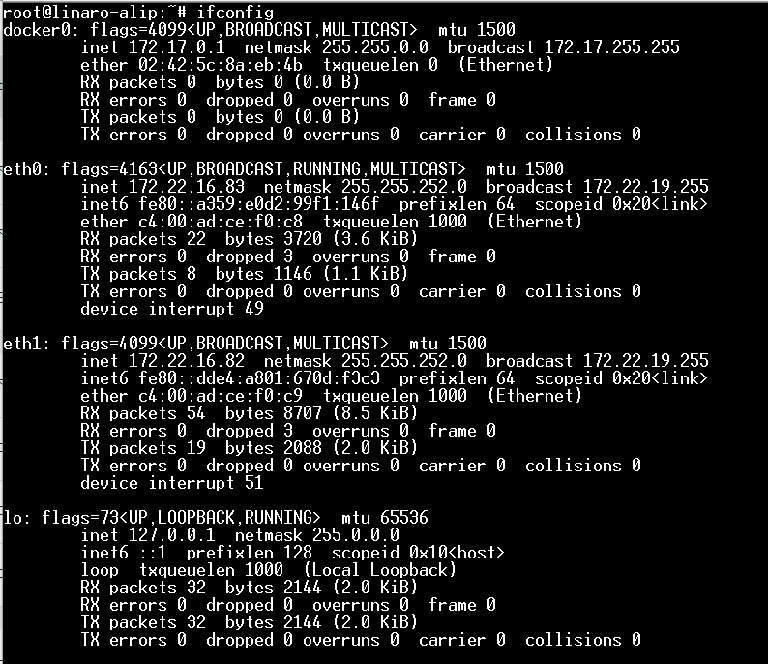
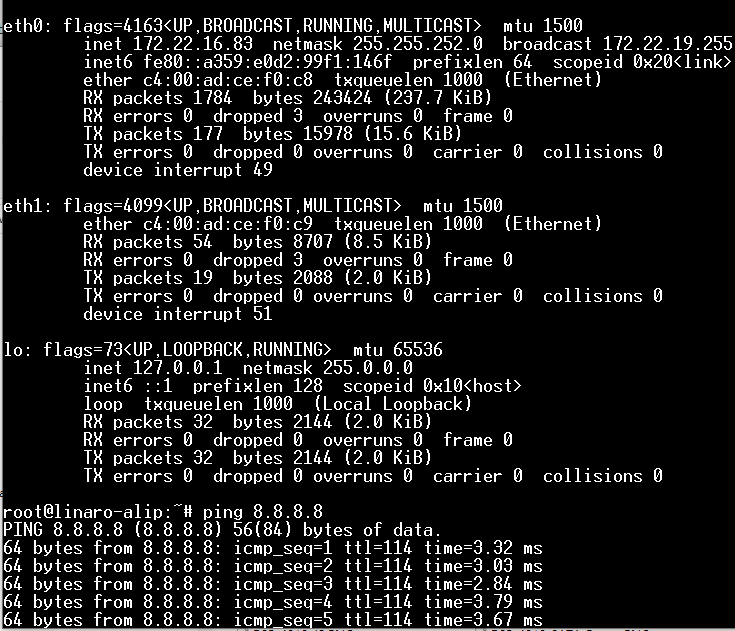
乙太網路使用方法(Ethernent Testing Method)
Command : ifconfig
WiFi使用方法(WIFI Testing Method)
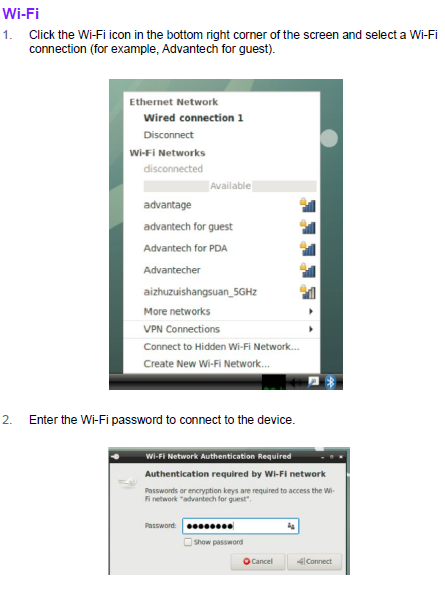
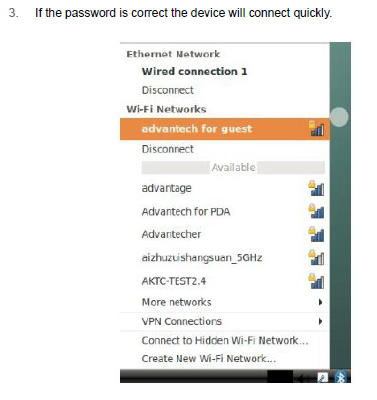
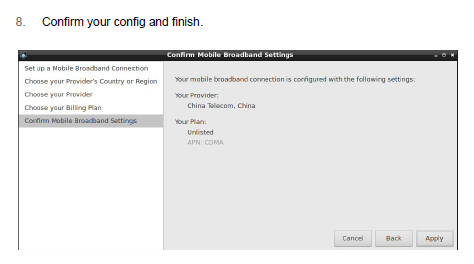
4G使用方法(4G Testing Method)
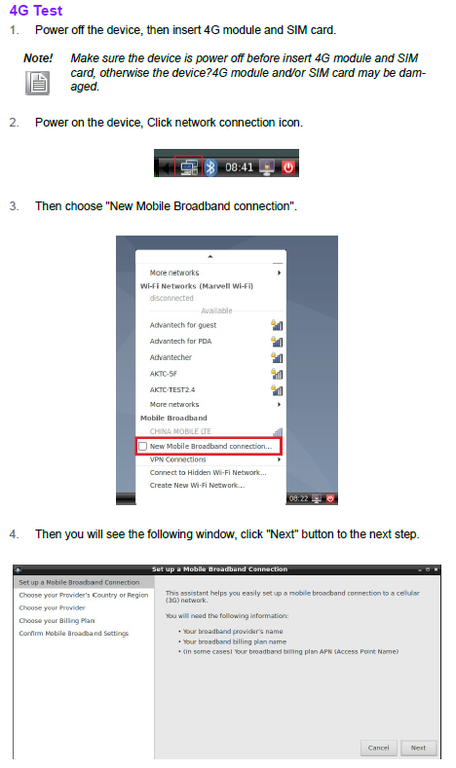
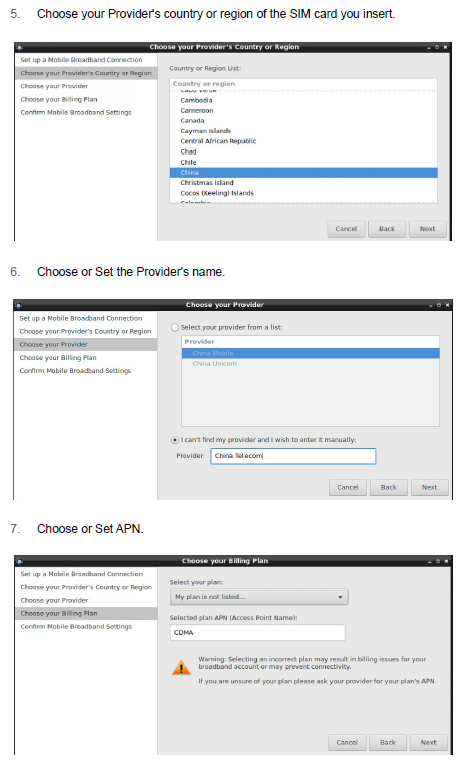
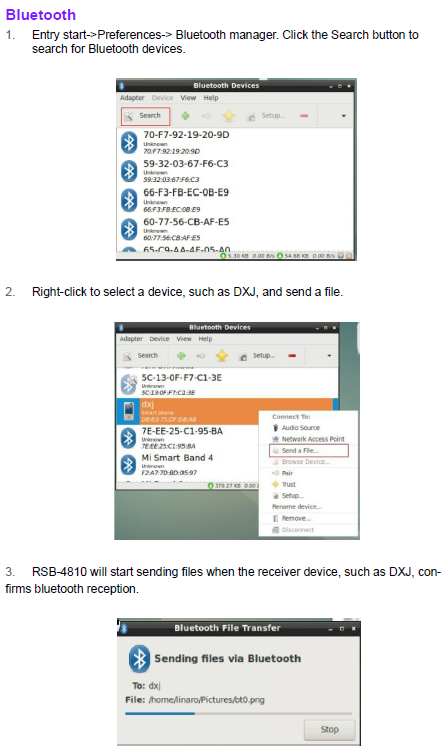
蓝牙使用方法(BlueTooth Operating Method)
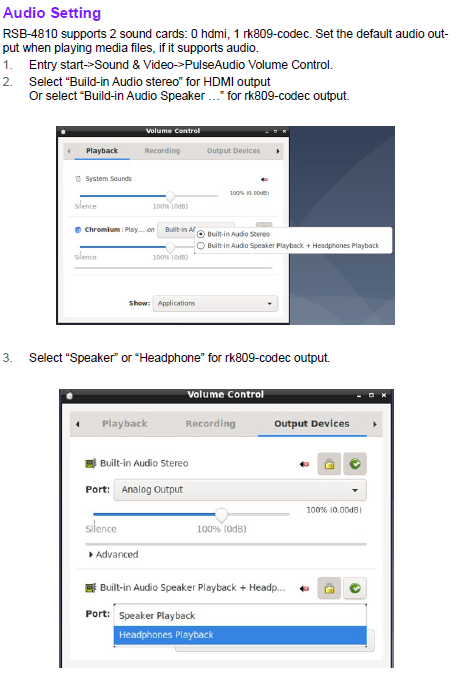
音訊使用方法(BlueTooth Operating Method)

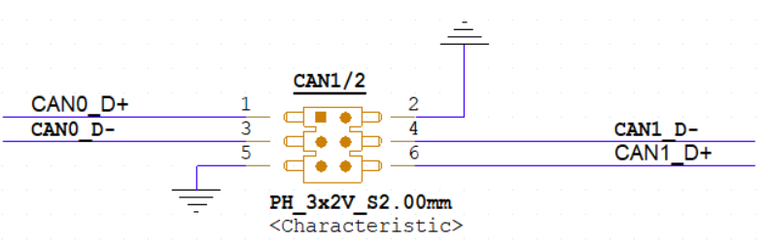
CAN2.0 測試( CAN Test method)
Note:RK3568 CAN2.0 Errata;
**CAN2.0 Errata:CAN2.0 Errata**提取码:a887
CAN2.0 Patch:Baidu Password:a887
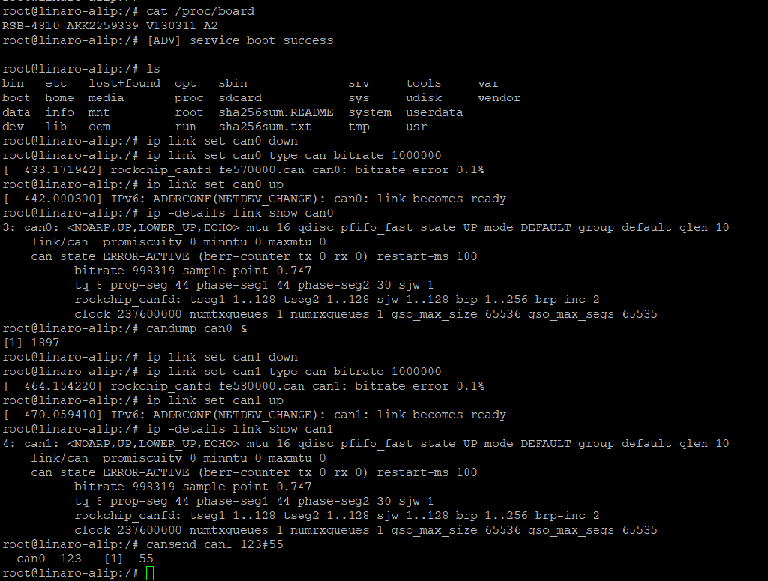
Short CAN1/2 Pin header ,Loopback test for example:
CAN0_D+->CAN1_D+
CAN0_D-->CAN1_D-
输入指令:
# ip link set can0 down

# ip link set can0 type can bitrate 1000000

# ip link set can0 up

# ip -details link show can0

# candump can0 &

# ip link set can1 down

# ip link set can1 type can bitrate 1000000

# ip link set can1 up

# ip -details link show can1

# cansend can1 123#55
can0  123   [1]  55
I2C 測試( I2C Test method)
看門狗測試 (Watch Dog Test method)

UART測試 (UART Test method)
How to Configure RS-232/485 Mode Enter U-boot interrupt mode. Connect the device to the debug port and open the debug console. Press “ctrl + c” before powering on the device.
The following information should be displayed on the debug console:
Hit any key to stop autoboot: 0
=>
=>
Then input the following command to configure the UART mode.
RS-485 Mode:
setenv uart_mode 0x0c
saveenv
reset
RS-232 Mode:
setenv uart_mode 0x00
saveenv
reset
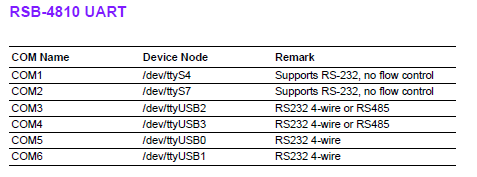
Note: The default value is RS-232. Cp210x supports four ports, but for RSB-4810 only ttyUSB2 and ttyUSB3 support RS-485 mode.
In the above command “setenv uart_mode 0x0c”, 0x0c means set bit2(ttyUSB2) and bit3(ttyUSB3) to 1 (0 means to RS-232; 1 means to RS-485). To configure just ttyUSB2 (or ttyUSB3) to RS-485 mode, change 0x0c to 0x04 (or 0x08).
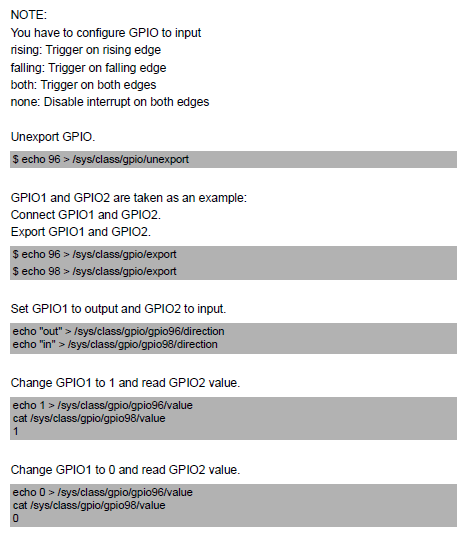
GPIO測試(GPIO Test method)
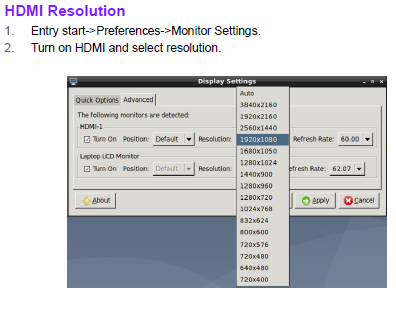
Display測試(Display Test method)
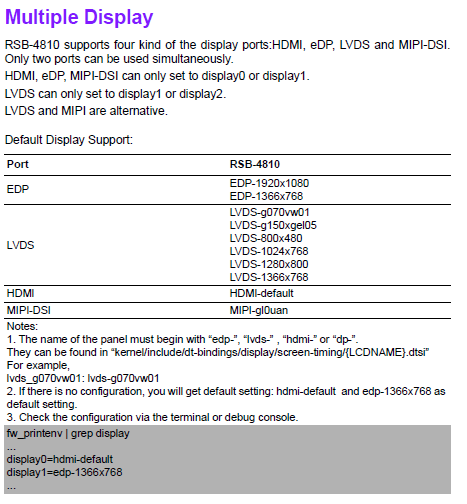
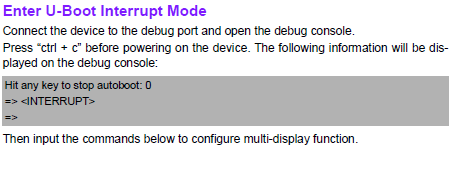
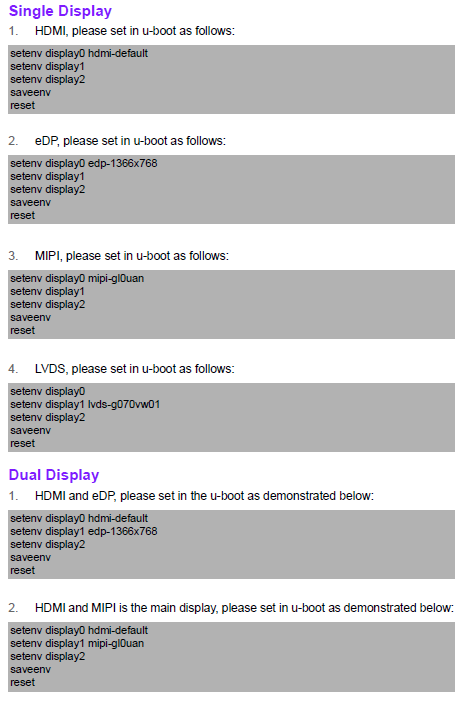
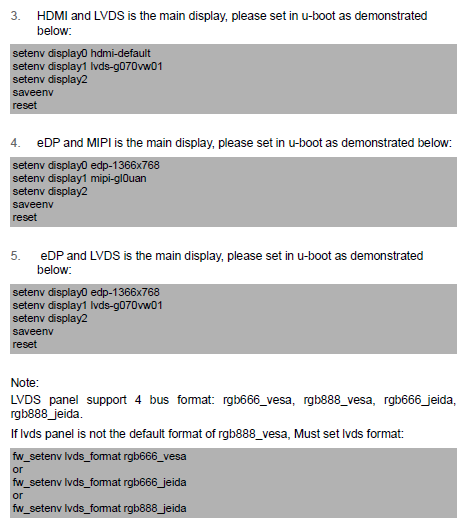
How_to_Config_Multi-Display
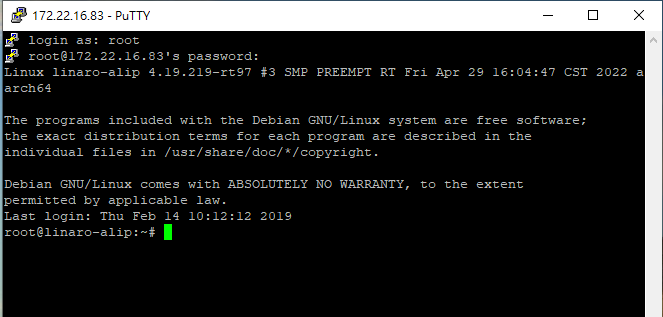
遠程訪問及文件傳輸(Remote Access and File Transimmion)
查看主板IP位址 ( Chech IP Address ):
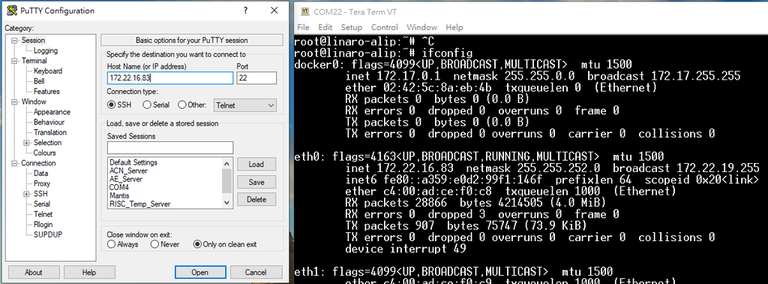
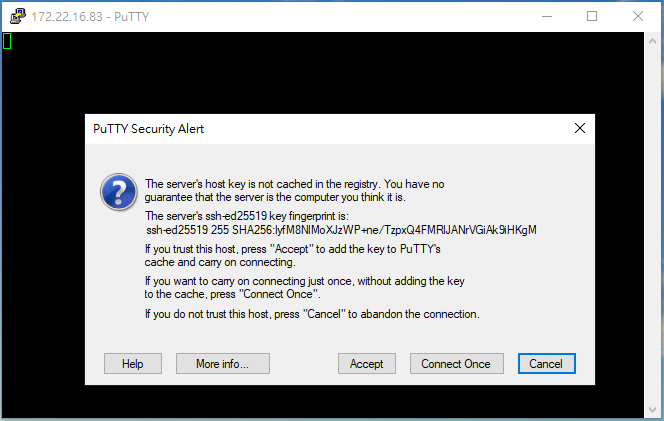

ID: root password:123456
通用方法(General Method)
QT Toolchain
查看CPU温度(Check CPU Temperature)
cat /sys/devices/virtual/thermal/thermal_zone0/temp 40000
或者直接以度爲單位顯示 echo $[$(cat /sys/class/thermal/thermal_zone0/temp)/1000]° >>> 40°
查看CPU频率(Check CPU Frequency)
cat /sys/devices/system/cpu/cpu0/cpufreq/cpuinfo_cur_freq
>> 1200000
cat /sys/devices/system/cpu/cpu0/cpufreq/cpuinfo_max_freq
>> 1800000
查看内存容量(Check Memory Capacity)
busybox free -m
查看存储容量(Check Storage Capacity)
busybox df -h
調整亮度(Change the backlight)
Note: connect with LVDS Panel , default value is 200
root@linaro-alip:# echo 100 > /sys/class/backlight/backlight/brightness# echo 200 > /sys/class/backlight/backlight/brightness
root@linaro-alip:
root@linaro-alip:~#
root@linaro-alip:# cat /sys/class/backlight/backlight/max_brightness# cat /sys/class/backlight/backlight/brightness
255
root@linaro-alip:
200