RSB-3730 Yocto4.2 User Guide
Contents
- 1 產品介绍(Product Presentation)
- 1.1 產品特性 (Product Features)
- 1.2 產品官網鏈結(Product official website link)
- 2 硬件接口說明(Hardware interface description)
- 2.1 接口布局圖 Board Layout
- 2.2 接口尺寸 Board Dimension
- 2.3 Jumper List
- 2.4 Connector List
- 3 快速入門(Quick Start)
- 3.1 系統下載(OS Download)
- 3.2 系统更新方法(System update method)
- 4 Linux基本使用方法(Linux Basic usage method)
- 4.1 Display Setting
- 4.2 UART(RS-232/RS-485)
- 4.3 USB
- 4.4 4G
- 4.5 Audio
- 4.6 GPIO
- 4.7 I2C Test
- 4.8 RTC
- 4.9 Watchdog
- 4.10 Ethernet
- 4.11 WIFI
- 4.12 BT
- 4.13 UIO Test
- 5 BSP/Linux编译
- 5.1 Yocto Linux BSP Ver.A User Guide for RSB-3730 series-Yocto 4.2
- 6 Build known issue
產品介绍(Product Presentation)
產品特性(Product Features)
- NXP i.MX 8M Mini Cortex-A53 Quad core up to 1.8GHz
- Onboard LPDDR4 2/4 GB
- 1 HDMI or 1 Dual Channel 24 bit LVDS or 1 MIPI-DSI by BOM option
- 4 USB2.0, 1 USB OTG, 2 RS232, 1 RS232/485, 8 GPIO, 1 I2C
- 1 GbE, 1 Mini-PCIe, 1 M.2
- Supports Yocto
- Support I/O Expansions by UIO40-Express I/O boards
產品官網鏈結(Product official website link)
硬件接口說明(Hardware interface description)
接口布局圖 Board Layout
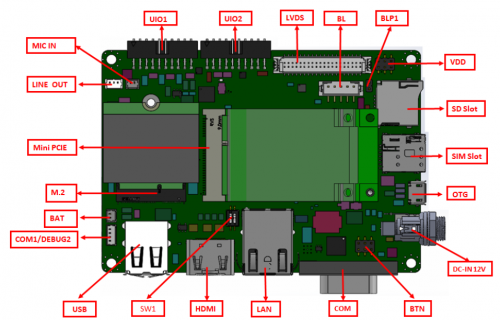
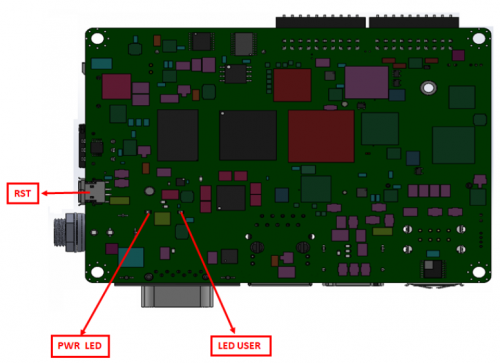
接口尺寸 Board Dimension
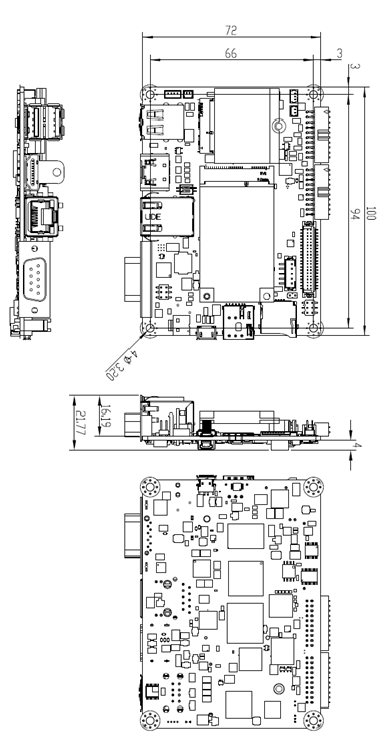
Jumper List
| Jumper list | describe |
|---|---|
| VDD | VDD 3.3V & 5V LVDS VDD & Backlight power level select |
| BLP1 | LVDS Backlight power 12V select |
| SW1 | AT & ATX Mode select and boot mode select |
| BTN | Power Button |
Connector List
| Connector | Description |
|---|---|
| COM1/DEBUG2 | Debug CONN |
| BAT | RTC CONN |
| M.2 | M.2 CONN |
| LINE OUT | LINE OUT CONN |
| MIC IN | MIC IN CONN |
| UIO1 | UIO1 |
| UIO2 | UIO2 |
| LVDS | LVDS CONN |
| SD | SD slot |
| SIM | SIM slot |
| OTG | OTG |
| DCIN | DC-IN JACK |
| USB1 | USB CONN |
| HDMI | HDMI CONN |
| COM | COM CONN |
| RST | RST CONN |
| LED | LED |
| Mini PCIE | Mini PCIE CONN |
| LAN1 | RJ45 LAN |
快速入門(Quick Start Guide)
系统更新方法(System update method)
Device Routes:
| Device | Node |
|---|---|
| eMMC | /dev/mmcblk2 |
| SD | /dev/mmcblk1 |
| QSPI | /dev/mtd0 |

For example: SD test
dd if=/dev/urandom of=data bs=1 count=1024
dd if=/dev/mmcblk1 of=backup bs=1 count=1024 skip=4096
dd if=data of=/dev/mmcblk1 bs=1 seek=4096
dd if=/dev/mmcblk1 of=data1 bs=1 count=1024 skip=4096
diff data data1
dd if=backup of=/dev/mmcblk1 bs=1 seek=4096
Install the System from SD Card
- Copy
imx-image-full-imx8mmrsb3730a2-xxxxxx.rootfs.sdcardto your desktop (use Ubuntu OS). - Insert SD card to PC.
- Make a bootable SD card (e.g. node is
/dev/sdv):
umount /dev/sdv*
dd if=./imx-image-full-imx8mmrsb3730a2-xxxx.rootfs.sdcard of=/dev/sdv bs=1M
sync
- Copy
imx-image-full-imx8mmrsb3730a2-xxxxxx.rootfs.sdcardto USB disk. - Insert USB disk and SD card, boot from SD card by changing SW1 to 1-2 ON.
- Enter USB disk folder, flash to eMMC:
cd /run/media/sda1/
umount /dev/mmcblk2*
dd if=./imx-image-full-imx8mmrsb3730a2-xxxx.rootfs.sdcard of=/dev/mmcblk2 bs=1M
sync
Linux基本使用方法(Linux Basic usage method)
Display Setting
UART(RS-232/RS-485)
USB
4G
Audio
GPIO
I2C Test
RTC
Watchdog
Ethernet
WIFI
BT
UIO Test
BSP/Linux编译
Yocto Linux BSP Ver.A User Guide for RSB-3730 series - Yocto 4.2
Build known issue
nnshark error
https://community.nxp.com/t5/i-MX-Processors/Yocto-3-3-5-10-72-BSP-Build-Fail/m-p/1487902