JetPack 6.1
Overview
JetPack 6.1 (L4T 36.4.x) targets Ubuntu 22.04 with kernel 5.15.148. This guide consolidates common preparation steps and documents the AFE-R750 flashing flow.
Platform Summary
- JetPack 6.1 / L4T 36.4.x
- Ubuntu 22.04 rootfs
- Kernel 5.15.148
- OS support list (Ubuntu 22)
- NVIDIA JetPack archives
Common Host Environment
sudo apt-get update
sudo apt-get install -y repo git python3 curl flex bison qemu-user-static
Docker build helper:
docker pull advrisc/u18.04-imx8lbv1
sudo docker run -it --name jetson_linux_risc \
  -v /home/bsp/myLinux:/home/adv/BSP:rw \
  --privileged advrisc/u18.04-imx8lbv1:latest /bin/bash
Inside the container:
sudo chown adv:adv -R BSP
Workspace initialisation
export GIT_SSL_NO_VERIFY=1
cd ~/BSP
mkdir -p jetson_linux_risc
cd jetson_linux_risc
git config --global user.name "Your Name"
git config --global user.email "you@example.com"
Manifest Selection
repo init -u https://AIM-Linux@dev.azure.com/AIM-Linux/risc_nvidia_jetson_36.4/_git/manifests -m afer750.xml
repo sync
Build Image
sudo ./scripts/build_release.sh
AFE-R750 Flash Guide
-
Enter recovery mode
Set the recovery switch (position 2) to ON and press the power button.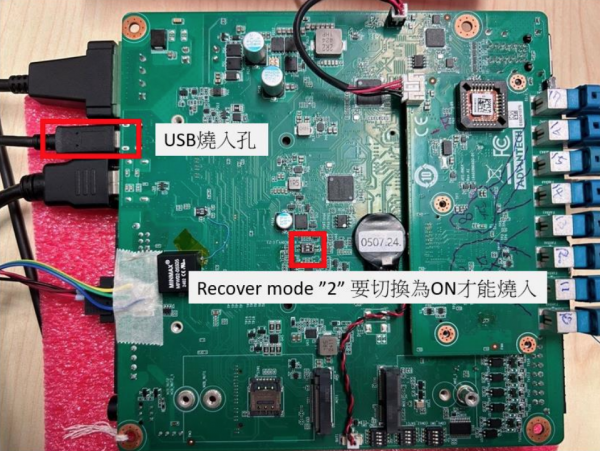
-
Connect the board to a Linux host via the USB flash cable and confirm detection:
lsusb
# Bus 001 Device 024: ID 0955:7223 NVIDIA Corp. -
Unpack the release tarball:
sudo tar -zxvf afer750_image_XXXXXX.tar.gz
cd Linux_for_Tegra -
Flash targets:
-
eMMC (AGX Orin module)
sudo ./flash.sh jetson-agx-orin-devkit mmcblk0p1 -
NVMe (AGX Orin module)
sudo ./tools/kernel_flash/l4t_initrd_flash.sh --external-device nvme0n1p1 \
  -c tools/kernel_flash/flash_l4t_t234_nvme.xml \
  -p "-c bootloader/generic/cfg/flash_t234_qspi.xml" \
--showlogs --network usb0 jetson-agx-orin-devkit nvme0n1p1 -
NVMe (Orin NX module)
sudo ./tools/kernel_flash/l4t_initrd_flash.sh --external-device nvme0n1p1 \
  -c tools/kernel_flash/flash_l4t_t234_nvme.xml \
  -p "-c bootloader/generic/cfg/flash_t234_qspi.xml" \
  --showlogs --network usb0 jetson-orin-nano-devkit internal
-