JetPack 6.2
Overview
JetPack 6.2 (L4T 36.4.3) is the current baseline for AIR-021, DS-015, and EPC-R7300 platforms. This guide consolidates build preparation, source retrieval, and flashing workflows for each device.
Platform Summary
- JetPack 6.2 (L4T 36.4.3)
- Ubuntu 22.04
- Kernel 5.15.148
- OS support list (Ubuntu 22)
- NVIDIA JetPack archives
Common Build Environment
Docker container
Currently we adopt Docker as the build environment.
Use the advrisc/u20.04-nvlbv2 container to match the JetPack 6.2 toolchain.
docker pull advrisc/u20.04-nvlbv2
If you rely on legacy flows, the advrisc/u18.04-imx8lbv1 image remains available but is not required for JetPack 6.2.
Run container
Launch a container and mount your BSP workspace:
sudo docker run -it --name jetson_linux_risc \
  -v /home/bsp/myLinux:/home/adv/BSP:rw \
  --privileged advrisc/u20.04-nvlbv2:latest /bin/bash
Inside the container adjust ownership if needed:
sudo chown adv:adv -R BSP
Host dependencies
Install helper tools on the host when you encounter Exec format error or similar issues:
sudo apt-get update
sudo apt-get install flex
sudo apt-get install bison
sudo apt-get install qemu-user-static
Workspace initialisation
export GIT_SSL_NO_VERIFY=1
cd ~/BSP
mkdir -p jetson_linux_risc
cd jetson_linux_risc
git config --global user.name "Your Name"
git config --global user.email "you@example.com"
Getting Linux Source Code
Use the same manifest repository for all platforms and select the appropriate XML per device:
| Device | Manifest XML | Notes |
|---|---|---|
| AIR-021 | air021.xml | Current release manifest |
| DS-015 | ds015.xml | Current release manifest |
| EPC-R7300 | epcr7300.xml | Current release manifest |
| AFE-R750 | afer750.xml | Current release manifest |
repo init -u https://AIM-Linux@dev.azure.com/AIM-Linux/risc_nvidia_jetson_36.4.3/_git/manifest -m <manifest>.xml
repo sync
Replace <manifest> with the value for your target.
For EPC-R7300 you can also pin to the tagged XML when required:
repo init -u https://AIM-Linux@dev.azure.com/AIM-Linux/risc_nvidia_jetson_36.4.3/_git/manifest -m epcr7300a1_uj06201_k0515148_nvona_8g.xml
repo sync
Build Image
sudo ./scripts/build_release.sh [-v <VERSION>]
Omit the -v option to build the default release package.
Device Guides
Follow the steps below after completing the common setup.
AIR-021
Manifest
repo init -u https://AIM-Linux@dev.azure.com/AIM-Linux/risc_nvidia_jetson_36.4.3/_git/manifest -m air021.xml
repo sync
Flash workflow
-
Change the JRCOVY1 switch to ON and press the power button to enter recovery mode.
-
Connect a Linux host to the AIR-021 with the USB flash cable and verify the device is detected:
lsusb
# Bus 001 Device 024: ID 0955:7223 NVIDIA Corp. -
Unpack the release tarball and enter the flashing tools:
sudo tar -zxvf AIR-021_XXX.tar.gz
cd Linux_for_Tegra -
Flash JetPack 6.2 to the NVMe device:
sudo ./tools/kernel_flash/l4t_initrd_flash.sh --external-device nvme0n1p1 \
  -c tools/kernel_flash/flash_l4t_external.xml \
  -p "-c bootloader/generic/cfg/flash_t234_qspi.xml" \
  --showlogs --network usb0 jetson-orin-nano-devkit-super internal
DS-015
Manifest
repo init -u https://AIM-Linux@dev.azure.com/AIM-Linux/risc_nvidia_jetson_36.4.3/_git/manifest -m ds015.xml
repo sync
Flash workflow
-
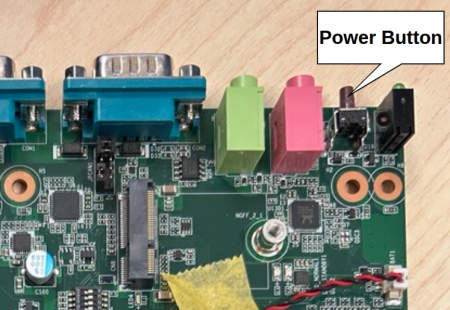
Change the SW7 switch to ON and press the power button to enter recovery mode.
-
Connect a Linux host with the USB flash cable and confirm the device is detected:
lsusb
# Bus 001 Device 024: ID 0955:7223 NVIDIA Corp. -
Unpack the release tarball and enter the flashing tools:
sudo tar -zxvf DS-015_XXX.tar.gz
cd Linux_for_Tegra -
Flash JetPack 6.2 to the NVMe device:
sudo ./tools/kernel_flash/l4t_initrd_flash.sh --external-device nvme0n1p1 \
  -c tools/kernel_flash/flash_l4t_external.xml \
  -p "-c bootloader/generic/cfg/flash_t234_qspi.xml" \
  --showlogs --network usb0 jetson-orin-nano-devkit-super internal
EPC-R7300
Manifest
repo init -u https://AIM-Linux@dev.azure.com/AIM-Linux/risc_nvidia_jetson_36.4.3/_git/manifest -m epcr7300.xml
repo sync
Flash workflow
-
Press the SW1 button while powering on EPC-R7300, or run the following command from the device to enter recovery mode:
sudo reboot --force forced-recovery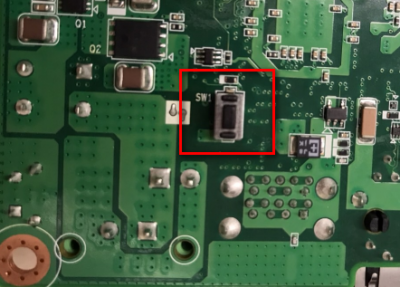
-
Connect a Linux host with the USB-OTG cable and confirm the board enumerates:
lsusb
# Bus 002 Device 001: ID 1d6b:0003 Linux Foundation 3.0 root hub
# Bus 001 Device 072: ID 174c:2362 ASMedia Technology Inc. ASM236X series
# Bus 001 Device 073: ID 05ac:12a8 Apple, Inc. iPhone5/5C/5S/6
# Bus 001 Device 074: ID 0955:7623 NVIDIA Corp. APX
# Bus 001 Device 003: ID 0bda:0169 Realtek Semiconductor Corp. Mass Storage Device -
Unpack the release tarball and enter the flashing tools:
sudo tar -zxvf epcr7300a1_uj06201_k0515148_nvona_8g_nvme_2025-01-18.tgz
cd Linux_for_Tegra -
Flash the desired target:
-
QSPI and NVMe SSD:
sudo ./tools/kernel_flash/l4t_initrd_flash.sh --external-device nvme0n1p1 \
  -c tools/kernel_flash/flash_l4t_external.xml \
  -p "-c bootloader/generic/cfg/flash_t234_qspi.xml" \
--showlogs --network usb0 jetson-orin-nano-devkit-super internal -
QSPI and USB disk:
sudo ./tools/kernel_flash/l4t_initrd_flash.sh --external-device sda1 \
  -c tools/kernel_flash/flash_l4t_external.xml \
  -p "-c bootloader/generic/cfg/flash_t234_qspi.xml" \
  --showlogs --network usb0 jetson-orin-nano-devkit-super internal
-
AFE-R750
Manifest
repo init -u https://AIM-Linux@dev.azure.com/AIM-Linux/risc_nvidia_jetson_36.4.3/_git/manifest -m afer750.xml
repo sync
Flash workflow
-
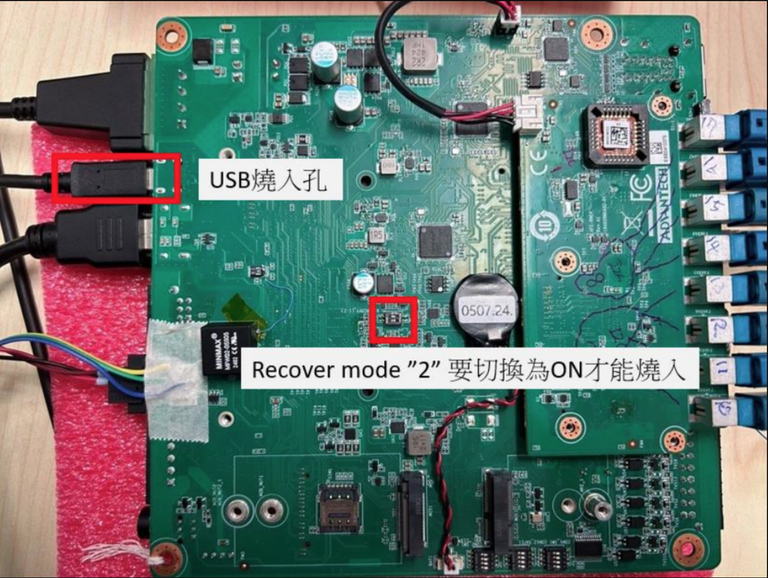
Change the JRCOVY1 switch to ON and press the power button to enter recovery mode.
-
Connect a Linux host to the AIR-021 with the USB flash cable and verify the device is detected:
lsusb
# Bus 001 Device 024: ID 0955:7223 NVIDIA Corp. -
Unpack the release tarball and enter the flashing tools:
sudo tar -zxvf AFE-R750_XXX.tar.gz
cd Linux_for_Tegra -
Flash JetPack 6.2 to the device:
-
AGX Orin Module Flah to eMMC:
sudo ./flash.sh jetson-agx-orin-devkit mmcblk0p1 -
AGX Orin Module Flash to NVMe:
sudo ./tools/kernel_flash/l4t_initrd_flash.sh --external-device nvme0n1p1 \
  -c tools/kernel_flash/flash_l4t_t234_nvme.xml \
  -p "-c bootloader/generic/cfg/flash_t234_qspi.xml" \
--showlogs --network usb0 jetson-agx-orin-devkit nvme0n1p1 -
Orin NX Module Flash to NVMe:
sudo ./tools/kernel_flash/l4t_initrd_flash.sh --external-device nvme0n1p1 \
  -c tools/kernel_flash/flash_l4t_t234_nvme.xml \
  -p "-c bootloader/generic/cfg/flash_t234_qspi.xml" \
  --showlogs --network usb0 jetson-orin-nano-devkit internal
-