JetPack 5.0
Overview
JetPack 5.x (L4T 35.x) remains the baseline for AIR-030 production images. This document captures the shared build workflow and the device-specific flashing routine.
Platform Summary
- JetPack 5.0.2 / L4T 35.1.0 (reference release)
- Ubuntu 20.04 rootfs
- Kernel 5.10.104
- OS support list (Ubuntu 20)
- NVIDIA JetPack archives
Common Host Environment
-
Recommended host OS: Ubuntu 20.04 with
repo,git, and build essentials -
Install helper packages:
sudo apt-get update
sudo apt-get install -y repo git python3 curl binutils libxml2-utils qemu-user-static -
Optional: containerised builds using Docker
docker pull advrisc/u18.04-imx8lbv1
Workspace initialisation
export GIT_SSL_NO_VERIFY=1
cd ~/BSP
mkdir -p jetson_linux_risc
cd jetson_linux_risc
git config --global user.name "Your Name"
git config --global user.email "you@example.com"
Launch Docker helper (optional)
sudo docker run -it --name jetson_linux_risc \
  -v /home/bsp/myLinux:/home/adv/BSP:rw \
  --privileged advrisc/u18.04-imx8lbv1:latest /bin/bash
Inside the container adjust ownership if required:
sudo chown adv:adv -R BSP
Manifest Selection
Use repo init with the manifest that matches the required JetPack release:
| Release | Manifest XML | Notes |
|---|---|---|
| JetPack 5.0.2 / L4T 35.1.0 | air030_3510.xml | Reference production release |
| JetPack 5.1.1 / L4T 35.3.1 | air030.xml (repo branch main) | Includes incremental updates |
| JetPack 5.1.2 / L4T 35.4.1 | air030.xml (35.4.1 manifest) | Latest 5.x fixes |
| JetPack 5.0.1 / L4T 34.1.1 (public) | 3411.xml | Public board build |
Example:
repo init -u https://AIM-Linux@dev.azure.com/AIM-Linux/risc_nvidia_jetson/_git/manifest -m air030_3510.xml
repo sync
For JetPack 5.1.x manifests hosted under version-specific repos, adjust the URL accordingly:
repo init -u https://AIM-Linux@dev.azure.com/AIM-Linux/risc_nvidia_jetson_35.3.1/_git/manifest -m air030.xml -b main
repo sync
Build Image
sudo ./scripts/build_release.sh -v <VERSION>
Omit the version argument for the default release artefact.
AIR-030 Flash Guide
-
Enter recovery mode
Toggle SW2 to ON and press the power button.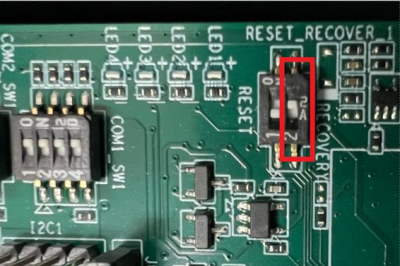
-
Connect the device to a Linux host via USB-OTG and confirm enumeration:
lsusb
# Bus 001 Device 024: ID 0955:7223 NVIDIA Corp. -
Unpack the release package:
tar -zxvf air030_image_XXXXXX.tar.gz -
Flash to eMMC (JetPack 5.x):
cd bootloader
sudo -s
source flashcmd.txt -
Flash to eMMC (JetPack 6.x compatibility builds):
cd Linux_for_Tegra
sudo ./flash.sh jetson-agx-orin-devkit mmcblk0p1 -
Flash to NVMe when supported:
sudo ./tools/kernel_flash/l4t_initrd_flash.sh --external-device nvme0n1p1 \
  -c ./tools/kernel_flash/flash_l4t_t234_nvme.xml \
  -p "-c ./bootloader/generic/cfg/flash_t234_qspi.xml" \
  --showlogs --network usb0 jetson-agx-orin-devkit nvme0n1p1
Refer to NVIDIA's Flashing Support Guide for additional options.