JetPack 7.1
Overview
JetPack 7.1 (Jetson Linux 38.4) is Advantech's next-generation baseline for NVIDIA Jetson platforms such as AIMB-294 carrier boards and the ASR-A702 rugged system. Both solutions now ship with Ubuntu 24.04, kernel 6.8.12, CUDA 13, and Thor-ready firmware so customers can evaluate AGX Thor compute while preserving a familiar Yocto-free workflow.
Platform Summary
- JetPack 7.1 (L4T 38.4.0)
- Ubuntu 24.04 LTS with Wayland
- Linux kernel 6.8.12 (PREEMPT_RT optional)
- Supports Jetson AGX Thor-based AIMB-294, ASR-A702 and AIR-075 platforms
Build Environment on Host
Recommended host and Docker image
Host OS must be Ubuntu 20.04 or newer. Install Docker CE and pull the Advantech-maintained Jetson container.
sudo docker pull advrisc/u20.04-nvlbv2:20240515
Run container
sudo docker run -it --name jetson_linux_risc \
  -v /home/bsp/myLinux:/home/adv/BSP:rw \
  --privileged advrisc/u20.04-nvlbv2:20240515 /bin/bash

# inside container (first launch)
sudo chown adv:adv -R BSP
Dependency library
If you hit Exec format error during cross-flashing, install QEMU on the host (outside Docker):
sudo apt-get install qemu-user-static
Getting Linux Source Code
export GIT_SSL_NO_VERIFY=1
cd ~/BSP
mkdir -p jetson_linux_risc
cd jetson_linux_risc
git config --global user.name "Your Name"
git config --global user.email "you@example.com"
Select the manifest that matches your processors:
| Device | Manifest XML | Notes |
|---|---|---|
aimb294a1_ubuntu24.04-jp7.1_v1.0.0_kernel-6.8.12_agx-thor.xml | JetPack 7.1 baseline for the carrier board | |
asra702a2_ubuntu24.04-jp7.1_v1.0.0_kernel-6.8.12_agx-thor.xml | JetPack 7.1 baseline for the boxed system | |
air075a1_ubuntu24.04-jp7.1_v1.0.0_kernel-6.8.12_agx-thor.xml | JetPack 7.1 |
repo init -u  https://AIM-Linux@dev.azure.com/AIM-Linux/meta-advantech-nvidia/_git/adv-manifest -b JP7.1-r38.4.0 -m default.xml
repo sync
cd adv-jetson-custom
./generate_profile.py --project <project name>
./apply_profile.py --project <project name>
Note:the project name are aimb294a1, asra702a2 and air075a1
Build Image
sudo ./scripts/build_release.sh
Package Image for Validation
sudo tar zcvf [project name]_JP71_xxx.tar.gz Linux_for_Tegra
Device Guides
AIMB-294 (Jetson AGX Thor)
Recovery mode & wiring
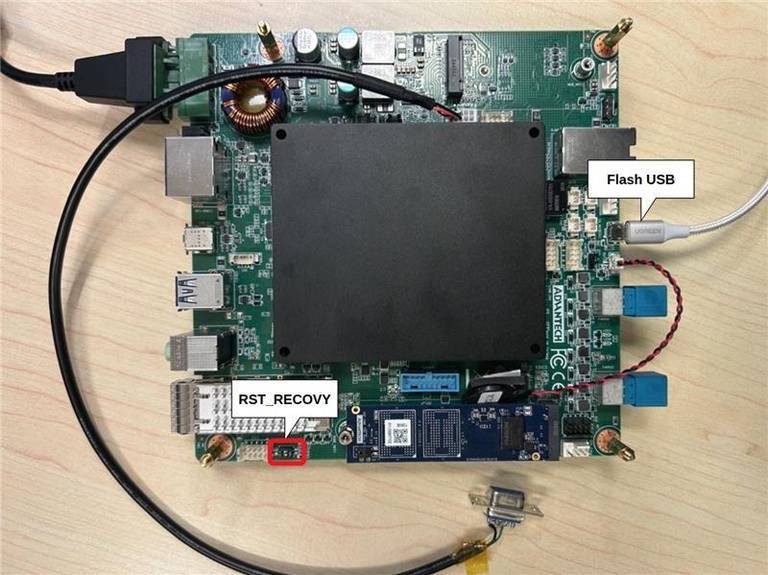
- Set the RST_RECOVY "2" DIP switch to ON and power on the board.
- Connect the host PC to the AIMB-294 recovery USB Type-C port.
- Verify detection as below:
lsusb
# Bus 001 Device 024: ID 0955:7026 NVIDIA Corp.
Flash image
sudo tar -zxvf [project name]_JP71_xxx.tar.gz
cd Linux_for_Tegra
sudo ./l4t_initrd_flash.sh \
  -c tools/kernel_flash/flash_l4t_t264_nvme.xml \
  --external-device nvme0n1p1 \
  --showlogs jetson-agx-thor-aimb294-a1 internal
Accounts & base image defaults
- Username:
ubuntu - Password:
ubuntu - Use
sudo/sudo suto escalate privileges.
ASR-A702 (Jetson AGX Thor Rugged System)
Recovery mode & wiring
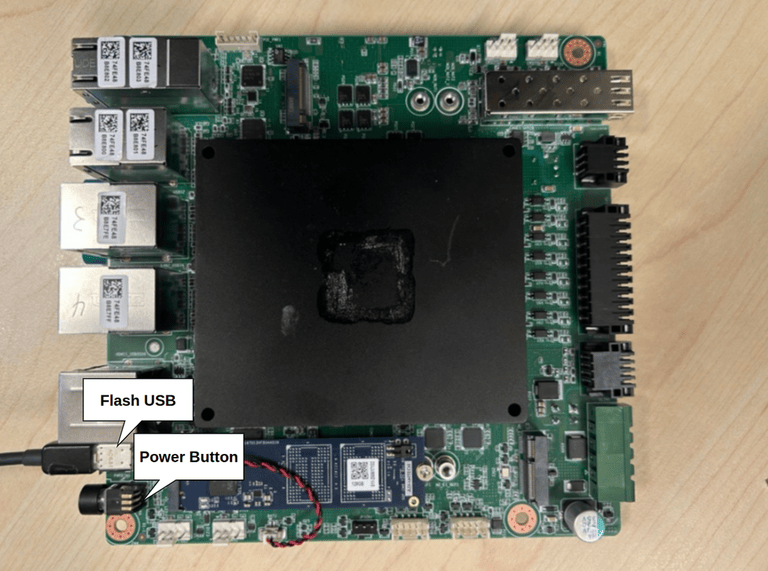
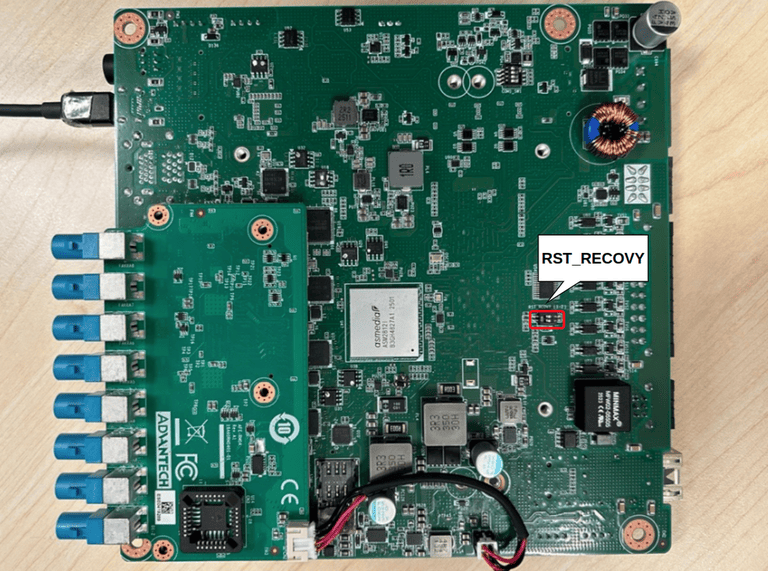
- Toggle the RST_RECOVY "2" switch to ON and press the power button.
- Connect a USB Type-C cable between the host and ASR-A702.
- Verify detection as below:
lsusb
# Bus 001 Device 024: ID 0955:7026 NVIDIA Corp.
Flash image
sudo tar -zxvf [project name]_JP71_xxx.tar.gz
cd Linux_for_Tegra
sudo ./l4t_initrd_flash.sh \
  -c tools/kernel_flash/flash_l4t_t264_nvme.xml \
  --external-device nvme0n1p1 \
  --showlogs jetson-agx-thor-asra702-a2 internal
Account & password
- Username:
ubuntu - Password:
ubuntu
AIR-075
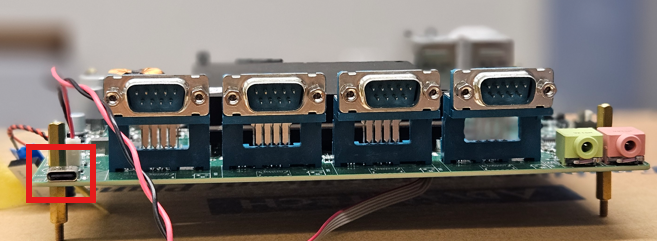
Recovery mode & wiring
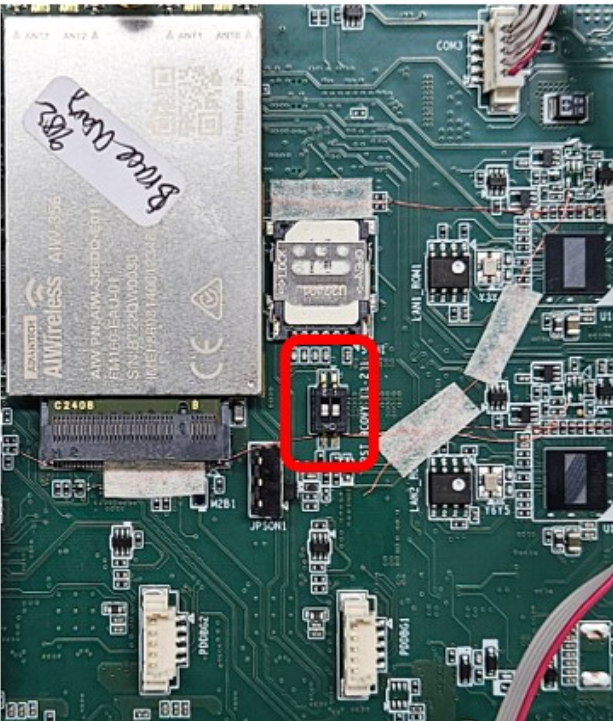
- Toggle the RST_RECOVY "2" switch to ON and press the power button.
- Connect a USB Type-C cable between the host and AIR-075.
- Verify detection as below:
lsusb
# Bus 001 Device 024: ID 0955:7026 NVIDIA Corp.
Flash image
sudo tar -zxvf [project name]_JP71_xxx.tar.gz
cd Linux_for_Tegra
sudo ./l4t_initrd_flash.sh \
  -c tools/kernel_flash/flash_l4t_t264_nvme.xml \
  --external-device nvme0n1p1 \
  --showlogs jetson-agx-thor-air075-a1 internal
Account & password
- Username:
ubuntu - Password:
ubuntu