JetPack 7.0
Overview
JetPack 7.0 (Jetson Linux 38.2) is Advantech's next-generation baseline for NVIDIA Jetson platforms such as AIMB-294 carrier boards and the ASR-A702 rugged system. Both solutions now ship with Ubuntu 24.04, kernel 6.8.12, CUDA 13, and Thor-ready firmware so customers can evaluate AGX Thor compute while preserving a familiar Yocto-free workflow.
Platform Summary
- JetPack 7.0 (L4T 38.2.0)
- Ubuntu 24.04 LTS with Wayland
- Linux kernel 6.8.12 (PREEMPT_RT optional)
- Supports Jetson AGX Thor-based AIMB-294 and ASR-A702 platforms
- OS support list (Ubuntu 24)
Build Environment on Host
Recommended host and Docker image
Host OS must be Ubuntu 20.04 or newer. Install Docker CE and pull the Advantech-maintained Jetson container.
sudo docker pull advrisc/u20.04-nvlbv2:20240515
Run container
sudo docker run -it --name jetson_linux_risc \
  -v /home/bsp/myLinux:/home/adv/BSP:rw \
  --privileged advrisc/u20.04-nvlbv2:20240515 /bin/bash

# inside container (first launch)
sudo chown adv:adv -R BSP
Dependency library
If you hit Exec format error during cross-flashing, install QEMU on the host (outside Docker):
sudo apt-get install qemu-user-static
Getting Linux Source Code
export GIT_SSL_NO_VERIFY=1
cd ~/BSP
mkdir -p jetson_linux_risc
cd jetson_linux_risc
git config --global user.name "Your Name"
git config --global user.email "you@example.com"
Select the manifest that matches your processors:
| Device | Manifest XML | Notes |
|---|---|---|
| AIMB-294 (AGX Thor carrier) | aimb294a1_ubuntu24.04-jp7.0_v0.0.0_kernel-6.8.12_agx-thor.xml | JetPack 7.0 baseline for the carrier board |
| ASR-A702 rugged system | asra702a1_ubuntu24.04-jp7.0_v0.0.0_kernel-6.8.12_agx-thor.xml | JetPack 7.0 baseline for the boxed system |
repo init -u https://AIM-Linux@dev.azure.com/AIM-Linux/risc_nvidia_jetson_38.2.0/_git/manifest -m <manifest>.xml
repo sync
Build Image
sudo ./scripts/build_release.sh
Package Image for Validation
sudo tar zcvf <device>_JP70_xxx.tar.gz Linux_for_Tegra
Device Guides
AIMB-294 (Jetson AGX Thor)
Recovery mode & wiring
- Set the RST_RECOVY "2" DIP switch to ON and power on the board.
- Connect the host PC to the AIMB-294 recovery USB Type-C port.
- Verify detection:
lsusb
# Bus 001 Device 024: ID 0955:7223 NVIDIA Corp.
Flash image
sudo tar -zxvf AIMB-294_JP70_xxx.tar.gz
cd Linux_for_Tegra
sudo ./l4t_initrd_flash.sh \
  -c tools/kernel_flash/flash_l4t_t264_nvme.xml \
  --external-device nvme0n1p1 \
  --showlogs jetson-agx-thor-aimb294-a1 internal
Accounts & base image defaults
From the AIMB-294 Development guide:
- Username:
ubuntu - Password:
ubuntu - Use
sudo/sudo suto escalate privileges.
Bootloader, burn-in, and boot-count tasks
-
Bootloader version: connect the debug UART and verify the UEFI banner during POST.
-
Burn-in: from the factory image run:
cd /tool
sudo Burnin.sh -
Boot-count cycling: install the helper once, then remove the counter file when you want to reset the tally.
cd /home/ubuntu
sudo ./bootCount.sh       # install service (first boot only)
# ... device will power cycle after 20 seconds automatically ...
rm bootCount.tt           # reset counter if needed
Camera / GMSL validation
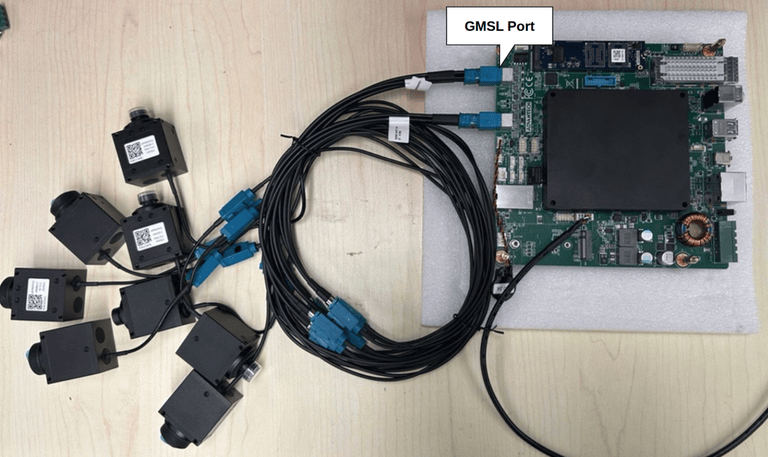
cd /tools/approcam/gmsl
sudo ./set_approcam_gmsl.sh    # install driver
cd /home/ubuntu
sudo ./enable-approcamera.sh   # preview IMX335 stream
ASR-A702 (Jetson AGX Thor Rugged System)
Recovery mode & wiring
- Toggle the RST_RECOVY "2" switch to ON and press the power button.
- Connect a USB Type-C cable between the host and ASR-A702.
- Confirm detection with
lsusb(NVIDIA 0955:7223).
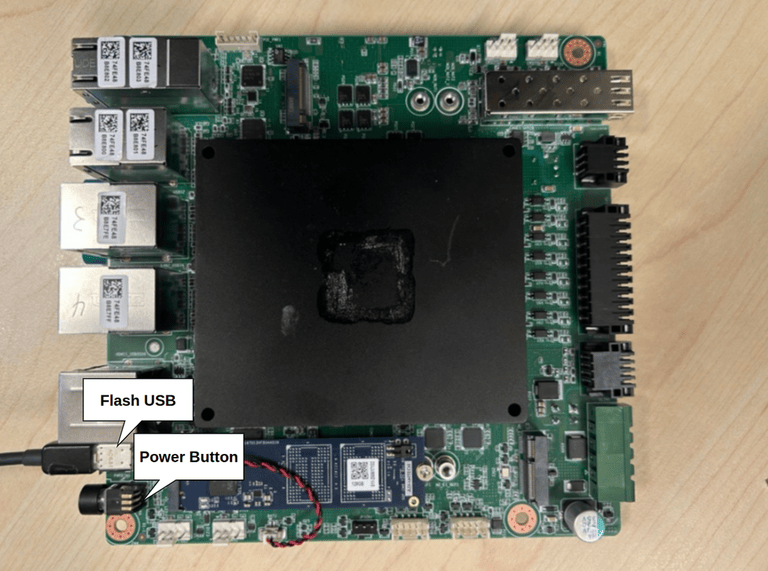
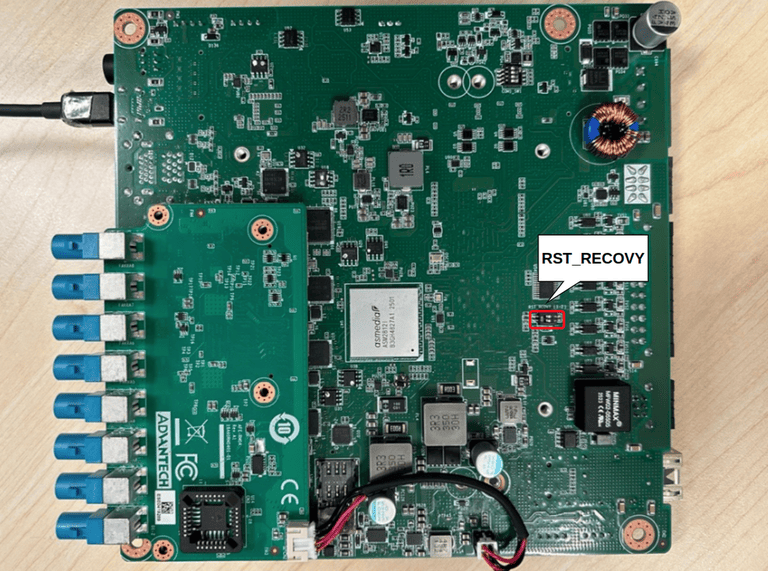
Flash image
sudo tar -zxvf ASR-A702_JP70_xxx.tar.gz
cd Linux_for_Tegra
sudo ./l4t_initrd_flash.sh \
  -c tools/kernel_flash/flash_l4t_t264_nvme.xml \
  --external-device nvme0n1p1 \
  --showlogs jetson-agx-thor-asra702-a1 internal
Account & password
- Username:
ubuntu - Password:
ubuntu
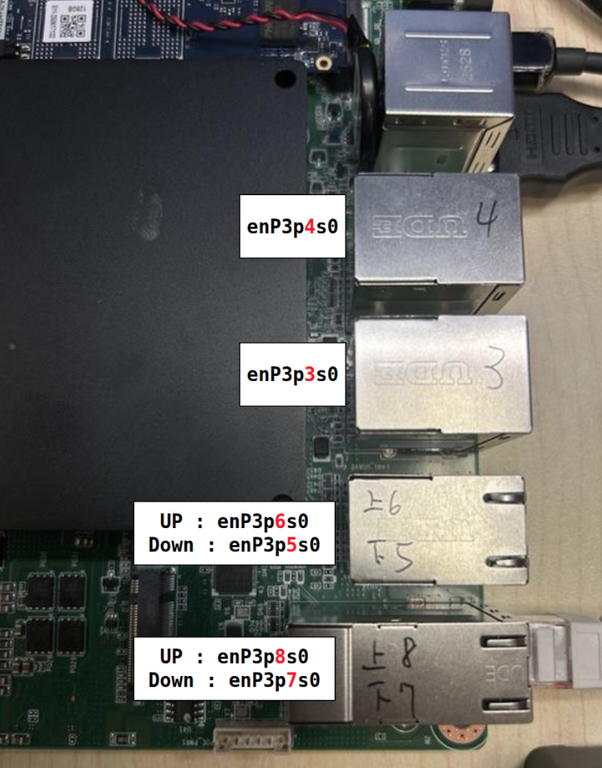
MAC address programming (Intel I226)
One-time operation. Each NIC only accepts a MAC address once. Double-check the value before flashing.
- Download and copy the I226 flash tool to the device.
- Extract and program each interface:
sudo tar zxvf LAN_I226_ASR-A702.tar.gz
cd LAN_I226_ASR-A702/I226_Flash_Tool
sudo su
./EepromAccessTool
setpci -s 0003:03:00.0 COMMAND=0003
./EepromAccessTool -nic=1 -f=FXVL_125C_V_2MB_2.36.1.bin -mac=<MAC1>
# repeat nic=2..6 using COMMAND=0004..0008 and MAC2..MAC6
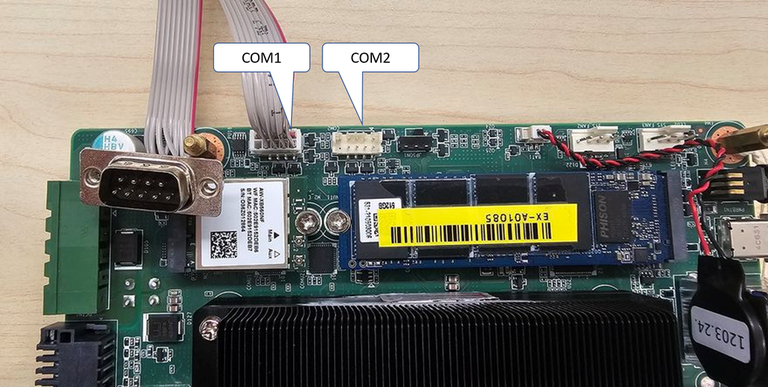
UART mapping
- Thor COM1:
/dev/ttyAMA9 - Thor COM2:
/dev/ttyAMA10
Bootloader verification
Use the debug port to capture the UEFI banner:
Burn-in and boot-count automation
# Burn-in
cd /tool
sudo Burnin.sh

# Boot-count installer
cd /home/ubuntu
sudo ./bootCount.sh
rm bootCount.tt   # reset counter when required
Additional tools (UART / AIW / GMSL)
- UART mode switching: COM1 (
/dev/ttyAMA9) and COM2 (/dev/ttyAMA10) can be toggled among RS-232/422/485. Adjust jumpers per the ASR A702 Development diagrams and rerun your UART test scripts. - AIW wireless modules: the same guide documents verification commands for AIW-210, AIW-356, and AIW-169. Run each script from
/tools/aiw/to validate Wi-Fi, cellular, and GNSS peripherals shipped with your SKU. - GMSL / Orbbec camera: connect the camera to the designated GMSL port, install the supplied driver package, and use the Orbbec preview command set to validate depth and RGB streams.