Yocto Linux BSP Ver.G User Guide for i.MX9 Series — Yocto 5.0 (Scarthgap)
Introduction
This document describes how to set up the build environment, fetch the BSP, build images, create bootable media, run benchmarks, and customize software for Advantech boards based on NXP i.MX9 (e.g., i.MX95, AOM-5521). It targets BSP Version G aligned with NXP release L6.6.36-2.1.0 (Yocto 5.0 scarthgap).
Getting Started
System Requirements
- CPU Cores: Intel® Core™ i7 (≥ 8 cores)
- Memory: ≥ 16 GB
- Disk Space: ≥ 500 GB (SSD strongly recommended)
Conventions
${PREBUILT_IMAGE}— compressed prebuilt image (*.img.gz)${CONTAINER_NAME}— container name (e.g.,imx9LBVG0006)${BSP_TARBALL}— BSP tarball (*.tgz)${BSP_HOME}— BSP root directory inside the container${BDIR}— build directory (e.g.,build_xwayland)${IMX9PROC}— i.MX9 processor code (e.g.,imx95for i.MX95)${BOARD}— target board (e.g.,aom5521)${BOARD_REV}— board revision (e.g.,a1)${MC}— machine code =${IMX9PROC}${BOARD}${BOARD_REV}
Example: imx95aom5521a1 for AOM-5521 A1
You can list supported machines after sourcing the environment:
$ source setup-environment
${MEM_SIZE}— memory size (1G/2G/4G/6G/8G)${UC}— U-Boot config (1G/2G/4G/6G/8G/FSPI_1G/FSPI_2G/FSPI_4G/FSPI_6G/FSPI_8G...)${SD_DEVICE}— SD device path on host Linux (e.g.,/dev/sdf)${SDCARD_IMAGE}— SD card image built by bitbake (*.wic.zst)${WORKSPACE}— host workspace folder mapped into the container${UBOOT}— U-Boot version (e.g.,v2024.04_6.6.36-2.1.0)${KERNEL}— Linux kernel version (e.g.,6.6.36-2.1.0)${TOOLCHAIN}— toolchain base (e.g.,/opt/fsl-imx-xwayland/6.6-scarthgap)
Debug/Serial console: use a terminal tool (minicom/putty/teraterm) configured to 115200 8N1. Terminal console: any terminal emulator (gnome-terminal, xfce4-terminal, etc.).
Docker Install and Settings
If Docker is not available on your system, please install it first.
Install Docker Engine
Refer to the official Docker installation guide for your platform.
Pull base image (example)
$ docker pull advrisc/u20.04-imx8lbv1
The example image is Ubuntu 20.04 and works as a base for i.MX9 builds.
Create a container
$ docker run --privileged -it \
  --name ${CONTAINER_NAME} \
  -v ${WORKSPACE}:/home/adv/adv-release-bsp \
  -v /dev:/dev \
  advrisc/u20.04-imx8lbv1 /bin/bash
Get BSP
You can obtain the BSP in two ways.
Method A — Download BSP from GitHub
The following example downloads the Advantech Yocto BSP into adv-release-bsp and checks out scarthgap / 6.6.36-2.1.0:
$ git config --global user.name "Your Name"
$ git config --global user.email you@example.com
$ sudo chown adv:adv adv-release-bsp
$ cd adv-release-bsp
$ repo init -u https://github.com/ADVANTECH-Corp/adv-arm-yocto-bsp.git \
            -b imx-linux-scarthgap \
            -m adv-6.6.36-2.1.0.xml
$ repo sync
Troubleshooting:
- "server certificate verification failed" (self-signed certs):
`export GIT_SSL_NO_VERIFY=1`
# or
git config --global http.sslverify false
- "The unauthenticated git protocol on port 9418 is no longer supported.":
git config --global url."https://".insteadOf git://
Method B — Copy BSP tarball into the container
If you have a BSP tarball (e.g., imx9LBVG0006_2025-01-14.tgz), copy it into the container workspace.
- Exit to host:
exit
- Copy into
${WORKSPACE}and fix ownership:
cp imx9LBVG0006_2025-01-14.tgz ${WORKSPACE}
sudo chown adv:adv ${WORKSPACE}/imx9LBVG0006_2025-01-14.tgz
- Re-attach to the container:
docker start ${CONTAINER_NAME}
docker attach ${CONTAINER_NAME}
- Unpack inside the container:
tar zxvf imx9LBVG0006_2025-01-14.tgz
Downloads Tarball (optional but recommended)
During Yocto builds, a downloads/ folder caches sources. To reduce fetch failures, reuse a prepared archive (e.g., downloads_imx9_6.6.36_2.1.0.tar.gz).
- Exit to host:
exit
- Copy the downloads tarball into
${WORKSPACE}:
cp downloads_imx9_6.6.36_2.1.0.tar.gz ${WORKSPACE}
sudo chown adv:adv ${WORKSPACE}/downloads_imx9_6.6.36_2.1.0.tar.gz
- Re-attach to the container:
docker start ${CONTAINER_NAME}
docker attach ${CONTAINER_NAME}
- Unpack:
tar zxvf downloads_imx9_6.6.36_2.1.0.tar.gz
- Link into the BSP tree:
cd adv-release-bsp
ln -s ${WORKSPACE}/downloads_imx9_6.6.36_2.1.0 downloads
Introducing BSP
The BSP is based on the Yocto Project with NXP (Freescale) enhancements for i.MX95, plus Advantech board support. The release directory contains:
sources/— Yocto layers (community + NXP + Advantech)- one or more build directories
- scripts to set up the environment
Naming Rule
- BSP file name:
imx9LBVG0006_YYYY-MM-DD.tgzLB= Linux BSPVG0006= Version G, build 0006
- Prebuilt image name:
5521A1AIM38LIVG0006_iMX95_8G_YYYY-MM-DD.img.gz5521A1= AOM-5521 A1LI= prebuilt Linux Image8G= DDR size
BSP Content (key items)
sources/meta-advantech/— Advantech meta-layersources/meta-fsl-*— NXP (Freescale) meta-layersfsl-setup-release.sh— create a new build environmentsetup-environment— continue an existing build environment
Build Instructions
Create a New Build Environment
cd ${BSP_HOME}
MACHINE=${MC} DISTRO=fsl-imx-xwayland source imx-setup-release.sh -b ${BDIR}
To set a default U-Boot config during creation:
MACHINE=${MC} UBOOT_CONFIG=${UC} DISTRO=fsl-imx-xwayland source imx-setup-release.sh -b ${BDIR}
You need to read and accept the EULA.

Continue an Existing Build Environment
cd ${BSP_HOME}
source setup-environment ${BDIR}
Build SD Card Image
bitbake imx-image-full
Results (upon success) in ./tmp/deploy/images/${MC}:
imx-image-full-${MC}.wic.zstimx-image-full-${MC}.wic.bmap
Build Toolchain Installer (SDK)
bitbake meta-toolchain
The installer appears in ./tmp/deploy/sdk/, e.g.:
fsl-imx-xwayland-glibc-x86_64-meta-toolchain-armv8a-imx95-19x19-lpddr5-evk-toolchain-6.6-scarthgap.sh
Build Bootloader
bitbake imx-boot
Build Linux Kernel
If you are in Docker, install tmux before running menuconfig:
sudo apt-get update
sudo apt-get install -y tmux
tmux
bitbake linux-imx -c menuconfig
# After editing, exit the tmux window:
exit
Build the kernel:
bitbake linux-imx
Resulting files under ./tmp/deploy/images/${MC}:
ImageImage-${IMX9PROC}-${BOARD}-${BOARD_REV}.dtb
Creating Boot Media
From a Prebuilt Image
Warning: Double-check
${SD_DEVICE}before runningdd.
sudo sh -c 'gunzip -c ${PREBUILT_IMAGE} | dd of=${SD_DEVICE} bs=1M status=progress'
sync
From a Built SD Card Image
pushd ${BSP_HOME}/${BDIR}/tmp/deploy/images/${MC}
zstd -cd ${SDCARD_IMAGE} | sudo dd of=${SD_DEVICE} bs=1M status=progress
# Or use bmaptool (faster, sparse aware):
sudo bmaptool copy --bmap ${SDCARD_IMAGE/.zst/.bmap} ${SDCARD_IMAGE} ${SD_DEVICE}
sync
popd
Debug Console Information
If you want to see bootloader/kernel messages, prepare:
Hardware
- Refer to your product's Debug Port Information for the connector location and pinout (AOM-5521).
Software
- Use a serial terminal such as
minicomorputty. - Baud rate: 115200
Customization
Setting up SDK
Build the SDK as described above, then run the installer:
cd ${BSP_HOME}/${BDIR}/tmp/deploy/sdk
sudo ./fsl-imx-xwayland-glibc-x86_64-meta-toolchain-armv8a-imx95-19x19-lpddr5-evk-toolchain-6.6-scarthgap.sh
Follow prompts: choose install path or press Enter for default, then confirm Proceed [y/n]?.
(Reference download link for SDK if provided: [downloads_SDK])

Setting up Cross-Compiling Environment
After SDK installation, source the toolchain environment:
source ${TOOLCHAIN}/environment-setup-aarch64-poky-linux
Build U-Boot in a Standalone Environment
Configure U-Boot
make ${IMX9PROC}_${BOARD}${BOARD_REV}_${MEM_SIZE}_defconfig
# e.g.
make imx95_aom5521a1_8G_defconfig
Build U-Boot
make -j$(nproc)
Build imx-boot Image using imx-mkimage (i.MX95)
- Obtain the
imx-boottarball for your product (example for AOM-5521):
tar zxvf 5521A1AIM38LIVG0006_iMX95_8G_imx-boot.tgz
cd 5521A1AIM38LIVG0006_iMX95_8G_imx-boot/
- Copy necessary artifacts into the
imx-mkimagefolder:
cp u-boot.bin spl/u-boot-spl.bin arch/arm/dts/imx95-aom5521-a1.dtb tools/mkimage \
   /path/to/imx-mkimage/iMX9/
- Build
flash.bin:
cd /path/to/imx-mkimage
make SOC=iMX95 OEI=YES flash_all
Flash imx-boot
- Using uuu to eMMC:
cp flash.bin ~/mfgtools/uuu/
cd ~/mfgtools/uuu
sudo ./uuu -b emmc flash.bin
- Or write raw to device (example
/dev/sdd, adjust as needed):
sudo dd if=flash.bin of=/dev/sdd bs=1K seek=32 conv=fsync
sync
Building & Updating Kernel / Modules / DTB Manually
Ensure your cross-compile environment is sourced (see Setting up Cross-Compiling Environment).
Get Linux-imx Sources
If not already available, obtain the sources per your workflow. (Reference: [adv_6.6.36_2.1.0])
Configure the Kernel
cd linux-imx
make distclean
make imx_v8_adv_defconfig
make menuconfig
Build Kernel Image
make -j$(nproc) Image
If you encounter link-flags issues, try:
unset LDFLAGS
make -j$(nproc) Image
The kernel Image is at: ./arch/arm64/boot/
Build Kernel Modules
make -j$(nproc) modules
make modules_install INSTALL_MOD_PATH=~/temp/rootfs
Build Device Tree Blob
make -j$(nproc) freescale/${IMX9PROC}-${BOARD}-${BOARD_REV}.dtb
# e.g.
make -j$(nproc) freescale/imx95-aom5521-a1.dtb
DTBs are at: ./arch/arm64/boot/dts/freescale/
Replace Kernel & DTB on Target Media
- Copy
Imageto the appropriate/boot(or partition) on SD/eMMC. - Copy
${IMX9PROC}-${BOARD}-${BOARD_REV}.dtbto the device's DTB directory on SD/eMMC. (Exact paths depend on your image layout and bootloader configuration.)
Improve Boot Speed
Bootloader
- Boot delay
Disable boot delay in U-Boot:
setenv bootdelay 0
saveenv
reset
- Disable console output
Reducing console messages accelerates boot.
- Kernel quiet mode in bootargs (example):
setenv mmcargs 'setenv bootargs ${jh_clk} console=${console} modprobe.blacklist=${modprobe_blacklist} root=${mmcroot} video=HDMI-A-1:${videores} quiet'
saveenv
reset
- Or disable console entirely:
setenv console
saveenv
reset
Rootfs
Optimize services and startup scripts based on your application.
Services
Disable unneeded services:
sudo systemctl disable <service-name>
# e.g.
sudo systemctl disable boottimes
System Recovery
This section provides detailed procedures for restoring the eMMC image.
For more information, refer to the NXP mfgtools (UUU) wiki.
Reflash eMMC from Boot SD Card
-
Download
mksd-linux.sh: https://github.com/ADVANTECH-Corp/RISC_tools_scripts/blob/mickledore/imx8/mksd-linux.sh -
Download
"Product_AIM_Release_version"_flash_tool.tgzand unzip it. -
Copy
mksd-linux.shinto themk_inandfolder. -
Run
mksd-linux.shand follow on-screen prompts to reflash from SD to eMMC.
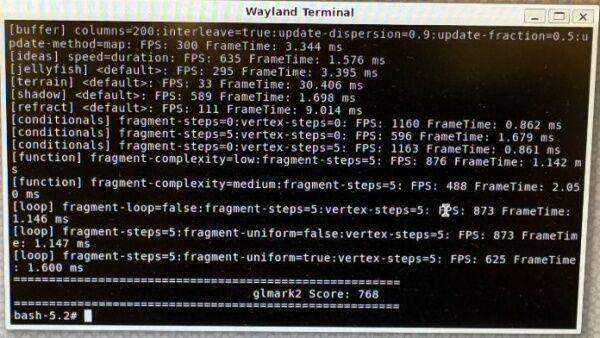
glmark2 Test
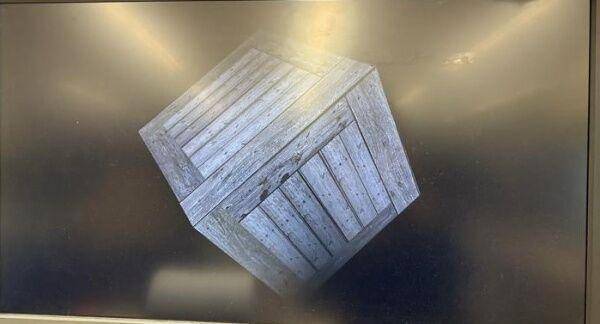
glmark2-es2-wayland --fullscreen
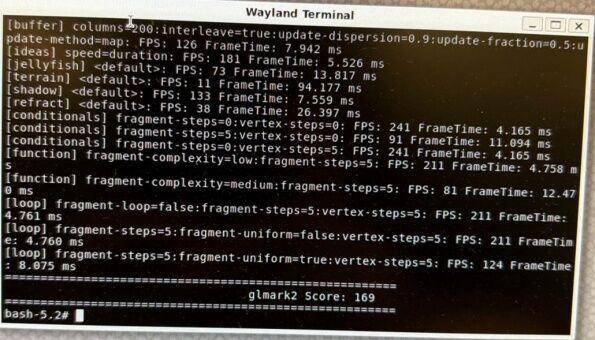
glmark2-es2-wayland -s 1920x1080
Document version: Ver.G (Yocto 5.0 — scarthgap, kernel 6.6.36-2.1.0, i.MX95 / AOM-5521).