RSB-4810 Debian11 user guide
Contents
- 1产品介绍(product presentation) 1.1产品特性(product feature) 1.2产品官网链接(Product official website link)
- 2硬件接口说明 2.1接口布局圖 Board Layout 2.2接口尺寸 Board Dimension 2.3接口引脚定義 (Pin definitions) 2.4List
- 4Linux系统的基本使用(Linux System Basic Operating Method) 4.1乙太網路使用方法(Ethernent Testing Method) 4.2WiFi使用方法(WIFI Testing Method) 4.34G使用方法(4G Testing Method) 4.4蓝牙使用方法(BlueTooth Operating Method) 4.5音訊使用方法(BlueTooth Operating Method) 4.6CAN2.0 測試( CAN Test method) 4.7I2C 測試( I2C Test method) 4.8看門狗測試 (Watch Dog Test method) 4.9UART測試 (UART Test method) 4.10GPIO測試(GPIO Test method) 4.11Display測試(Display Test method) 4.11.1How_to_Config_Multi-Display 4.12遠程訪問及文件傳輸(Remote Access and File Transimmion)
- 5通用方法(General Method)
- 6How to build Debian 11 BSP (Debian 11 BSP 編譯) 6.1Linux BSP User Guide for RSB-4810 series Debian11
产品介绍(product presentation)
产品特性(product feature)
- Rockchip RK3568 Arm Quad Cortex-A55, up to 2.0GHz
- Built-in NPU with processing performance of up to 0.8 TOPS
- Onboard 2/4GB LPDDR4 memory and 16/32GB eMMC
- Supports 1 x HDMI 2.0 4K, 1 x LVDS/MIPI-DSI, and 1 x eDP
- Supports 4K H.264/H.265 video decoder
- Provides 2 x GbE, 1 x SATA 3.0, 6 x UART, 2 x USB 3.0, 2 x USB 2.0, 1 x USB OTG, and 2 x CAN FD
- Provides a M.2 E Key with PCIE 3.0/USB 2.0/SDIO/UART signal for Wi-Fi 5/6 Modules, and a MINI-PCIE with PCIE 3.0/USB 2.0 signal for LTE/5G Modules
- Supports Linux and Android OS
产品官网链接(Product official website link)
RSB-4810 - Rockchip Arm Cortex-A55 RK3568 3.5" SBC - Advantech
硬件接口说明
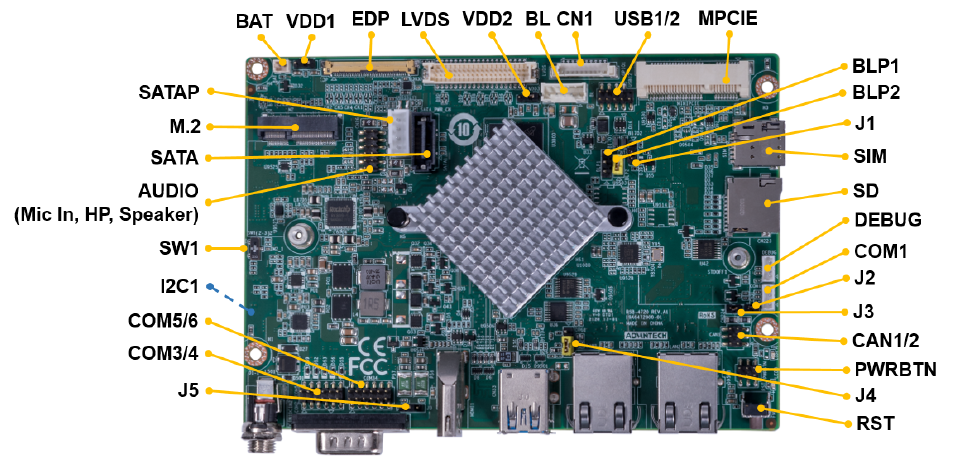
接口布局圖 Board Layout
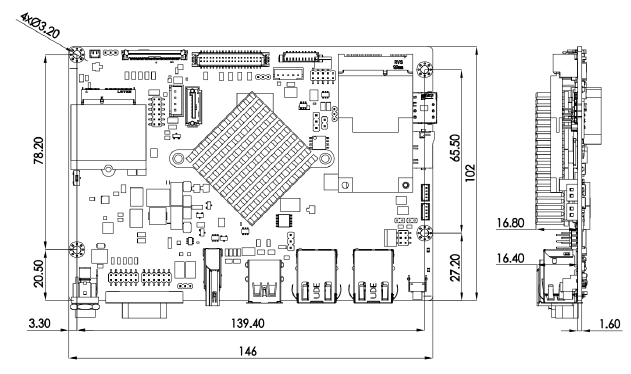
接口尺寸 Board Dimension
接口引脚定義 (Pin definitions)
| Jumper List | |
|---|---|
| J1 | MASKROM mode select Short pin 12 and power on the RSB-4810 to enter MASKROM mode. Change back to pin 23 before click "Run" to flash image |
| J2 | CAN impedance matching |
| J3 | CAN impedance matching |
| J4 | OTG Mode selection, default USB3.0 host |
| SW1 | AT & ATX Mode Switch, default AT mode |
| BLP1 | LVDS BKL PWR 3.3V&5V level select, default 5V |
| BLP2 | LVDS BKL PWR 12V select |
| VDD1 | EDP VDD 3.3V &5V level select, default 3.3V |
| VDD2 | LVDS VDD 3.3V & 5V level select, default 3.3V |
| J5 | COM5,COM6 power 12/5V level select, default 5V |
List
| AUDIO | Audio pin header (Headphone, Mic in, Speaker) |
|---|---|
| EDP | eDP CONN |
| LVDS | LVDS CONN |
| BL | LVDS Back light Control |
| SATA | SATA3.0 |
| MINIPCIE | MINI PCIe 52P |
| SIM | Nano SIM card |
| M2 | M.2 E-Key CONN |
| SD | Micro SD slot |
| PWRBTN | Power button and LED |
| DCIN1 | 12V DC jack |
| COM1 | RS-232 pin header |
| COM2 | RS-232 DB9 |
| HDMI | HDMI CONN |
| CAN1/2 | CAN FD CONN |
| USB1/2 | USB pin header |
| USB3/4 | USB Type A ((2 x USB3.0, the lower Type A connector can be configured to OTG by jumper setting)) |
| SATAP | SATA Power |
| LAN1 | LAN1 |
| LAN2 | LAN2 |
| BAT | RTC CONN |
| COM3/4 | COM3 and COM4 with RS-232 or RS-485 |
| COM5/6 | COM5 and COM6 with RS-232 |
| RST | Reset button |
| CN1 | GPIO CONN |
| I2C1 | I2C pin header |
| Debug port | Debug connector |
快速入门 (Quick Start)
系统下载 (OS Download)
Note: LIV=Yocto Linux, UIV=Ubuntu, DIV=Debian, AIV=Android
LBV=BSP, LIV=Image
| Platform | Product | Image Version | Release Date | Release Version | Release notes | Image Download | BSP Download Tag | SDK | Comment | CAN2.0 Patch |
|---|---|---|---|---|---|---|---|---|---|---|
| RK3568 | RSB-4810 | DIV130311 | 2024/03/15 | Beta | Release note | Baidu Password:a887 Dropbox | RK3568_RISC_DIV130311.xml | Baidu Password:a887 Dropbox | Test Report CAN2.0 Errata 提取码:a887 | Baidu Password:a887 |
-
Alpha: Basic I/O function bring up by RD;
-
Beta: Basic I/O function、performance and middleware verified by RD. Peripherals integrated;
-
GA: Beta version by QE verification;
-
RTM: Beta version by SI/Power/QE verification and pre-loaded;
How to update images .
There are three ways to update images:
Usering_RKTool.
SD_update image.
Linux系统的基本使用(Linux System Basic Operating Method)
乙太網路使用方法(Ethernent Testing Method)
Command : ifconfig
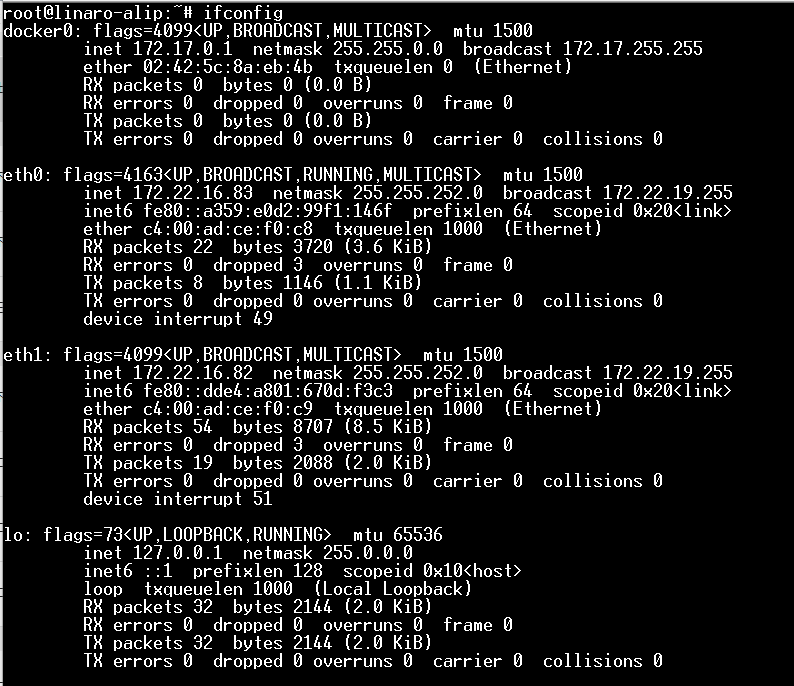
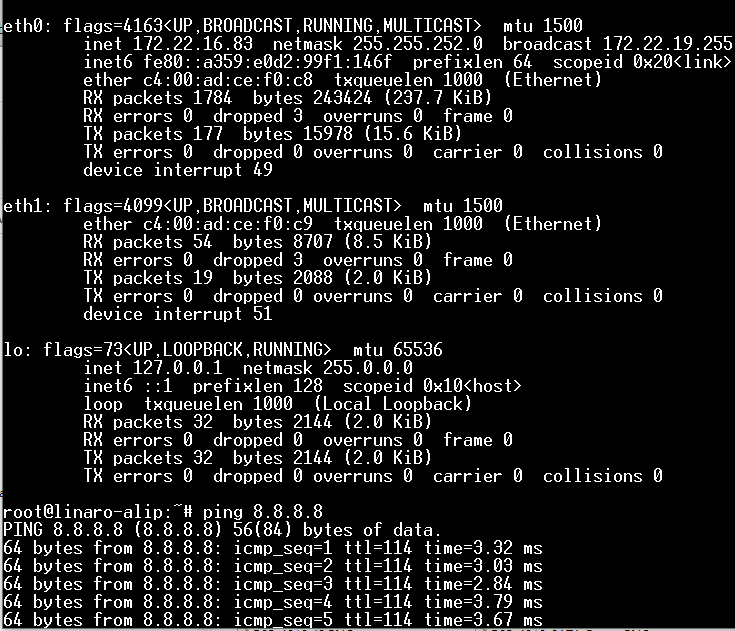
WiFi使用方法(WIFI Testing Method)
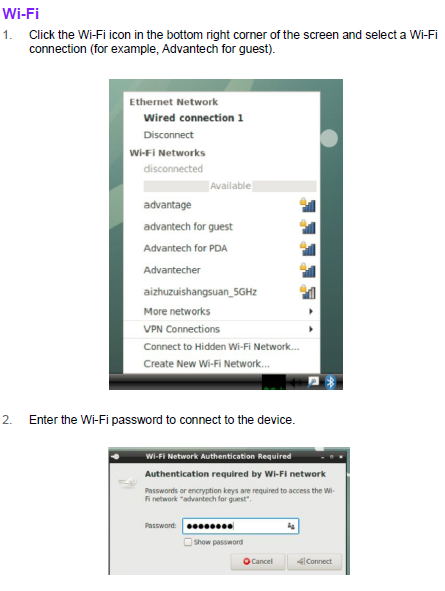
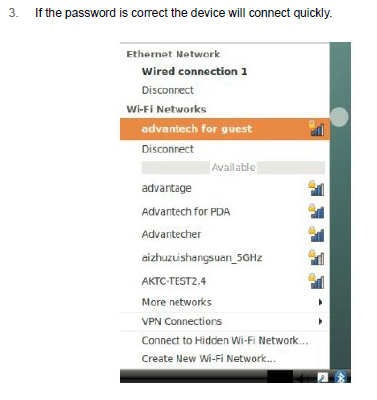
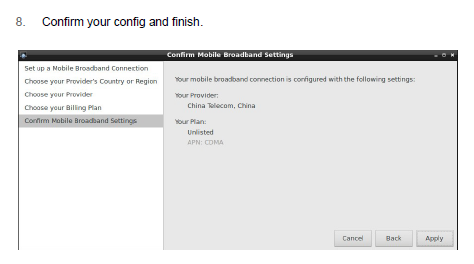
4G使用方法(4G Testing Method)
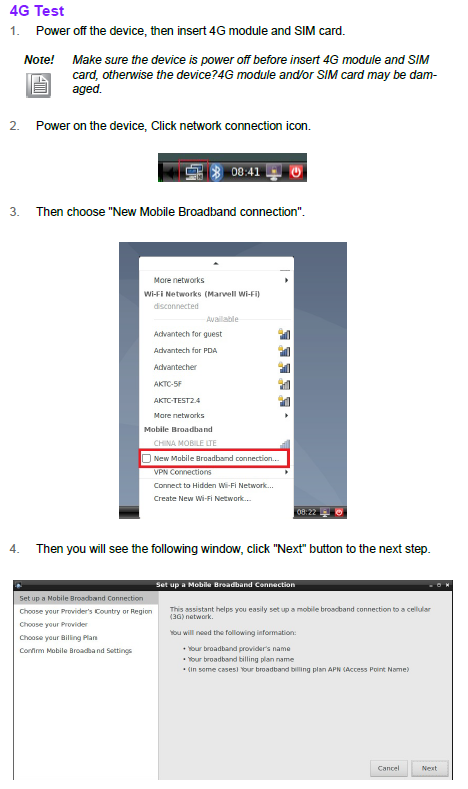
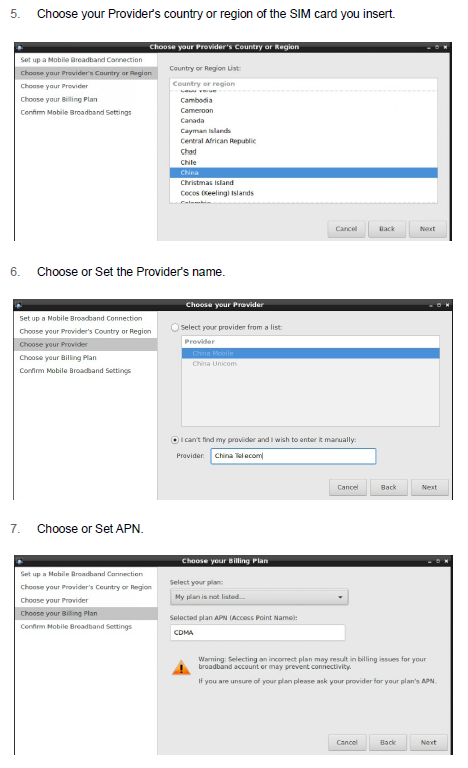
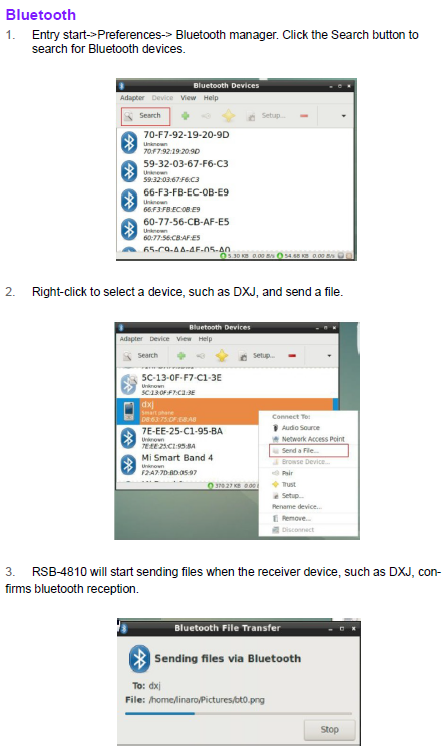
蓝牙使用方法(BlueTooth Operating Method)
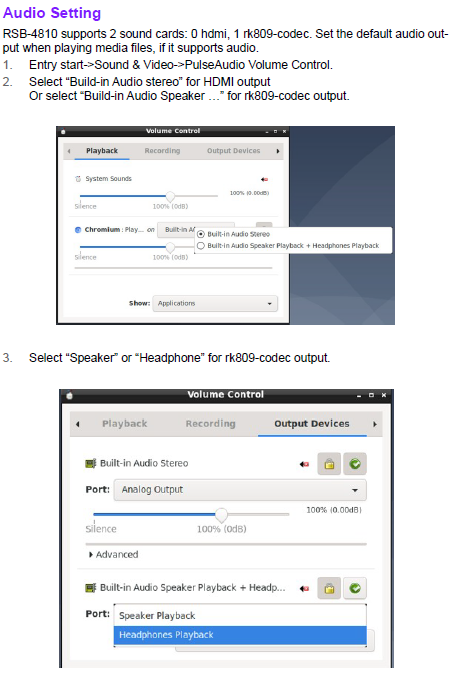
音訊使用方法(BlueTooth Operating Method)

CAN2.0 測試( CAN Test method)
Note:RK3568 CAN2.0 Errata;
CAN2.0 Errata: CAN2.0 Errata 提取码:a887
CAN2.0 Patch: Baidu Password:a887
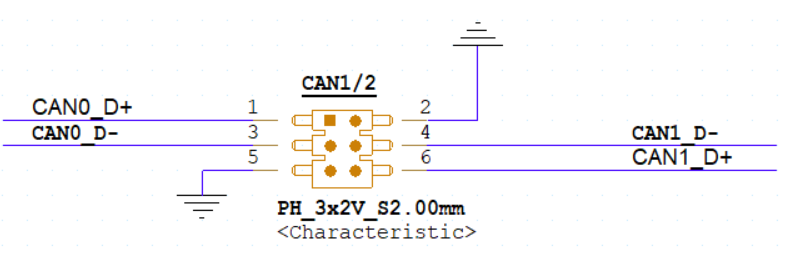
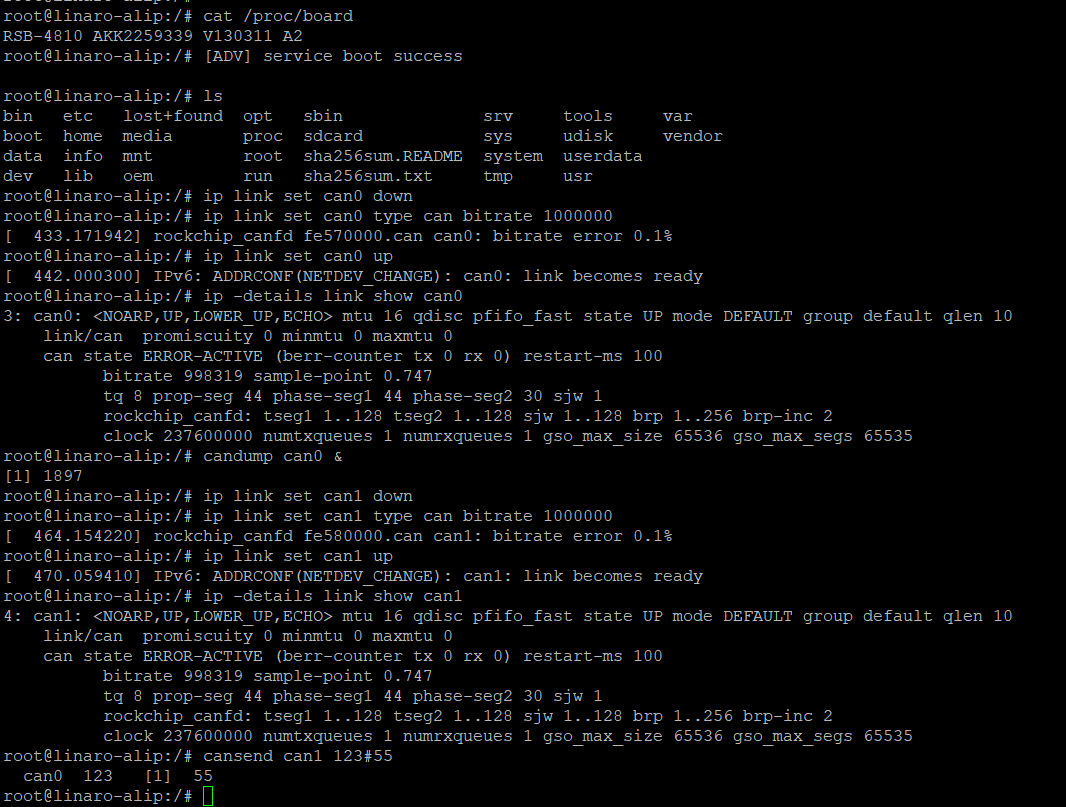
Short CAN1/2 Pin header ,Loopback test for example:
CAN0_D+->CAN1_D+
CAN0_D-->CAN1_D-
输入指令:
# ip link set can0 down
# ip link set can0 type can bitrate 1000000
# ip link set can0 up
# ip -details link show can0
# candump can0 &
# ip link set can1 down
# ip link set can1 type can bitrate 1000000
# ip link set can1 up
# ip -details link show can1
# cansend can1 123#55
can0  123   [1]  55
I2C 測試( I2C Test method)
看門狗測試 (Watch Dog Test method)

UART測試 (UART Test method)

How to Configure RS-232/485 Mode Enter U-boot interrupt mode. Connect the device to the debug port and open the debug console. Press “ctrl + c” before powering on the device.
The following information should be displayed on the debug console:
Hit any key to stop autoboot: 0
=>
=>
Then input the following command to configure the UART mode.
RS-485 Mode:
setenv uart_mode 0x0c
saveenv
reset
RS-232 Mode:
setenv uart_mode 0x00
saveenv
reset
Note: The default value is RS-232. Cp210x supports four ports, but for RSB-4810 only ttyUSB2 and ttyUSB3 support RS-485 mode.
In the above command “setenv uart_mode 0x0c”, 0x0c means set bit2(ttyUSB2) and bit3(ttyUSB3) to 1 (0 means to RS-232; 1 means to RS-485). To configure just ttyUSB2 (or ttyUSB3) to RS-485 mode, change 0x0c to 0x04 (or 0x08).
GPIO測試(GPIO Test method)
Display測試(Display Test method)
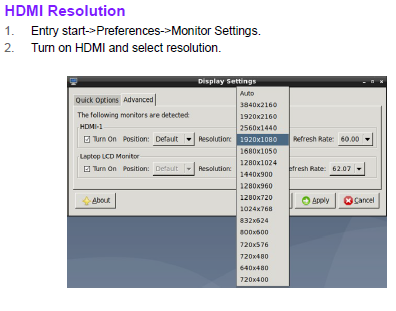
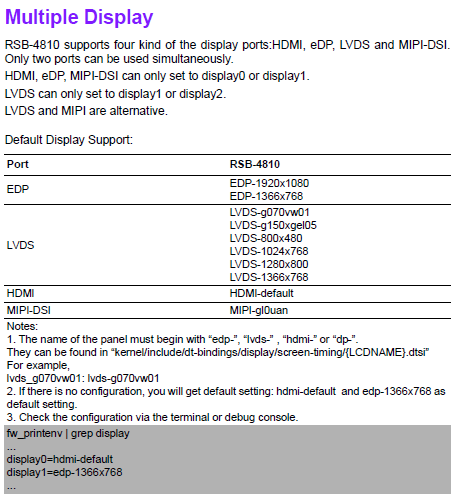
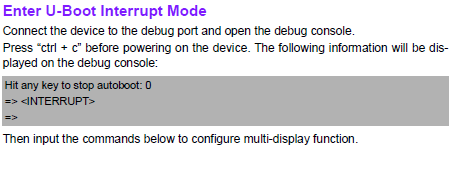
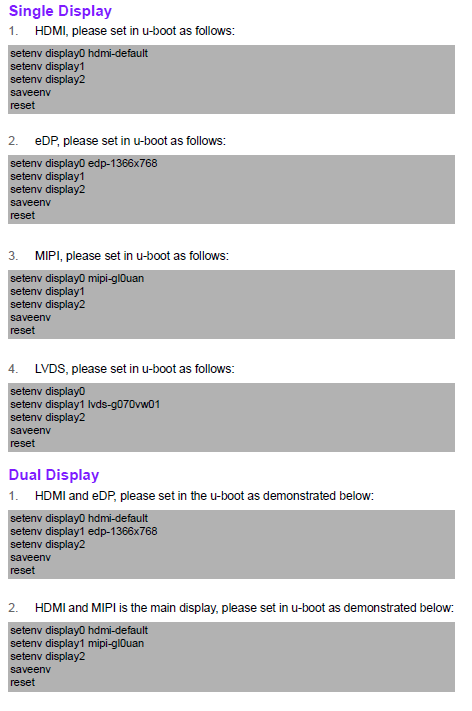
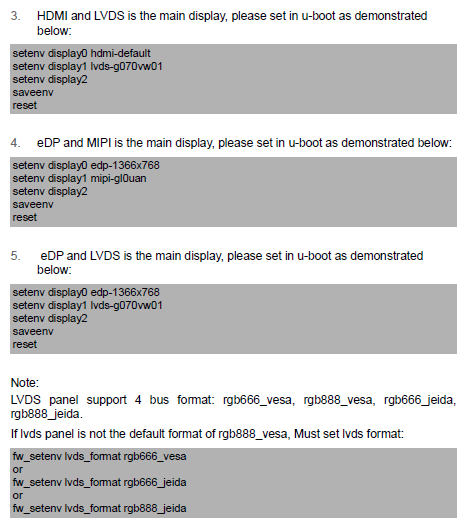
How_to_Config_Multi-Display
遠程訪問及文件傳輸(Remote Access and File Transimmion)
查看主板IP位址 ( Chech IP Address ):
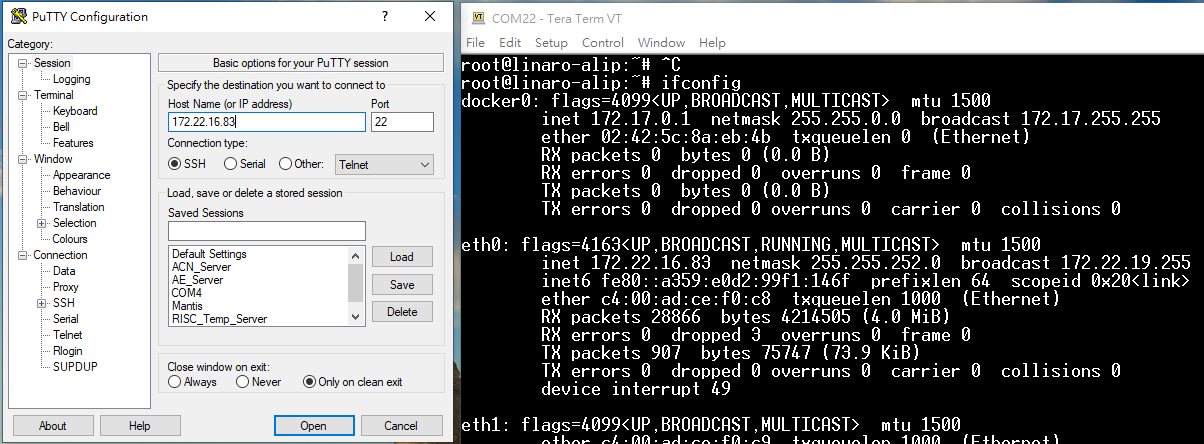
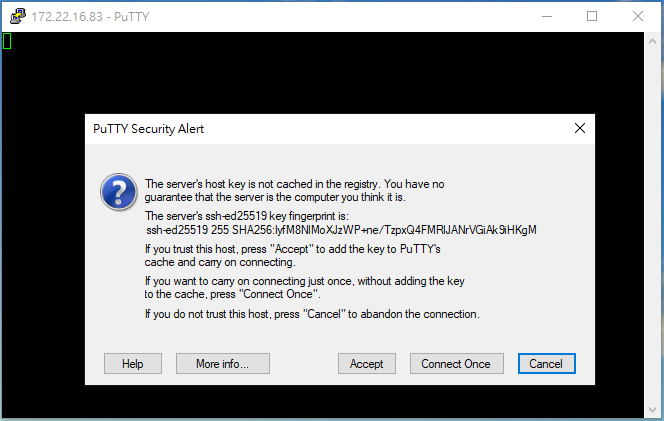

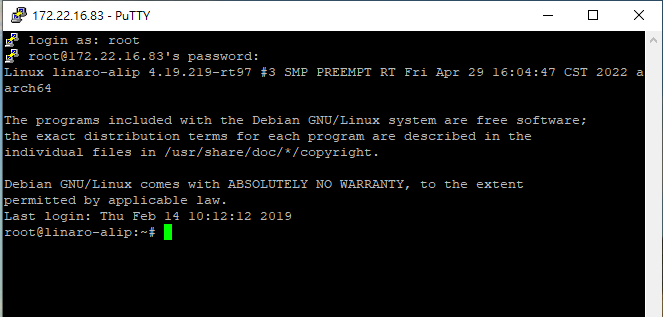
ID: root password:123456
通用方法(General Method)
QT Toolchain
查看CPU温度(Check CPU Temperature) # cat /sys/devices/virtual/thermal/thermal_zone0/temp 40000
或者直接以度爲單位顯示 echo $[$(cat /sys/class/thermal/thermal_zone0/temp)/1000]° >>> 40°
查看CPU频率(Check CPU Frequency) cat /sys/devices/system/cpu/cpu0/cpufreq/cpuinfo_cur_freq >> 1200000 cat /sys/devices/system/cpu/cpu0/cpufreq/cpuinfo_max_freq >> 1800000
查看内存容量(Check Memory Capacity) # busybox free -m
查看存储容量(Check Storage Capacity) # busybox df -h
調整亮度(Change the backlight)
Note: connect with LVDS Panel , default value is 200
root@linaro-alip:# echo 100 > /sys/class/backlight/backlight/brightness root@linaro-alip:# echo 200 > /sys/class/backlight/backlight/brightness root@linaro-alip:~#
root@linaro-alip:# cat /sys/class/backlight/backlight/max_brightness 255 root@linaro-alip:# cat /sys/class/backlight/backlight/brightness 200