EPC-R5710 Extend AI Card
Extend AI Card
Provide external AI module , hailo8. Insert the AI module,HDMI display and USB camera, before boot, and run the script of the following path to view the AI test effect on the screen.
Hardware part
HAILO : HLLWME0214600093
-
Plug the HAILO module into the M.2 connector of the EPC-R5710.
-
Plug the USB camera into the USB port
Software part
Enter the following command to view the USB camera node.
# v4l2-ctl --list-device
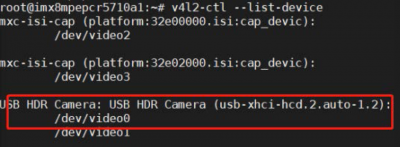
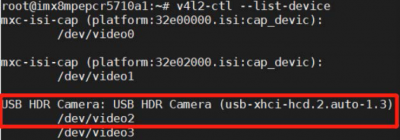
The execution results and commands are shown in the following figure. If the result is shown in Figure 1, enter command 1. If the result is shown in Figure 2, please enter command 2.
command1:
# sed -i 's/\/dev\/video[0-3]*/\/dev\/video0/g' /home/root/apps/detection/detection.sh
Figure 1:
command2 :
# sed -i 's/\/dev\/video[0-3]*/\/dev\/video2/g' /home/root/apps/detection/detection.sh
After completing the above commands, execute the following commands
# sed -i 's/,framerate=30\/1 !/ !/g' /home/root/apps/detection/detection.sh
# /home/root/apps/detection/detection.sh