AFE-R761 ETH
Contents
- 1Hardware pin definition:
- 2SW Function: 2.1Configure to Static IP 2.2Configure to DHCP 2.3Ethernet Test 2.4LED
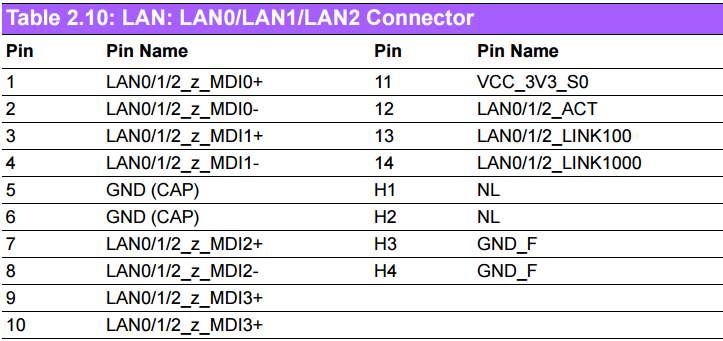
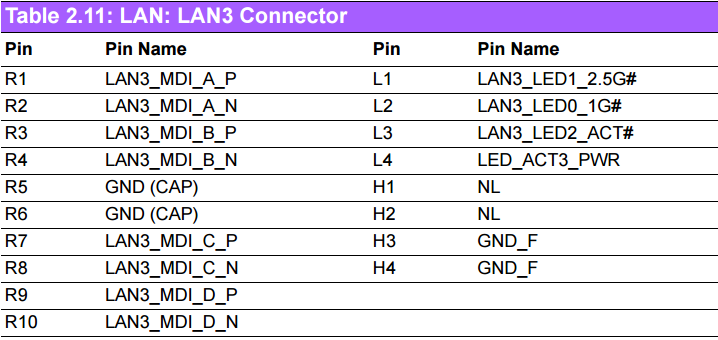
Hardware pin definition:
SW Function:
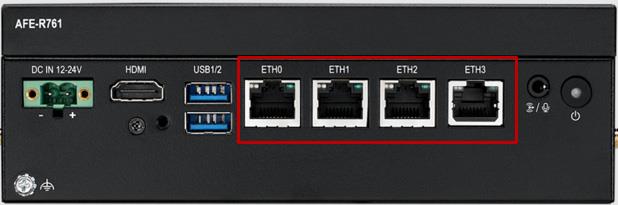
AFE-R761 supports four Ethernet ports: eth0, eth1, eth2, eth3.All ports are using the "DHCP" mode by default. The following configurations and tests are taking eth0 as an example.
| Ethernet | Chipset & Speed | 2 x RTL8211FS 10/100/1000Mbps 1 x RTL8119I 10/100/1000Mbps 1 x Intel I226 2.5Gbps |
|---|
Configure to Static IP
- Click “Applications” -> “Settings” -> “Advanced Network Configration”.
2. Double-click “Wired Connection 1” to configure it.
Configure to DHCP
1. Click “Applications” -> “Settings -> “Advanced Network Configration”.
2. Double-click “Wired Connection 1” to configure it.
Ethernet Test
After connection, Ethernet will create a net point “eth0”,"eth1","eth2" and “eth3”.
# #---- Test eth0 ----# #
# ping –I eth0 www.advantech.com

# #---- Test eth1 ----# #
# ping –I eth1 www.advantech.com

# #---- Test eth2 ----# #
# ping -I eth2 www.advantech.com

# #---- Test eth3 ----# #
# ping -I eth3 www.advantech.com
LED
# ethtool -s eth3 duplex full autoneg on speed 10       #灭
# ethtool -s eth3 duplex full autoneg on speed 100       #灭
# ethtool -s eth3 duplex full autoneg on speed 1000        #橙色
# ethtool -s eth3 duplex full autoneg on speed 2500           #绿色(一般速度为1G需要确认网线)