AFE-R761 GMSL & AHD
Contents
- 1GMSL
- 2Hardware pin definition:
- 3SW Number
- 4AHD 4.1Hardware pin definition: 4.2SW Number:
- 5SW Function 5.1View Resolution 5.2Set Resolution 5.3Preview camera 5.4Camera photography 5.5Camera screen recording
GMSL
| GMSL Support List |
|---|
| Camera |
| GMSL Camera |
| Sensor:ISX031(2M) Serializer:MAX9295A |
| GMSL | Camera model | Output Voltage | Power | Rate | Reslution Ratio |
|---|---|---|---|---|---|
| MAX96712/MAX96716 | 12V | 200mA | 6G | 1920*1080 30HZ |
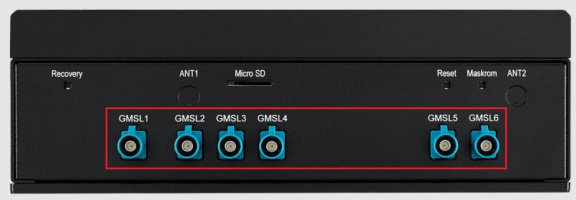
AFE-R761-UxC1 can support 4 ~ 6 GMSL Cameras via AFE-RM02-xPA1 expansion board. The default supported resolution is 1920 x 1080 @ 30fps. Please note that the supported voltage is 12V.
Hardware pin definition:
| GMSL:GMSL Camera Connector |
|---|
| Pin |
| 1 |
| 2 |
| 3 |
| 4 |
| 5 |
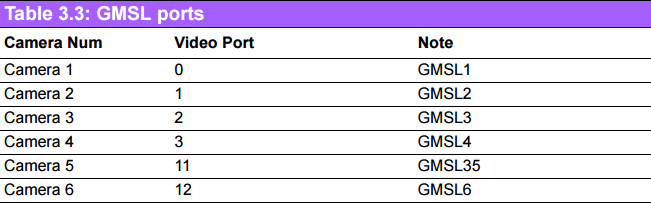
SW Number
AHD
| AHD | Camera model | Output Voltage | Power | Rate | Resolution Ratio |
|---|---|---|---|---|---|
| MAX96717 | 12V(5V Bom) | 200mA | 1.2G | 1920*1080 30Hz |
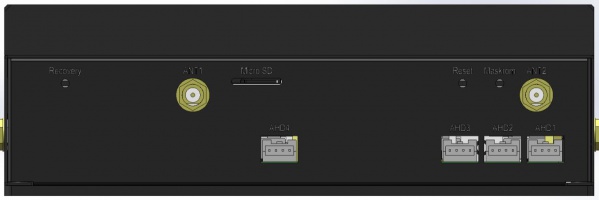
AFE-R761-UxB1 can support 4 ~ 6 AHD Cameras via AFE-RM01 expansion board. The default supported resolution is 1920 x 1080 @ 30fps.
Please note that the supported voltage/current is 12V/200mA.
Hardware pin definition:
| AHD:AHD Camera Connector |
|---|
| Pin |
| 1 |
| 2 |
| 3 |
| 4 |
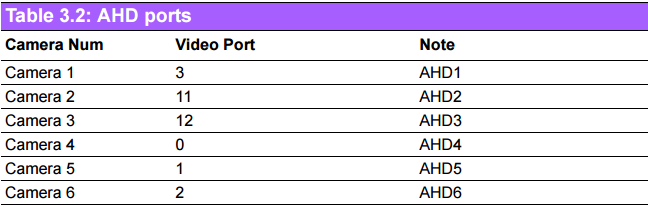
SW Number:
SW Function
View Resolution
Taking port 0 as an example, you can enter the following instructions to view information such as the resolution, pixel format, Field, Number of planes, Flags, Colorspace, Transfer Function, YCbCr/HSV Encoding, Quantization, Bytes per Line and Size Image.
# v4l2-ctl -d /dev/video0 --get-fmt-video
Format Video Capture Multiplanar:
 Width/Height : 1920/1080
 Pixel Format : 'NV12' (Y/UV 4:2:0)
 Field : None
 Number of planes : 1
 Flags :
 Colorspace : Rec. 709
 Transfer Function : Rec. 709
 YCbCr/HSV Encoding: Rec. 709
 Quantization : Default
 Plane 0 :
 Bytes per Line : 1920
 Size Image : 31104000
Set Resolution
Taking port 0 as an example, you can enter the following commands to set the resolution to 1920*1080.
# v4l2-ctl -d /dev/video0 --set-fmt-video=width=1920,height=1080,pixelformat='NV12'
Preview camera
Taking port 0 as an example, you can set the preview of the camera video by using the following command.
# export DISPLAY=:0.0
# export LD_LIBRARY_PATH=$LD_LIBRARY_PATH:/usr/lib/aarch64-linux-gnu/
gstreamer-1.0
#gst-launch-1.0 v4l2src device=/dev/video0 \
! video/x-raw,format=NV12,width=1920,height=1080,framerate=30/1 ! xvimagesink
Camera photography
Taking port 0 as an example, the following command can be used to take a camera photo, and the save address is picture.jpg in the current directory.
# gst-launch-1.0 v4l2src device=/dev/video0 num-buffers=10 \
! video/x-raw,format=NV12,width=1920,height=1080 ! jpegenc \
! multifilesink location=picture_%02d.jpg && \
rm picture_0{0..8}.jpg && mv picture_09.jpg picture.jpg
Camera screen recording
Taking port 0 as an example, the following command can be used to record videos with the camera, and the save address is video.mp4 in the current directory.
# gst-launch-1.0 -e \
v4l2src device=/dev/video0 \
! video/x-raw,format=NV12,width=1920,height=1080,framerate=25/1 \
! videoconvert \
! x264enc bitrate=5000 speed-preset=ultrafast tune=zerolatency \
! h264parse \
! mp4mux \
! filesink location= video.mp4
Note:
If the camera used by the customer is not on the supported list, close cooperation with the original manufacturer of the camera is required. Please ask the original manufacturer to provide the following materials: 1. The specification sheet of the camera 2. The specification sheet of the serial converter 3. The specification of the camera sensor 4. And reference code.