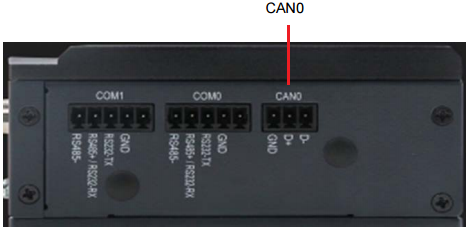
AFE-E630 CAN0
AFE-E630 has one CAN port.
Use the “candump” and “cansend” tools directly to send and receive messages. The tools have been embedded into the system.
# ifconfig -a
......
can0: flags=193<UP,RUNNING,NOARP> mtu 16
      unspec 00-00-00-00-00-00-00-00-00-00-00-00-00-00-00-00 txqueuelen 10 (UNSPEC)
      RX packets 0 bytes 0 (0.0 B)
      RX errors 0 dropped 0 overruns 0 frame 0
      TX packets 0 bytes 0 (0.0 B)
      TX errors 0 dropped 0 overruns 0 carrier 0 collisions 0
... ...
Send and Receive Data(Please prepare two AFE-E630)
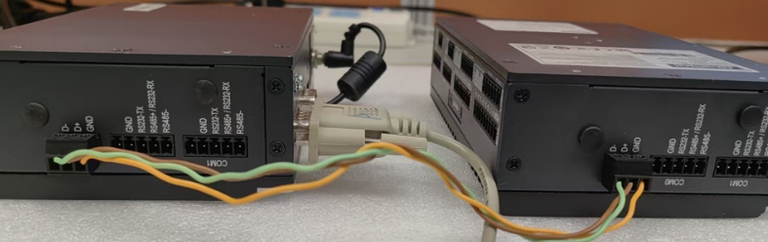
Mode of connection: (D+ to D+、D- to D-、GND to GND)
- As receiver
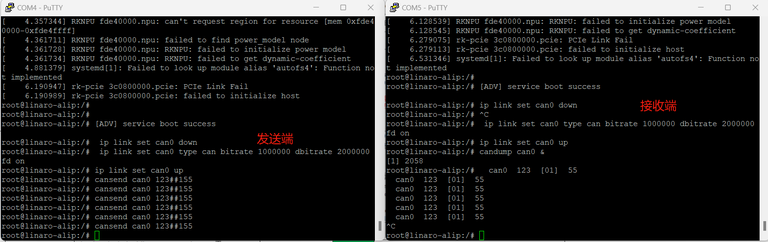
# #---- As receiver ----# #
# ip link set can0 down
# ip link set can0 type can bitrate 1000000 dbitrate 2000000 fd on
# ip link set can0 up
# candump can0 &
- As sender
# #---- As sender ----# #
# ip link set can0 down
# ip link set can0 type can bitrate 1000000 dbitrate 2000000 fd on
# ip link set can0 up
# cansend can0 123##155

# #----If no error, the receiver will receive the following data----# #
Can0 123 [01] 55
See more details of the usage of “candump” and “cansend” :
# candump --help
# cansend --help