AFE-E630 COM0、COM1
UART(RS232 or RS485)
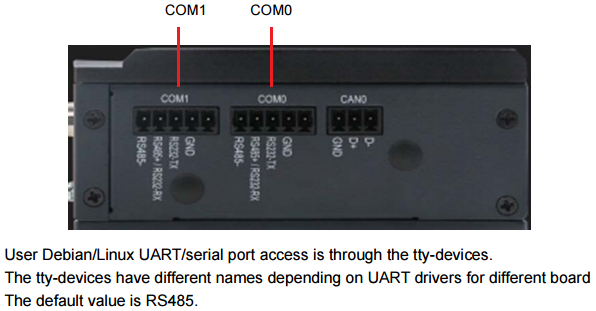

Configure RS232 or RS485
Only ttyS3 and ttyS4 support RS485 mode and the default mode is RS485. Set RS232 or RS485 separately (0 means to RS232; 1 means to RS485): Set ttyS3 to RS232 mode and ttyS4 to RS232 mode
# fw_setenv uart_mode_cpu 3:0,4:0
# reboot
Set ttyS3 to RS232 mode and ttyS4 to RS485 mode
# fw_setenv uart_mode_cpu 3:0,4:1
# reboot
Set ttyS3 to RS485 mode and ttyS4 to RS232 mode.
# fw_setenv uart_mode_cpu 3:1,4:0
# reboot
Set ttyS3 to RS485 mode and ttyS4 to RS485 mode.
# fw_setenv uart_mode_cpu 3:1,4:1
# reboot
For example, set COM0 ,“Baud rate” to 115200 ,“Data bits” to 8,“Stop bits” to 1,“Parity” to None,“Flow control” to None.
# stty -F /dev/ttyS3 115200 cs8 -parenb -cstopb -crtscts
Send and Receive Data
The following figure shows the connection mode.
COM0_GND=>COM1_GND
COM0_RS232-TX=>COM1_RS232-TX
COM0_RS485+/RS232-RX=>COM1_RS485+/RS232-RX
COM0_RS485-=>COM1_RS485-
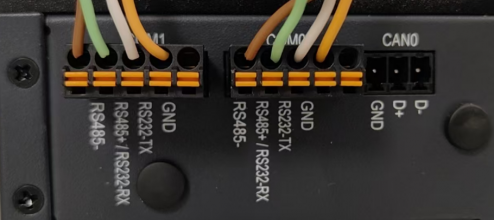
Taking COM0 as receiver and COM1 as sender(RS485) :
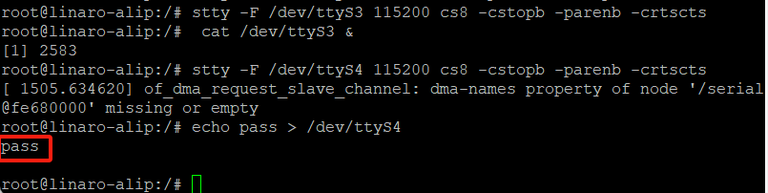
# #---- COM0 as receiver ----# #
# stty -F /dev/ttyS3 115200 cs8 -cstopb -parenb -crtscts
# cat /dev/ttyS3 &

# #---- COM1 as sender ----# #
# stty -F /dev/ttyS4 115200 cs8 -cstopb -parenb -crtscts
# echo pass > /dev/ttyS4

# #----If no error, the receiver will receive “pass”----# #
pass
Note:
1、Receiver should run before sender.
2、The “serial port parameters” should be the same for sender and receiver.